25 Free Digital Audio Editors You Should Know

Advertisement


free audio editors

Don't miss any article. Subscribe to RSS feed, or follow us in Twitter

Credit: Background image from DA

A digital audio editor is defined as a computer application for manipulating digital audio. As a multimedia creator, we normally use audio editor for recording audio, edit the duration and timeline, mix multiple sound tracks, apply simple effects for audio enhancement and create conversion between different audio file formats.

There are countless ways that digital audio editor can be used, and fortunately there are plenty of good and free digital audio editors out there to help you with your own implementation. So if you’re thinking to purchase a license for Adobe Audition, Cool Edit or Soundforge, hold that thought first. Not to say they aren’t cool, but it’s always wiser to tryout free applications before going to the pay deal.

Here’s our collection of 25 free digital audio editors. Full list after jump!

  1. Audacity

    Audacity is free, open source software for recording and editing sounds. It allows you to record live audio, converts tapes and records into digital recordings or CDs, edit Ogg Vorbis, MP3, WAV or AIFF sound files. You also can cut, copy, splice or mix sounds together with Audacity. Built-in effects are given to remove static, hiss, hum or other constant background noises.

    Audacity

  2. Power Sound Editor

    Power Sound Editor Free is a visual audio editing and recording software solution, which supports many advanced and powerful operations with audio data.

    You can use Power Sound Editor Free to record your own music, voice, or other audio files, edit it, mix it with other audio or musical parts, add effects like Reverb, Chorus, and Echo, and burn it on a CD, post it on the World Wide Web or e-mail it.

    power_sound_editor

  3. mp3DirectCut

    mp3DirectCut is a fast and extensive audio editor and recorder for compressed mp3. You can directly cut, copy, paste or change the volume with no need to decompress your files for audio editing. Using Cue sheets, pause detection or Auto cue you can easily divide long files.

    mp3DirectCut

  4. Music Editor Free

    Music Editor Free (MEF) is a multi-award winning music editor software tool. MEF helps you to record and edit music and sounds. It lets you make and edit music, voice and other audio recordings. When editing audio files you can cut, copy and paste parts of recordings and, if required, add effects like echo, amplification and noise reduction.

    Music_Editor_Free

  5. Wavosaur

    Wavosaur is a free sound editor, audio editor, wav editor software for editing, processing and recording sounds, wav and mp3 files. Wavosaur has all the features to edit audio (cut, copy, paste, etc.) produce music loops, analyze, record, batch convert. Wavosaur supports VST plugins, ASIO driver, multichannel wav files, real time effect processing. The program has no installer and doesn’t write in the registry. Use it as a free mp3 editor, for mastering, sound design.

    wavosaur

  6. Traverso DAW

    Traverso DAW is a GPL licensed, cross platform multitrack audio recording and editing suite, with an innovative and easy to master User Interface. It’s suited for both the professional and home user, who needs a robust and solid DAW. Adding and removal of effects plugins, moving Audio Clips and creating new Tracks during playback are all perfectly safe, giving you instant feedback on your work!

    traverso_daw

  7. Ardour

    Ardour is a digital audio workstation. You can use it to record, edit and mix multi-track audio. You can produce your own CDs, mix video soundtracks, or just experiment with new ideas about music and sound. Ardour capabilities include: multichannel recording, non-destructive editing with unlimited undo/redo, full automation support, a powerful mixer, unlimited tracks/busses/plugins, timecode synchronization, and hardware control from surfaces like the Mackie Control Universal. If you’ve been looking for a tool similar to ProTools, Nuendo, Pyramix, or Sequoia, you might have found it.

    ardour

  8. Rosegarden

    Rosegarden is a well-rounded audio and MIDI sequencer, score editor, and general-purpose music composition and editing environment. Rosegarden is an easy-to-learn, attractive application that runs on Linux, ideal for composers, musicians, music students, and small studio or home recording environments.

    Audacity

  9. Hydrogen

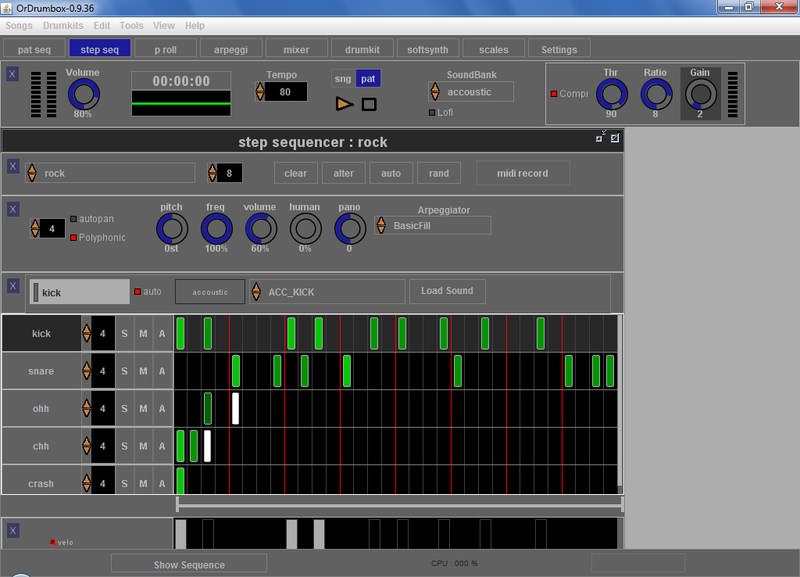
    Hydrogen is an advanced drum machine for GNU/Linux. It’s main goal is to bring professional yet simple and intuitive pattern-based drum programming.

    Audacity

  10. WavePad Sound Editor

    WavePad Sound Editor lets you make and edit music, voice and other audio recordings. When editing audio files you can cut, copy and paste parts of recordings and, if required, add effects like echo, amplification and noise reduction. WavePad works as a wav editor or mp3 editor but it also supports a number of other file formats including vox, gsm, real audio, au, aif, flac, ogg and more.

    wavepad

  11. Sound Engine

    SoundEngine is the best tool for personal use, because it enables you to easily edit a wave data while it has many functions required for a mastering process.

    soundengine

  12. Expstudio Audio Editor

    Expstudio Audio Editor is a visual music file editor that has many different options and a multiple functionality to edit your music files like editing text files. With a given audio data it can perform many different operations such as displaying a waveform image of an audio file, filtering, applying various audio effects, format conversion and more.

    Expstudio_Audio_Editor

  13. DJ Audio Editor

    DJ Audio Editor is easy-to-use and well-organized audio application which allows you to perform various operations with audio data. You can create and edit audio files professionally, also displaying a waveform image of audio file makes your work faster.

    DJ_Audio_Editor

  14. Eisenkraut

    Eisenkraut is a cross-platform audio file editor. It requires Java 1.4+ and SuperCollider 3. It supports multi-channel and multi-mono files and floating-point encoding. An OSC scripting interface and experimental sonagramme functionality are provided.

    Audacity

  15. FREE WAVE MP3 Editor

    Free Wave MP3 Editor is a sound editor program for Windows. This software lets you make and edit voice and other audio recordings. You can cut, copy and paste parts of recording and, if required, add effects like echo, amplification and noise reduction.

    free_wave_mp3_editor

  16. Kangas Sound Editor

    Fun Kangaroo-themed program that allows the user to create music and sound effects. It uses a system of frequency ratios for pitch control, rather than conventional music notation and equal temperament. It allows instruments, both musical and percussion, to be created.

    Kangas_Sound

  17. Ecawave

    Ecawave is a simple graphical audio file editor. The user-interface is based on Qt libraries, while almost all audio functionality is taken directly from ecasound libraries. As ecawave is designed for editing large audio files, all processing is done direct-to-disk. Simple waveform caching is used to speed-up file operations. Ecawave supports all audio file formats and effect algorithms provided by ecasound libraries. This includes JACK, ALSA, OSS, aRts, over 20 file formats, over 30 effect types, LADSPA plugins and multi-operator effect presets.

    ecawave

  18. Audiobook Cutter

    Audiobook Cutter splits your MP3 audio books and podcasts in a fast and user friendly way. The split files can easily be used on mobile MP3 players because of their small-size. Their duration allows smooth navigation through the book. The split points are determined automatically based on silence detection.

    audiobook_cutter

  19. Jokosher

    Jokosher is a simple yet powerful multi-track studio. With it you can create and record music, podcasts and more, all from an integrated simple environment.

    jokosher

  20. LMMS

    LMMS is a free cross-platform alternative to commercial programs like FL Studio, which allow you to produce music with your computer. This includes the creation of melodies and beats, the synthesis and mixing of sounds, and arranging of samples. You can have fun with your MIDI-keyboard and much more; all in a user-friendly and modern interface.

    LMMS

  21. Mp3Splt

    Mp3Splt-project is a utility to split mp3 and ogg files selecting a begin and an end time position, without decoding. It’s very useful to split large mp3/ogg to make smaller files or to split entire albums to obtain original tracks. If you want to split an album, you can select split points and filenames manually or you can get them automatically from CDDB (internet or a local file) or from .cue files. Supports also automatic silence split, that can be used also to adjust cddb/cue splitpoints. You can extract tracks from Mp3Wrap or AlbumWrap files in few seconds.

    mp3splt

  22. Qtractor

    Qtractor is an Audio/MIDI multi-track sequencer application written in C++ with the Qt4 framework. Target platform is Linux, where the Jack Audio Connection Kit (JACK) for audio, and the Advanced Linux Sound Architecture (ALSA) for MIDI, are the main infrastructures to evolve as a fairly-featured Linux desktop audio workstation GUI, specially dedicated to the personal home-studio.

    qtractor

  23. ReZound

    ReZound aims to be a stable, open source, and graphical audio file editor primarily for.

    ReZound

  24. Sweep

    Sweep is an audio editor and live playback tool for GNU/Linux, BSD and compatible systems. It supports many music and voice formats including WAV, AIFF, Ogg Vorbis, Speex and MP3, with multichannel editing and LADSPA effects plugins.

    sweep

  25. Wavesurfer

    WaveSurfer is an Open Source tool for sound visualization and manipulation. It has been designed to suit both novice and advanced users. WaveSurfer has a simple and logical user interface that provides functionality in an intuitive way and which can be adapted to different tasks.

    LMMS


Related Contents

Sponsors

Posted by Kay in Tools , at 11.04.08

Tags: , , , , , ,

Comments

  1. Andy Sowards November 4th, 2008

    Thanks for the collection! Nice ones! I use Audacity myself usually, which is your favorite?

    Reply
  2. Wakkos November 4th, 2008

    nice compilation!! i’ll test a couple to edit my World of Warcraft PVP video!

    Reply
  3. Danh ba web 2.0 November 4th, 2008

    Great list for me. Thanks you very much
    Keep up the good work !

    Reply
  4. inetbuzz November 4th, 2008

    I like it as long as they are Free.. thanks bro.. :D

    Reply
  5. dev(devSoft.Mobi ) November 4th, 2008

    huge list again from hongkiat ^_^, hope all or most of them are easy of use software, thank

    Reply
  6. Dainis Graveris November 5th, 2008

    oh lovely article..as always..:) didn’t realize there are so many great and freee audio editors available..:)

    Reply
  7. shyboy November 5th, 2008

    Thank to this great collection of freeware!

    Reply
  8. Joey November 5th, 2008

    If you could add which platforms each editor is for, it would be appreciated.

    Reply
  9. Television Spy November 5th, 2008

    Great set, audacity is a personal favorite.

    Reply
  10. Miles Logan November 5th, 2008

    Which one is best to mix songs?

    Reply
  11. Kristina November 5th, 2008

    Free is good! I like audacity, and I use it to make my own ringtones, but I’ve yet to get into podcasting.

    Reply
  12. ngocvu November 5th, 2008

    thanks for shares,,good

    Reply
  13. TV Guide November 5th, 2008

    Audacity is just fab. Simple and powerful. No mess nor fuss.

    Reply
  14. Mr. Candid November 6th, 2008

    Great list! Thanks!

    Reply
  15. Rahul November 6th, 2008

    Thank for this awesome collection of of audio editors!

    looking forward for some DJ’ing editors as well.

    Reply
  16. valonic November 6th, 2008

    thanks a lot of this list.

    Reply
  17. znydz November 6th, 2008

    Wow..there’s a lot of them..I only know 2 of them, Free Wave Mp3 editor and Audacity..

    you come up with a good list…great work

    Reply
  18. Bored November 7th, 2008

    this is a very good list. I really liked the screenshots so that i could get an idea of the interface.

    Reply
  19. MVRH+ November 7th, 2008

    I didn’t know the most of them. i think i’ll replace audacity.

    Reply
  20. MVRH+ November 7th, 2008

    Hey! wait! Some of them are for linux. You should add it to the caption.

    Reply
  21. afas November 12th, 2008

    thats crazy cool! thanks for sharing with us this digital audio editor!

    Reply
  22. Informixx November 23rd, 2008

    this is a very good collection!

    Reply
  23. marlop98 November 24th, 2008

    Woowwww….Great list, nice. Thanks for the info

    Reply
  24. TechNald December 2nd, 2008

    thanks so much for posting this list!

    Reply
  25. Marco Tonini December 3rd, 2008

    Hi,
    good list!
    If you are interested, another one here:
    http://marcotonini.wordpress.com/2008/06/30/free-or-open-source-audio-software/

    Bye

    Reply
  26. pradeep December 20th, 2008

    ka … sab thik ba.. bahute badhiya hai … hamaar ke pasand ba

    Reply
  27. Ryan December 31st, 2008

    CD Wave is great for splitting up a long WAV file into separate tracks while maintaining sector boundries for burning to cd. It’s great for tracking concerts.

    Reply
  28. Bhimsa January 7th, 2009

    Great one!! I liked ur post..but there are other software as well..like cool edit pro..though they are not freeware but it damn best..than any other i have used so far..

    Reply
  29. grego January 10th, 2009

    Cool! Thanks.
    (I *still* can’t figure out how to do a few basic things on Audacity…)

    Reply
  30. Audio Dude January 12th, 2009

    Great roundup you’ve created. I’m an avid user of Audacity, but I’d not heard of many of the others. “Ardour” looks like something I’m going to have to check out.

    Reply
  31. Les February 4th, 2009

    Many thanks a great site

    Reply
  32. Hiphopsamplez February 19th, 2009

    great post, thanks for sharing this info

    Reply
  33. don elliot March 17th, 2009

    Depends what you mean by MIX? Crossfading pre-record, ed tunes to make a “mix-CD” can be done with just about anything, including, AUDACITY. This would also be the #1 choice for doing a multitrack mix of original instruments in a new recording as well. A hugh step up from that and the best of the best is SawStudio. Elegant code, easy interface, stunning sound and inexpensive. Compared to ProTools, which is a drag with its slooowww real-time rendering, the SawStudio choice is a no-brainer.

    Reply
  34. Bob Sloan April 4th, 2009

    Very exiting list, lots of good tools here

    Reply
  35. khanhpt April 7th, 2009

    thanks!

    Reply
  36. Shami Mohammed April 8th, 2009

    I have no words to express my feeling, you made my studio more professional with these gifts. Thank you

    Reply
  37. rav April 10th, 2009

    WOULD YOU HAVE ANYTHING THAT CAN HELP ME LISTEN TO WHISPERING AUDIO FILE SOUND..WHAT DO I DO TO BE ABLE TO LISTEN TO IT…..

    Reply
  38. J4 cXSparrow April 29th, 2009

    oh……… thanks

    Reply
  39. Bunty Ghatak April 30th, 2009

    Graet posting. You have saved a lot of time at least for beginners like me. Thanks so much.

    Reply
  40. staff going into music May 15th, 2009

    i am very happy too have you guys by my side,am a young boy from africa Ghana and i can now be able too make my own music in my room even if i dont have money too go for a studio you guys are going too be on my album your name will allways be on my mouth i lov eyou guys keep it up i am going too make every body know about you

    Reply
  41. HorusHab7 May 24th, 2009

    Hi!!!
    Somebody knows if some of these softwere’ s is similar to Mixcraft 4?
    I thank the contact for email. And tanks to all.
    albery777@hotmail.com

    Reply
  42. frank furter May 25th, 2009

    Cheeser Muffin!

    Reply
  43. vietdogstarvebones May 27th, 2009

    Free stuff is suit for the starved viet dog, global beggar ME he he

    Reply
  44. christopher May 28th, 2009

    Now if only we could find an application that removes layered sounds and keeps the vocals only, hard to do, because the spectrum analysis would have to be so precise and CPU intensive, IZOTOPE has some free stuff for renedering and remastering, even for the iphone!i know that there are vocal removers, just hard to find the opposite.

    Here is a site with a bunch of free really cool audio tools.
    http://www.analogx.com/contents/download/audio.htm

    ~Namaste
    .:*~*:._.:*~*:._.:*~*:.Christopher.:*~*:._.:*~*:._.:*~*:.

    Reply
  45. vietdogstarvebones May 28th, 2009

    What a pile of bones you just laid down before my muzzle, ha ha. Growl, mam mam. A godsend for the impoverished, round-the-year starved viet dog, global beggar, ever forlorn ever rejected by Jesus…

    Reply
  46. cocofolie June 3rd, 2009

    Audacity is the best. I like it. Thank you for all programs. Greeting

    Reply
  47. Rob P June 11th, 2009

    I really love audacity and wavosaurus!! I tried a bunch of editors like Soundforge,Wavelab and Cool Edit Pro and I always go back to audacity for its simplicity and ease of use.Wavosaurus is a perfect alternative to Recycle and the chops can be exported in wav and not a crappy proprietary format like rex files.
    Wavepad isn’t that bad too,it’s crazy all the freeware that’s available out on the web:)

    Reply
  48. Johar June 14th, 2009

    I think more better if we use cool edit pro, but its not free software

    Reply
  49. Audio software June 23rd, 2009

    I will refer new learners about audio editing to this site. Thank you. Keep up the the efford.

    Reply
  50. James Ireng July 7th, 2009

    Thanks for sharing… Great blog…

    Reply
  51. Gary July 23rd, 2009

    Downloaded Audacity, only to find it was a none activated version – uninstalled. They should warn us if the free offer is useless!

    Reply
  52. chot July 27th, 2009

    Thank you

    Reply
  53. Mike August 5th, 2009

    Another one – quick and simple Wave Editor http://www.wave-editor.com

    Reply
  54. Nick August 11th, 2009

    Nice list, but would be better if more details were available in pitch and time shifting abilities on the list itself

    Reply
  55. DriveN August 29th, 2009

    Great list man. I’ve got some lines that I’ve been trying to spit over these beats, but I can’t figure out how to record vocal tracks during playback. I’ve used “Expstudio Audio Editor” and “Music Editor Free” and haven’t been able to make it work in either, is there a way that i”ve been missing? Or am I just wasting my time trying with these two?

    Reply
  56. mukund rajwade. September 7th, 2009

    Dear Sir,
    Iam a retired person,73 yrs old ,i am very fond of instrumental
    music,with me i have about 400 Audio cassettes , some of them
    are rare.All these audio cassettes i intend to converet them to mp3
    audio cds.I have downloaded Audacity softeware .
    1>Iam able to record the music/save it.
    2>unable to repley the same,ihave tried every thing icould do as
    per the Help guide,PL suggest me a very eassy Soft ware/system.
    I will be thankfull to you SIR.
    Yours,sincerly
    M.B.Rajwade.

    Reply
  57. Paco October 9th, 2009

    There is something for MAC?

    Reply
  58. R.C October 10th, 2009

    How do you upload your MP3 or wavs to your phone after you make your ring tone. Please help

    creditmaxx7@yahoo.com

    Reply
  59. beggarman October 11th, 2009

    tao ghet viet nam lam!

    Reply
  60. James Ireng October 14th, 2009

    Thanks for sharing..

    Reply
  61. Gman October 27th, 2009

    I’m looking for an an audio editor to lengthen or shorten wav files, which is necessary to correct audio-video synchronization problems. Can anybody tell me which of these apps is capable of modifying the length of an sound file?

    Reply
  62. westcoastmaniac October 28th, 2009

    At last a list where to pick and try out several sound editors – great compilation! My personal favourite – not listed here, though – is Adobe Audition, but kinda overkill regarding to small audio recording and editing jobs.

    Reply
  63. bbbb October 31st, 2009

    ขอบคุณค่า เป็นประโยชน์มาก
    กำลังต้องการเลย

    Reply

Trackbacks

  1. Download Free Audio Editors - 25 Free Sound Editors Compilation – iNetBuzz
  2. โปรแกรมตัดเพลง ฟรี ดี ง่าย | iSchool.in.th
  3. Audival - Podcasting Tips & Tricks → Archive » Need an audio editor?
  4. Blog Memoria | 25 aplicaciones grátis para manejar audio digital
  5. 25 software per l’editing audio at DefaultUser
  6. Webiest : Bookmarks for November 4th through November 5th
  7. Through the LCD clearly » Blog Archive » Propaganda, vacuum tubes, links, and tech.
  8. 25 Free Digital Audio Editors You Should Know | Tools - L3AK Magazine
  9. 25 Editores de Audio que debes probar « [Pixelaris]
  10. AndySowards.com :: Web Development Nerdy Daily Links For 11/05/2008 | AndySowards.com :: Professional Web Design, Development, Programming, Hacks, Downloads, Math and being a Web 2.0 Hipster?
  11. links for 2008-11-05 « copula’s weblog
  12. 25 Free Digital Audio Editors You Should Know - DV247 Forums
  13. 25 Free Digital Audio Editors You Should Know | Geekai
  14. 25 Aplicaciones de Audio gratuitas para descargar - MadBoxpc.com
  15. mskari.org » Daily Summary 2008-11-05
  16. 25 editores de audio gratuitos « Audio News
  17. 25 programmi di audio editing gratuiti « Jacopo Farina
  18. 25 software per l’editing audio | Yourpage live news aggregator
  19. Austoon Daily » 25 Free Digital Audio Editors You Should Know
  20. PolyPink » Blog Archive » 25 Free Digital Audio Editors You Should Know
  21. Audio editing: 25 programmi gratuiti | Il Blog di NonSoloP2P
  22. :: Eliax - Para Mentes Curiosas ::
  23. 25 programas gratuitos para editar audio « PerikuLog
  24. Editores de sonido gratuitos | Tecnologia al dia
  25. Los mejores juegos Flash OnLine « PerikuLog
  26. No ShrinkWrap Web2.0 Reviews » Blog Archive » » My delicious bookmarks for November 12th through November 13th
  27. Propaganda, vacuum tubes, links, and tech. | Raillery
  28. Link Heaven – partea 50 | Some things will never change
  29. 25 Free Digital Audio Editors You Should Know « polypink
  30. AravindJose.com | Fresh Thoughts, Insights & Analysis
  31. Editores de audio, 25 editores que debes conocer
  32. Editores de audio gratis | Un Punto NET
  33. Descargar editores de audio gratis
  34. Link: 25 Free Digital Audio Editors You Should Know  |  HIPHOPMAKERS.COM
  35. Editores de audio gratis - URIELMANIA
  36. Link: 25 Free Digital Audio Editors You Should Know « New Money
  37. ClacksBlog » Collection of Audio tools
  38. 55 Great Websites To Download Free Sound Effects | Best Friends Planet
  39. Блог Артема Беляйкина » Архив блога » В Фокусе…А что в Фокусе? Прави
  40. 25 editores de audio gratuitos que deberías conocer « RobertDice.com
  41. 25 Free Digital Audio Editors « All the News: The Companion Blog
  42. Editores de Audio gratuitos « Amigos de lo Ajeno
  43. 55 Great Websites To Download Free Sound Effects | Fusuy.com || Webmaster Accessary Platform
  44. 34 - Hey There Delilah’ın Web Günlüğü » 55 Great Websites To Download Free Sound Effects
  45. 25 editores de áudio que você deve conhecer « My Weblog
  46. Berbagai Software Gratis Edit Audio (mp3, wma, wav, ogg) « Johan’s Pratama Wordpress
  47. Great Hype
  48. Tagz | "25 Free Digital Audio Editors You Should Know | Tools" | Comments
  49. Using Audacity « Nalates’ Things & Stuff Blog
  50. Lite, free and Open-source audio/video softwares for windows | Srivigneshwar R
  51. 55 Great Websites To Download Free Sound Effects | Marketing & Design
  52. Music (Tech) Resources | learningIT
  53. 25 editores de audio gratuitos que debes conocer | SOLO|DESCARGAS
  54. Get The Stems! | Rhudeisland Records Blog

Leave a reply