A look into EmDash CMS
When Cloudflare announced EmDash CMS on April 1st, I thought it was a joke.
But as I looked at the GitHub code, read Cloudflare’s announcement, and saw Matt Mullenweg’s response, I realized this isn’t just another CMS trying to beat WordPress. I think it’s an interesting test of what a CMS could be in a world with AI tools, serverless hosting, and more security worries.

The real question isn’t if EmDash will replace WordPress. It’s whether it shows us what CMS software might look like next.
What is EmDash CMS?
EmDash is Cloudflare’s attempt to make a next version of WordPress
. It is written in TypeScript and built on Astro, which runs well on serverless platforms, especially Cloudflare’s own services. It tries to keep WordPress’s flexibility and admin panel, but adds type safety and plugin sandboxing to fix security issues that WordPress has been facing for years.
Prerequisites
Before you start playing with EmDash, here’s what you’ll need:
- Node.js 22+: For local development
- A Cloudflare account: For the best experience (though it can run elsewhere)
- Basic TypeScript knowledge: The entire codebase is TypeScript
- Familiarity with Astro: EmDash uses Astro for frontend rendering
Installation
You have a few options to install EmDash, depending on how you want to try it:
Create a new EmDash site locally
For local development and testing, use the npm command:
npm create emdash@latest
Deploy directly to Cloudflare
If you want to skip local setup and go straight to deployment, use the Cloudflare deploy link:
https://deploy.workers.cloudflare.com/?url=https://github.com/emdash-cms/templates/tree/main/blog-cloudflare
Try the online playground
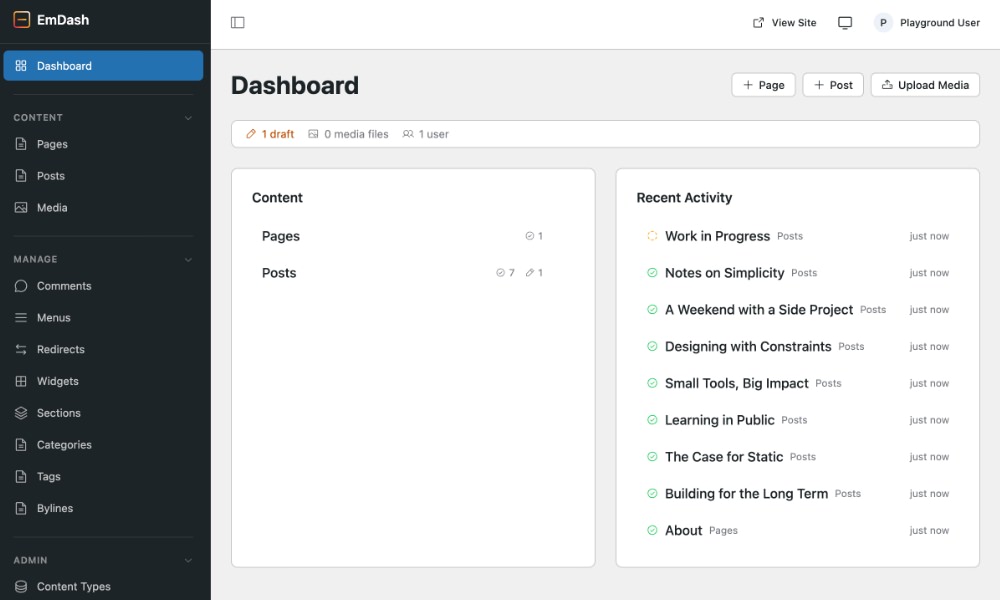
For a quick look without any setup, check out the EmDash playground.
Plugin security
Here’s where EmDash goes a different way from WordPress.
WordPress plugins can do anything. They can read and write to your database, change files, connect to the internet. This isn’t a mistake. It’s a choice that allows great flexibility.
But this flexibility also has security risks. So EmDash uses a different method called sandboxing where each plugin runs in its own separate space with clear rules about what it can do.
Here’s what a simple email notification plugin looks like:
import { definePlugin } from "emdash";

export default () => definePlugin({
  id: "notify-on-publish",
  version: "1.0.0",
  capabilities: ["read:content", "email:send"],
  hooks: {
    "content:afterSave": async (event, ctx) => {
      if (event.collection !== "posts" || event.content.status !== "published") return;

      await ctx.email!.send({
        to: "editor@example.com",
        subject: `New post published: ${event.content.title}`,
        text: `"${event.content.title}" is now live.`,
      });

      ctx.log.info(`Notified editors about ${event.content.id}`);
    },
  },
});
See those capabilities?
The plugin can only do what it says it will do. No secret internet connections, no database access beyond what’s allowed. This is a big change from WordPress’s “trust me with everything” approach.
AI-native from day one
While WordPress 7.0 is starting to introduce AI features into the core through its Connectors API, which enables plugins to connect to external AI services, EmDash takes a more direct approach by giving AI agents the ability to actually run your site.
Every EmDash site comes with three core tools that make this possible:
- Agent skills provide clear instructions that guide AI in building plugins, themes, and making changes to your site—like recipes that agents can follow step by step.
- EmDash CLI gives you powerful command-line tools for managing content, uploading files, and creating content types, making automation and scripting much easier.
- Built-in MCP server. This allows AI tools to connect directly to your site, read and update content, and manage everything through a standard protocol.
WordPress is also moving in a similar direction with its official MCP adapter, which connects the Abilities API to the MCP.
The key difference is that in WordPress, this is an additional plugin you install. In EmDash, it’s built in from the start.
Built-in x402 support for monetization
Here’s something WordPress doesn’t have: every EmDash site has x402 support built in. x402 is an open standard for internet payments that lets you charge for content each time someone uses it.
When an AI tool tries to read your content, it gets a “Payment Required” message, pays immediately, and gets access. No subscriptions, no extra coding.
In a time when AI tools are collecting web content, this feels less like an extra feature and more like something you need to survive.
WordPress import support
EmDash wants to make it as easy as possible to migrate your WordPress blogs. So they provide:
- A WordPress import tool that makes it easy to migrate your site to EmDash, including content and media
- Tools to convert WordPress custom post types to EmDash collections
- Agent skills for porting WordPress themes to EmDash
The migration tools work surprisingly well. I imported a test WordPress site in under 10 minutes.
Migration results, however, may vary depending on your site. If you rely on plugins that add custom post types or custom database tables, you may need to migrate them to EmDash manually.
Where EmDash stumbles
No CMS is perfect, and EmDash is no exception. Matt Mullenweg’s feedback, I think, makes some good points:
1. The sandboxing problem
As Matt says, their sandboxing breaks down as soon as you look at what most WordPress plugins do.
Complex plugins that work with many systems, handle files, or connect to other services would need so many permissions that the sandbox doesn’t help much.
2. The UI feels strange
It looks a bit like WordPress but not exactly, and some things don’t work right.
3. Vendor lock-in worries
While it can run elsewhere, it works best on Cloudflare.
4. Missing WordPress’s spirit
WordPress runs everywhere, from Raspberry Pis to $0.99/month Indonesian hosting. EmDash? Not really.
5. No community (yet)
WordPress isn’t just software; it’s meetups, WordCamps, tattoos. EmDash has GitHub stars.
And there’s the April 1st announcement date. Cloudflare has a tradition of releasing real products on April Fools’ Day (remember 1.1.1.1?), but it still feels…weird.
Performance and architecture
Inside, EmDash is built on modern technologies:
1. Astro
For showing web pages, a fast framework for content sites.
2. Cloudflare Workers
Serverless code that starts quickly and runs at the edge.
3. D1 Database
Cloudflare’s SQLite-based database for serverless applications.
4. R2 Storage
For image and file storage with no egress fees.
5. Portable Text
Built on top of PortableText, it uses structured JSON content instead of HTML in the database.
The performance is good. Pages load quickly, and the “scale-to-zero” setup means you only pay for what you use.
Should you use EmDash?
Before deciding whether you should use EmDash, here’s a comparison table to help you see the differences between these two systems:
| Feature | WordPress | EmDash CMS |
|---|---|---|
| Technology Stack | PHP, MySQL, JavaScript (jQuery/React) | TypeScript, Astro, Cloudflare Workers |
| Architecture | Monolithic, traditional LAMP stack | Serverless, JAMstack, edge-first |
| Database | MySQL/MariaDB | D1 or SQLite, Turso/libSQL, PostgreSQL |
| Hosting Requirements | PHP 7.4+, MySQL 5.6+, Apache/Nginx | Node.js 18+, serverless platform (Cloudflare preferred) |
| Deployment | Traditional web hosting, shared/VPS/dedicated | Serverless platforms, edge deployment |
| Plugin Ecosystem | ~60,000+ plugins (full system access) | Very few since it’s in early stage |
| Plugin Security Model | Full system access (trust-based) | Capability-based sandboxing |
| Theme System | PHP templates, child themes | Astro components, TypeScript-based |
| Content Storage | Serialized HTML in database | Portable Text (structured JSON) |
| AI Integration | Via plugins (varying quality) | Built-in MCP server, agent skills |
| Monetization | Plugins, subscriptions, ads | Built-in x402 pay-per-use |
| Performance | Caching plugins required | Edge-native, fast by default |
| Scalability | Requires scaling infrastructure | Auto-scaling, pay-per-request |
| Learning Curve | Beginner-friendly, extensive docs | Requires TypeScript/Node.js knowledge |
| Community | Massive global community, WordCamps | Early adopters |
| Cost Model | Hosting costs + premium plugins/themes | Pay-per-request + potential vendor lock-in |
| Maturity | 20+ years, battle-tested | v0.1.0 preview, experimental |
My opinion:
Use EmDash if:
- You’re already using Cloudflare services
- Plugin security worries you a lot
- You want AI tools built in right now
- You’re starting a new site, not moving an old one
Stick with WordPress if:
- You need to run on cheap, shared hosting
- Your site depends on specific WordPress plugins
- Community and available tools matter more than technical details
- You’re not ready to try a v0.1.0 preview version
The Verdict
EmDash is ambitious, well-built, and working on real problems. The sandboxed plugin model is a careful way to handle security, even if it may have limits for complex plugins. The AI tools feel like they’re thinking ahead. The x402 payment system is a smart answer to AI tools collecting web content.
It’s also v0.1.0, announced on April Fools’ Day, and made to work best with Cloudflare. The UI needs work. It doesn’t have WordPress’s “run anywhere” idea that has let millions of people publish online.
Would I use EmDash for my personal blog today? Probably not. WordPress has too many tools and too much community support to ignore.
Would I try it for a new project where I’m already using Cloudflare and want built-in AI tools? Yes, maybe. But I prefer to wait for it to mature a bit more.
EmDash might not be the next WordPress. And that’s fine. It shows an idea of what CMS software might look like in a future with serverless hosting and AI tools. The sandboxing method isn’t perfect (no security method is), but it’s a useful test of how to balance flexibility with safety.
The best part, I think, is that both WordPress and EmDash can learn from each other. WordPress could use better security methods and AI tools. EmDash could learn from WordPress’s focus on making publishing easy for everyone.
Maybe we’re not looking at a replacement, but at two different ways to solve the same basic problem: helping people put content on the web.