Hermes Desktop Is a GUI for Hermes Agent
A new app called Hermes Desktop makes Hermes Agent easier to use for people who do not want to stay in the terminal. If you have been looking for a cleaner way to install and use an agent on your own machine, this sits in the same wider conversation as how people run AI locally with lighter setup friction.
This is not an official Nous Research desktop app.
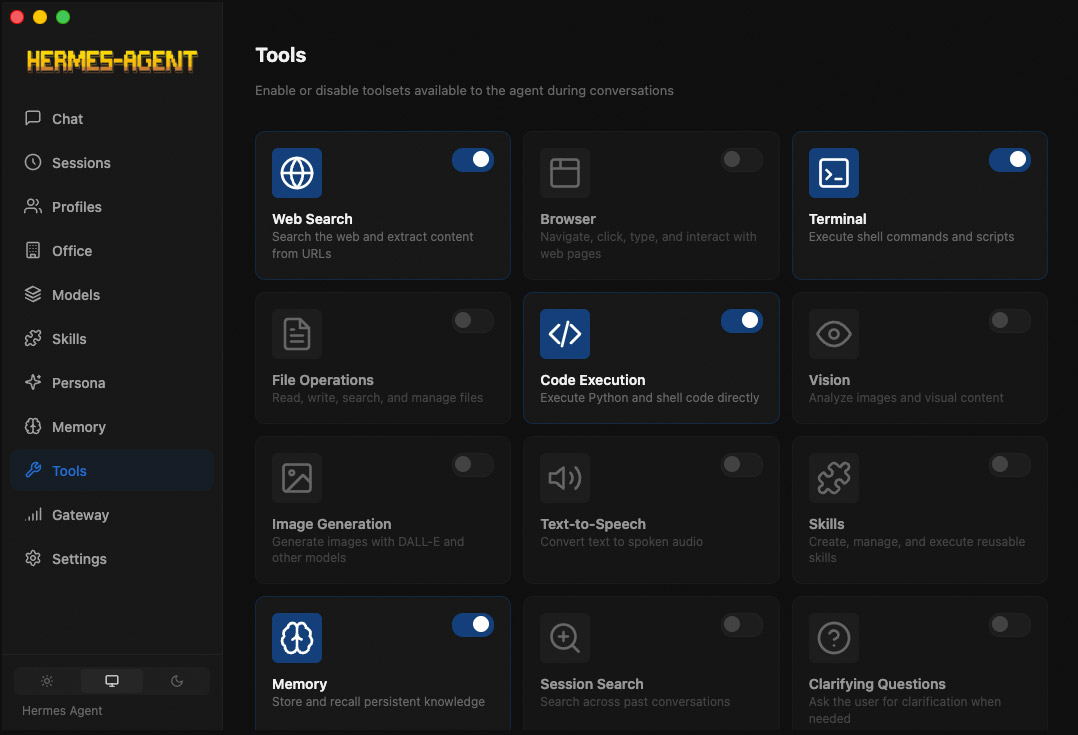
Hermes Desktop is a separate open-source project created by GitHub user fathah. It sits on top of Hermes Agent and gives it a native interface for setup, chat, and day-to-day management.
It is a third-party desktop companion for Hermes Agent, not the upstream project itself.
What Is Hermes Desktop?
Hermes Desktop is a native app for installing, configuring, and chatting with Hermes Agent without doing everything by hand from the command line.
According to the project’s GitHub repo, it uses the official Hermes install script, stores Hermes under ~/.hermes, and provides screens for chat, sessions, profiles, memory, skills, tools, schedules, and messaging gateways.
That makes it less of a simple wrapper and more of a desktop control panel for Hermes.
What Can the App Do?
Based on the repo and release notes, Hermes Desktop already goes well beyond a basic chat box.
- first-run install for Hermes Agent
- provider and API key setup
- streaming chat with slash commands and tool progress
- token usage and cost tracking
- session search and resume
- separate Hermes profiles
- skill, tool, memory, and saved model management
- scheduled tasks
- messaging gateway setup for multiple platforms
- logs, backups, imports, and debug tools
Some of that will sound familiar if you have followed tools that make it easier to chat with your bot on Telegram instead of keeping everything locked inside a terminal window.
Why This Stands Out
Hermes Agent itself is powerful, but the official experience is still heavily CLI-driven. That works fine for technical users, but it adds friction for anyone who mainly wants to install the agent, choose a provider, open a chat window, and get started.
Hermes Desktop smooths out that process. Instead of wiring everything together manually, you get one interface for setup, chat, profiles, memory, scheduling, and gateway integrations.
That also makes Hermes easier to compare with other local-first setups, especially if you are already familiar with getting started with Ollama and want something that feels more like a complete agent workspace.
What Providers and Platforms Are Supported?
The repo says Hermes Desktop supports a mix of hosted and local model providers, including mainstream API services and OpenAI-compatible local endpoints.
It also ships with local presets for tools like LM Studio, Ollama, vLLM, and llama.cpp.
As for the app itself, current releases are available for macOS and Linux. The repo lists macOS downloads as .dmg, while Linux builds are offered as .AppImage and .deb.
What It Is Not
The branding can blur together fast.
Hermes Agent is the upstream project from Nous Research. Hermes Desktop is a separate interface layer built around it.
- Hermes Agent is the core agent
- Hermes Desktop is a third-party native app for using it
The difference is useful if you want to know what is official, who maintains the app, and where feature requests or bug reports should go.
Should You Use It?
If you are curious about Hermes Agent but the command-line setup feels like unnecessary friction, Hermes Desktop looks like a strong entry point.
It gives Hermes a real interface, keeps the upstream install flow, and exposes a lot of the project’s useful features without forcing you to memorize commands first.
Just do not mistake it for an official Nous Research desktop release. It is a community-built project around Hermes Agent, and that is part of why people are paying attention to it.