What’s in WordPress 7.0
WordPress 7.0 brings several major changes for developers, site owners, and content teams.
This release adds real-time collaboration, extends the Gutenberg editor, introduces new AI infrastructure, and changes a few long-standing WordPress conventions.
Here’s what is coming and what to prepare for.
1. Real-time collaboration in the block editor
The centerpiece of WordPress 7.0 is real-time collaboration (RTC).
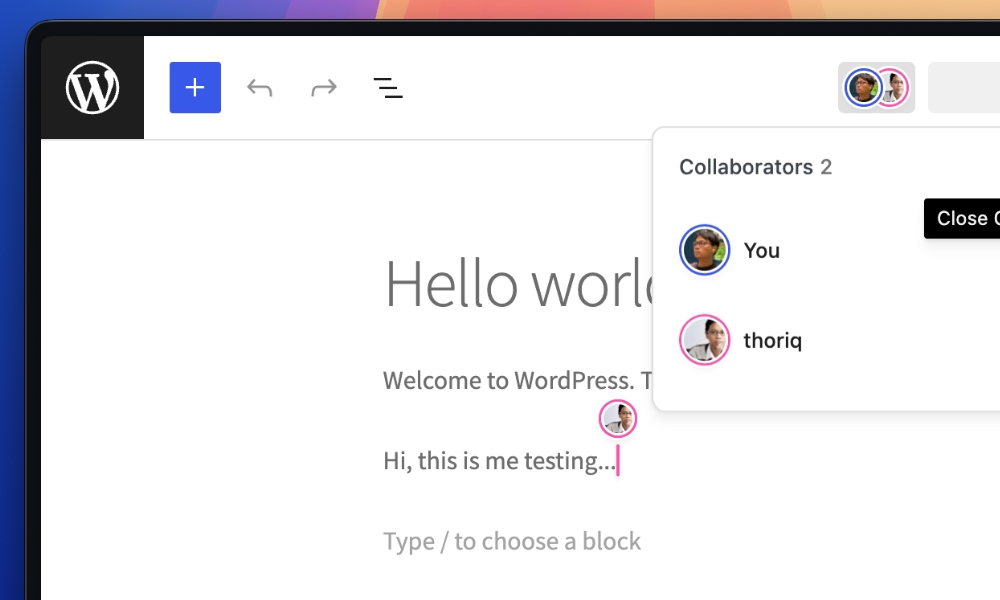
Multiple users can edit the same post simultaneously, with changes syncing instantly across all editors. You’ll see cursors, selections, and edits from other users in real time.
It handles conflict resolution gracefully so when two people edit the same paragraph, changes merge intelligently rather than overwriting each other.
Is it enabled by default?
No.
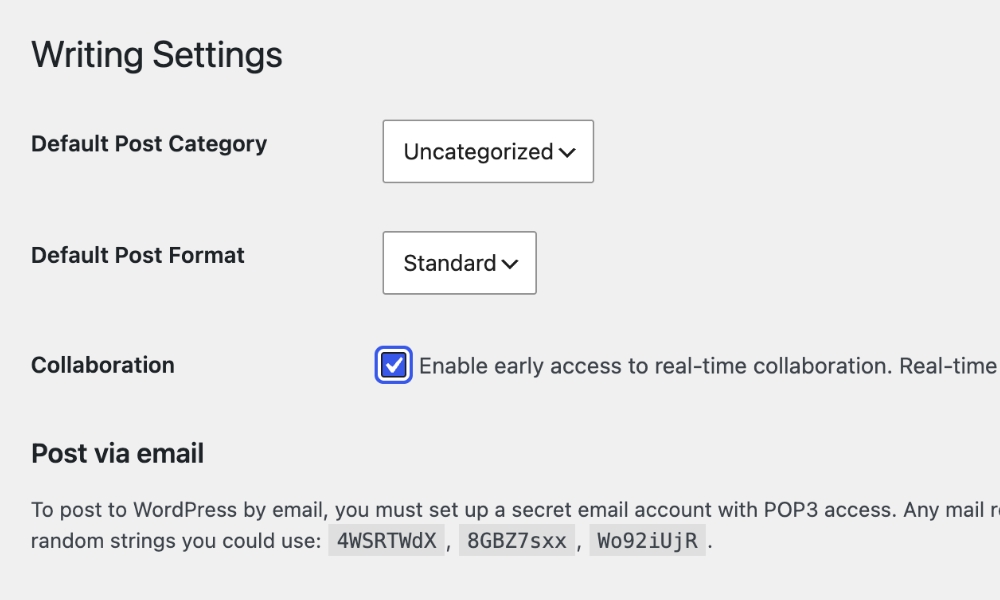
For security and compatibility reasons, real-time collaboration is opt-in rather than enabled by default. Site administrators must explicitly enable it for their sites.
- Go to Settings > Writing in your WordPress admin dashboard
- Scroll to the “Collaboration” section
- Check the box labeled “Enable real-time collaboration in the block editor”
- Click Save Changes
For multisite networks, network administrators can control whether real-time collaboration is available to site administrators through network settings.
Once enabled, you’ll see collaboration features appear in the block editor. You’ll need at least two user accounts with editing permissions to test the collaborative features properly.
2. PHP-only block registration
WordPress 7.0 removes a major barrier for developers who want to build blocks without a JavaScript-heavy workflow.
You can now register blocks using only PHP, without needing React, Node.js, or a build toolchain. This removes a major barrier for traditional PHP WordPress developers who have avoided block development because of the JavaScript complexity.
With PHP-only block registration, you write your block in PHP and WordPress automatically generates the inspector controls (the settings panel in the editor sidebar) for you. This is perfect for blocks that don’t need complex client-side interactivity.
Here’s a basic example of registering a block with PHP:
add_action( 'init', function() {
    register_block_type( __DIR__ . '/build/my-block', array(
        'api_version' => 3,
        'title'       => __( 'My Custom Block', 'my-plugin' ),
        'description' => __( 'A simple block registered with PHP.', 'my-plugin' ),
        'category'    => 'widgets',
        'icon'        => 'smiley',
        'supports'    => array(
            'html' => false,
        ),
        'attributes'  => array(
            'content' => array(
                'type'    => 'string',
                'default' => '',
            ),
            'alignment' => array(
                'type'    => 'string',
                'default' => 'none',
            ),
        ),
        'render_callback' => function( $attributes, $content, $block ) {
            $classes = array( 'my-custom-block' );
            if ( ! empty( $attributes['alignment'] ) ) {
                $classes[] = 'has-text-align-' . $attributes['alignment'];
            }

            return sprintf(
                '<div class="%s">%s</div>',
                esc_attr( implode( ' ', $classes ) ),
                wp_kses_post( $attributes['content'] )
            );
        },
    ) );
} );
For more complex blocks, you can still mix PHP registration with JavaScript for the editor interface. But for simple content blocks, PHP-only registration means faster development, lighter plugins, and no build toolchain headaches.
3. Introducing the Connectors API
WordPress 7.0 introduces the Connectors API.
This is a new framework for registering and managing connections to external services, providing standardized API key management, provider discovery, and admin UI for configuring services.
The Connectors API works hand-in-hand with the built-in AI Client. It automatically discovers AI providers from the WP AI Client registry and creates connectors with proper metadata. Plugins using the AI Client do not need to handle credentials directly. They describe what they need, and WordPress routes requests to configured providers.
Plugins can register custom connectors or override existing ones using the wp_connectors_init action hook.
Here’s a basic example of registering a custom connector:
add_action( 'wp_connectors_init', function ( $registry ) {
    $connector = array(
        'name'           => 'My Custom Service',
        'description'    => 'Connect to my custom API service.',
        'type'           => 'custom_provider',
        'authentication' => array(
            'method'          => 'api_key',
            'credentials_url' => 'https://example.com/api-keys',
            'setting_name'    => 'connectors_custom_my_service_api_key',
        ),
        'plugin'         => array(
            'file' => 'my-custom-service/plugin.php',
        ),
    );

    $registry->register( 'my_custom_service', $connector );
} );
The API provides three main functions for developers:
// Check if a connector is registered
if ( wp_is_connector_registered( 'anthropic' ) ) {
    // The Anthropic connector is available
}

// Get a single connector's data
$connector = wp_get_connector( 'anthropic' );
if ( $connector ) {
    echo $connector['name']; // 'Anthropic'
}

// Get all registered connectors
$connectors = wp_get_connectors();
foreach ( $connectors as $id => $connector ) {
    printf( '%s: %s', $connector['name'], $connector['description'] );
}
API keys can be provided via environment variables, PHP constants, or database settings.
WordPress already ships with an example Connectors implementation, which you can find under Settings > Connectors in the admin.
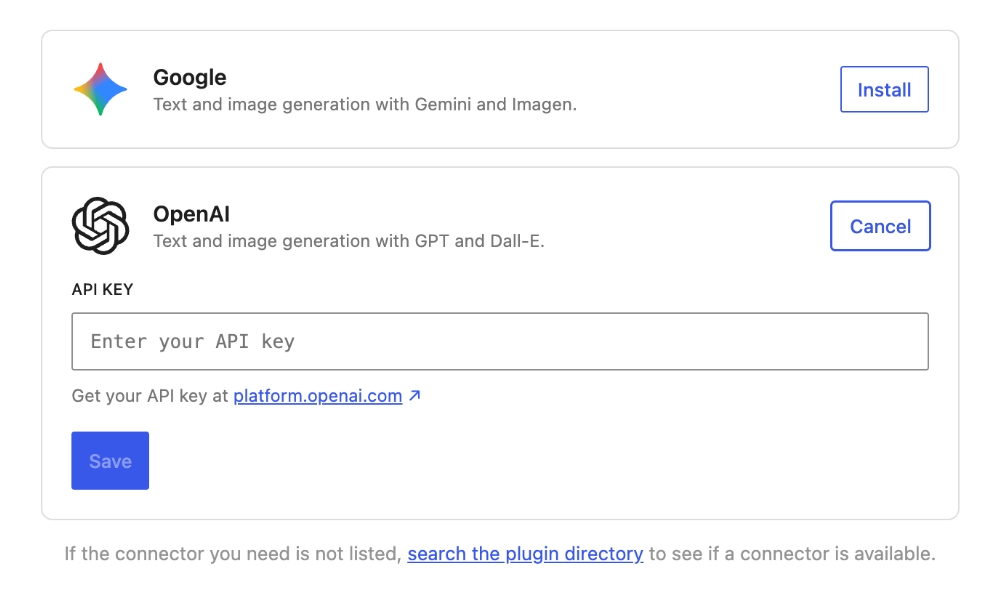
This API is designed to expand beyond AI providers to support payment gateways, social media integrations, and other external services in future releases. That should make it easier for more plugins to plug into the same connection model.
4. Unified AI interface
WordPress 7.0 includes a built-in AI Client that provides a provider-agnostic PHP API for plugins to send prompts to AI models and receive results through a consistent interface. This is the engine that powers AI features across WordPress, working hand-in-hand with the Connectors API.
The AI Client handles provider communication, model selection, and response normalization. Your plugin describes what it needs and how it needs it. WordPress handles routing the request to a suitable model from a provider the site owner has configured.
Every interaction starts with the wp_ai_client_prompt() function:
// Basic text generation
$text = wp_ai_client_prompt( 'What is the capital of France?' )
    ->using_temperature( 0.8 )
    ->generate_text();

if ( is_wp_error( $text ) ) {
    // Handle error
    return;
}

echo wp_kses_post( $text );
The AI Client supports multiple modalities, for example, image generation:
$image_file = wp_ai_client_prompt( 'A futuristic WordPress logo in neon style' )
    ->generate_image();

if ( is_wp_error( $image_file ) ) {
    return;
}

echo '<img src="' . esc_url( $image_file->getDataUri() ) . '" alt="">';

// JSON-structured responses.
$schema = array(
    'type'  => 'array',
    'items' => array(
        'type'       => 'object',
        'properties' => array(
            'plugin_name' => array( 'type' => 'string' ),
            'category'    => array( 'type' => 'string' ),
        ),
        'required' => array( 'plugin_name', 'category' ),
    ),
);

$json = wp_ai_client_prompt( 'List 5 popular WordPress plugins with their primary category.' )
    ->as_json_response( $schema )
    ->generate_text();
Before showing AI-powered UI, check whether the feature can work:
$builder = wp_ai_client_prompt( 'test' )
    ->using_temperature( 0.7 );

if ( $builder->is_supported_for_text_generation() ) {
    // Safe to show text generation UI
}
These checks use deterministic logic to match the builder’s configuration against the capabilities of available models. They don’t make API calls, so they’re fast and cost nothing. If you want a related developer-facing example of how WordPress is exposing structured capabilities, the WordPress Abilities API is a useful companion.
AI Provider Plugins
Keep in mind that the AI Client architecture consists of two layers:
- PHP AI Client: A provider-agnostic PHP SDK bundled in Core as an external library. This handles provider communication, model selection, and response normalization.
- WordPress wrapper: Core’s
WP_AI_Client_Prompt_Builderclass wraps the PHP AI Client with WordPress conventions: snake_case methods,WP_Errorreturns, and integration with WordPress HTTP transport, the Abilities API, the Connectors infrastructure, and the WordPress hooks system.
WordPress Core doesn’t bundle any AI providers directly. Instead, they’re developed and maintained as plugins, which allows for more flexible and rapid iteration. The WordPress project has developed three initial flagship implementations:
For developers who have been using the wordpress/php-ai-client or wordpress/wp-ai-client packages, the simplest path is to update your plugin’s “Requires at least” header to 7.0 and replace any AI_Client::prompt() calls with wp_ai_client_prompt().
5. No new default theme
WordPress 7.0 breaks with tradition.
There will be no “Twenty Twenty-Six” default theme. The focus shifts to improving existing block themes like Twenty Twenty-Five through the Site Editor and Phase 3 collaboration tools.
This change signals a maturing approach to WordPress theming. The goal is to show users that you don’t need a new theme every year. You can evolve the one you have using the Site Editor.
This reflects a broader trend in WordPress development. Moving from rigid, theme-controlled designs to flexible, user-customizable layouts. With the Site Editor, users can modify templates, create custom patterns, and adjust styles without touching code. A new default theme each year becomes less necessary when users have these tools at their fingertips.
Breaking changes and compatibility requirements
Real-time collaboration introduces significant compatibility requirements that plugin and theme developers must address.
1. Minimum PHP version bump to 7.4
WordPress 7.0 raises the minimum supported PHP version to 7.4, dropping support for PHP 7.2 and 7.3. This change is necessary to support modern libraries required for collaboration features and AI APIs.
The WordPress core team recommends PHP 8.2 or 8.3 for best performance and security. If your sites run PHP 7.2 or 7.3, you need to upgrade before installing WordPress 7.0. Test the upgrade thoroughly in a staging environment first. Check for deprecated functions, incompatible plugins, and theme issues.
Here’s how to check your current PHP version and prepare for the upgrade:
php -v
Most hosting providers offer PHP version selection in their control panels. If you’re on shared hosting, check your provider’s documentation for how to switch PHP versions. Some hosts may automatically update sites to compatible versions, but it’s better to test first.
2. Meta boxes disable collaboration
This is likely the biggest compatibility issue in WordPress 7.0 for many existing plugins.
The real-time collaboration feature is automatically disabled when classic meta boxes are present on a post. Since the system can’t sync classic meta box content, it turns off collaboration entirely when meta boxes are detected.
This affects thousands of plugins that still use the traditional meta box approach for custom fields and settings. If your plugin adds meta boxes, users won’t be able to use real-time collaboration on posts where those meta boxes appear.
The solution is to migrate from meta boxes to registered post meta with show_in_rest: true. This allows the data to sync through the WordPress REST API, which the collaboration system can track.
Here’s an example of migrating from a traditional meta box to registered post meta:
// OLD: Traditional meta box approach (breaks collaboration)
add_action( 'add_meta_boxes', function() {
    add_meta_box(
        'my_custom_field',
        'Custom Field',
        'render_my_custom_field',
        'post',
        'side',
        'high'
    );
} );

function render_my_custom_field( $post ) {
    $value = get_post_meta( $post->ID, '_my_custom_field', true );
    echo '<input type="text" name="my_custom_field" value="' . esc_attr( $value ) . '" />';
}

add_action( 'save_post', function( $post_id ) {
    if ( isset( $_POST['my_custom_field'] ) ) {
        update_post_meta( $post_id, '_my_custom_field', sanitize_text_field( $_POST['my_custom_field'] ) );
    }
} );

// NEW: Registered post meta (works with collaboration)
add_action( 'init', function() {
    register_post_meta( 'post', '_my_custom_field', array(
        'type'         => 'string',
        'single'       => true,
        'show_in_rest' => true, // REQUIRED for collaboration
        'auth_callback' => function() {
            return current_user_can( 'edit_posts' );
        }
    ) );
} );

// Use in block editor with useSelect
import { useSelect } from '@wordpress/data';
import { store as coreStore } from '@wordpress/core-data';

function MyCustomFieldComponent() {
    const metaValue = useSelect( ( select ) => {
        return select( coreStore ).getEditedEntityRecord( 'postType', 'post', postId )?.meta?._my_custom_field || '';
    }, [ postId ] );

    // Render your field component
}
The Block Editor Handbook has a complete migration guide that walks through the process in detail.
3. Plugin architecture requirements
Beyond meta boxes, plugins need to follow specific patterns to work correctly with real-time collaboration. Custom meta field interfaces must use the WordPress data store via useSelect instead of local React state. If you copy store data into component state, your UI won’t update when other collaborators make changes.
Here’s the difference between the wrong approach (local state) and the right approach (useSelect):
// WRONG: Local state breaks collaboration
import { useState, useEffect } from '@wordpress/element';

function WrongComponent( { postId } ) {
    const [metaValue, setMetaValue] = useState( '' );

    // This only loads once and won't update when collaborators change the value
    useEffect( () => {
        apiFetch( { path: `/wp/v2/posts/${postId}` } ).then( ( post ) => {
            setMetaValue( post.meta._my_custom_field || '' );
        } );
    }, [postId] );

    return <div>{metaValue}</div>;
}

// RIGHT: useSelect enables real-time updates
import { useSelect } from '@wordpress/data';
import { store as coreStore } from '@wordpress/core-data';

function RightComponent( { postId } ) {
    // This automatically updates when any collaborator changes the value
    const metaValue = useSelect( ( select ) => {
        const post = select( coreStore ).getEditedEntityRecord( 'postType', 'post', postId );
        return post?.meta?._my_custom_field || '';
    }, [ postId ] );

    return <div>{metaValue}</div>;
}
The key difference is that useSelect subscribes to the WordPress data store, which is synchronized across all collaborators. Local state only reflects the initial value and won’t update when others make changes.
Blocks with side effects on insertion need special consideration too. Since block content syncs immediately to all collaborators, auto-opening modals or triggering animations on insertion will affect everyone editing the post. The recommendation is to use placeholders with explicit user actions instead of automatic behaviors.
What’s Next?
WordPress 7.0 represents a bold step forward for the platform.
Real-time collaboration transforms WordPress from a tool for an individual blogger into a platform for a team. The architectural changes required to make this work will have ripple effects through the plugin and theme ecosystem, but the result is a more modern, capable content management system.
As you prepare for WordPress 7.0, focus on meta box migration first. For many plugins, that is the most immediate compatibility issue. Then test your interfaces in collaborative mode to catch synchronization problems.
These extra efforts now will ensure your site works seamlessly when it’s finally used in WordPress 7.0.