llmfit Helps You Pick the Right Local LLM for Your Machine
Running local LLMs gets expensive fast, not just in money, but in time.
You find a model that looks promising, pull it into Ollama or llama.cpp, then realize it is too slow, too large, or just wrong for your machine. By the time you figure that out, you have already wasted bandwidth, storage, and a chunk of your afternoon.
That is the problem llmfit is built to solve.
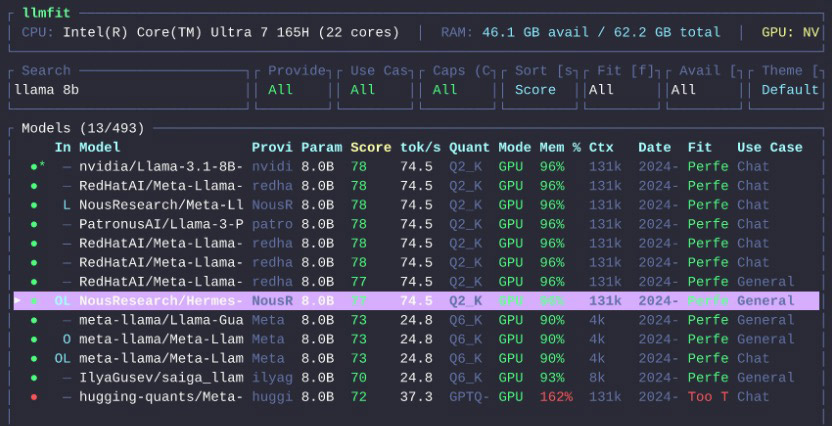
Created by Alex Jones, llmfit is a terminal tool that checks your hardware, compares it against hundreds of models, and recommends the ones that are actually practical for your setup. Instead of guessing whether a model will fit into RAM or VRAM, it ranks options by fit, speed, quality, and context so you can make a smarter choice before downloading anything.
If you run local models often, this is one of those tools that feels immediately sensible.
What is llmfit?
llmfit is a local model recommendation tool for people who run LLMs on their own hardware.
It detects your machine specs, including RAM, CPU, and GPU, then ranks models based on what your system can realistically handle. It supports both an interactive terminal UI and a standard CLI mode, so you can browse visually or script it into your workflow.
According to the project README, it works with local runtime providers such as Ollama, llama.cpp, MLX, Docker Model Runner, and LM Studio.
In plain English, llmfit answers one very practical question:
Which LLM should I run on this machine?
What does llmfit do?
At its core, llmfit helps you stop guessing.
It can:
- detect your CPU, RAM, GPU, and available VRAM
- check model size and quantization options
- estimate which models will run well, barely run, or not fit at all
- suggest models by use case, such as coding, chat, reasoning, or embeddings
- simulate hardware setups, so you can test imaginary builds before upgrading or buying anything
- estimate what hardware a specific model would need
That last part matters more than it sounds.
Most local AI tools tell you what exists. llmfit tries to tell you what is practical.
Why llmfit Is Useful
There are already plenty of places to browse models.
What is usually missing is a clear answer to whether a model makes sense on your machine.
A 7B model might technically run, but if it crawls, that is not much use. A quantized model might squeeze into memory, but leave too little headroom for the context length you want. llmfit tries to bridge that gap by combining hardware detection, model scoring, and runtime awareness.
If you are new to running local models, setting up a local LLM launcher is a useful first step before narrowing down the right fit with llmfit. The tool is useful for a few different kinds of users:
- people new to local LLMs who do not know where to start
- developers comparing Ollama, MLX, or llama.cpp setups
- anyone planning an upgrade and wanting to know what more RAM or VRAM would unlock
- teams running local AI across different machines and needing a quick way to compare fit
How to Install llmfit
The project offers a few install options.
Homebrew
If you are on macOS or Linux with Homebrew:
brew install llmfitMacPorts
If you use MacPorts:
port install llmfitWindows with Scoop
scoop install llmfitQuick Install Script
For macOS or Linux, the project also provides an install script:
curl -fsSL https://llmfit.axjns.dev/install.sh | shIf you want a user-local install without sudo:
curl -fsSL https://llmfit.axjns.dev/install.sh | sh -s -- --localDocker
You can also run it with Docker:
docker run ghcr.io/alexsjones/llmfitBuild from Source
If you prefer building it yourself:
git clone https://github.com/AlexsJones/llmfit.git
cd llmfit
cargo build --release
The binary will be available at:
target/release/llmfitHow to Use llmfit
The easiest way to start is to just run it.
llmfitThat launches the interactive terminal UI.
Inside the interface, llmfit shows your detected hardware at the top and a ranked list of models below it. You can search, filter, compare, and sort models without leaving the app.
Several useful keys from the project documentation:
j/kor arrow keys to move through models/to searchfto filter by fit levelsto change sort orderpto open hardware planning modeSto simulate different hardwaredto download the selected modelEnterto open model detailsqto quit
If you prefer command-line output instead of the TUI, use CLI mode:
llmfit --cliHere are a few commands worth knowing.
Show Your Detected System Specs
llmfit systemList All Known Models
llmfit listSearch for a Model
llmfit search "llama 8b"Get Recommendations in JSON
llmfit recommend --json --limit 5Get Coding-Focused Recommendations
llmfit recommend --json --use-case coding --limit 3Estimate Hardware Needed for a Specific Model
llmfit plan "Qwen/Qwen3-4B-MLX-4bit" --context 8192Features Worth Calling Out
Hardware Simulation
This is one of the smarter parts of the tool.
Inside the TUI, pressing S opens simulation mode, where you can override RAM, VRAM, and CPU core count. That lets you answer questions like:
- What if I upgrade from 16GB to 32GB RAM?
- What if I move this workload to a machine with more VRAM?
- What could I run on a smaller target machine?
It is a practical way to plan hardware without leaving the app or doing the math manually.
Planning Mode
Planning mode flips the normal question around.
Instead of asking what fits your current machine, it asks what hardware a specific model would need. That is useful when you already know the model you want and need a quick sense of whether your machine can run it comfortably.
Web Dashboard and API
llmfit is not limited to an interactive terminal.
It can also start a web dashboard, and it includes a REST API through llmfit serve. That makes it more useful for scripting, automation, or folding into a larger local AI setup.
Who Should Use llmfit?
llmfit makes the most sense for:
- developers who run local LLMs regularly
- people choosing between Ollama, MLX, and llama.cpp
- anyone tired of trial-and-error model downloads
- hardware tinkerers planning a RAM or GPU upgrade
- teams that want fast recommendations for different machines
If you only run one or two models and already know what works on your system, you may not need it.
But if you experiment often, compare runtimes, or keep asking, “will this model actually run well here?”, llmfit starts looking genuinely useful.
Final Thoughts
llmfit is not another model launcher.
It is closer to a fit advisor for local LLMs.
That sounds modest, but it solves a real problem. Local AI is full of model lists, leaderboards, and download buttons. What most people need first is a faster way to narrow that list to models that actually make sense on their machine.
That is exactly where llmfit looks useful.
Install it, let it inspect your hardware, and see what it recommends before downloading your next model.