30+ Tools to Enhance Your Flickr Experience
Being a popular online image platform, Flickr is a revolution for photo sharing and management plus it has a huge community of photographers who showcase their work the world to see.
And so to help you make the most of Flickr’s amazing platform, there are a number of tools that can add a lot to your experience. So, no matter whether you are a casual user or a regular one, here are 30+ tools to enhance your Flickr experience.
Note: This post was originally published in October 2008 and was updated in May 2018 as all the non-working apps have been removed and new apps have been added.
10 Free Photo Management Desktop Apps
Photo managers allow you to organize your life in photo albums and take care of your digital memories... Read more
Flickr Uploadr
A useful tool to backup your photo collections from your computer, hard drives, iPhoto or Dropbox, Flickr Uploadr is available for Windows 7, 8.x, and 10.

Aperture for Flickr
Export your photos right from Aperture into Flickr with this amazing Aperture for Flickr tool. It makes it really easy to do posting on Flickr as part of your everyday workflow.

jUploadr
Another uploader in the list, jUploadr is a cross-platform, cross-site photo uploader that supports Flickr. You can batch edit your photos and set all properties of your images before uploading. jUploadr is available for Windows Linux and OS X.

Flickr Mobile
It is the official Flickr mobile app to upload, share and access photos on the go. It allows you to upload photos in HD, edit, apply filters, resize, crop or flip your photos before uploading. Flickr’s mobile app is free and serves as a gateway to the rest of the site. The app is available for both iOS and Android.
Flickr Commons Map
A tool that shows you the most recently uploaded photos for any displayed map area, Flickr Commons Map allows you to pick a city, town or area you’re interested in and you’ll be able to drill down to see how many photos are available from that location.

Glimmr
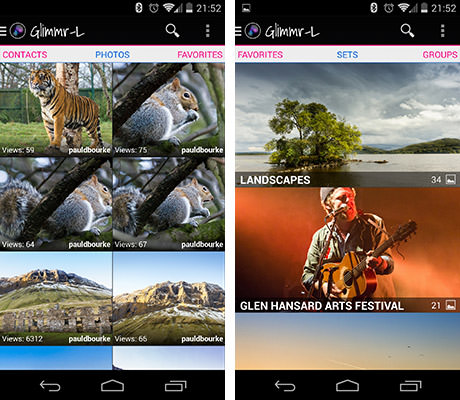
Glimmr is a tool for frequent Flickr users with a beautiful interface, support for Flickr groups, commenting on photos, and view EXIF and location data. Though you can’t upload or organize your photos through this app, however, it’s a great tool for browsing Flickr photos.
Flump
Want to download some public photos from Flickr? Try Flump. It is a simple application to download all of the public photos of a specific Flickr account easily.

Phlogre
A helpful photo organizer tool for local as well as Flickr photos, Phlogre enables you to sort your photos with name or tag and upload them to Flickr. Phlogre can be a good substitute for the official Flickr Uploadr.

Desktop Flickr Organizer for Gnome
Yet another photo organizer for Flickr, with this app you can manage your photos in online/offline mode. It has an easy-to-use-interface where you can upload, search and download photos.

dFlickr: Delphi API Kit for Flickr
dFlickr has many functions of the Flickr API. It gives you the necessary classes to access users, photos, photosets, groups, pools, and blogs in Flickr.

FlickrFaves
FlickrFaves is a small utility for downloading high-resolution versions of your Flickr favorites to your hard drive. FlickrFaves is a cross-platform utility written in Java.

Gnickr
Gnickr allows you to manage photos on your Flickr site as if they were local files on your Gnome desktop. It does this by creating a Flickr virtual filesystem.

Foldr Monitr
Foldr Monitr is a free tool that runs in the background and watches a selected folder (and optionally subfolders) waiting for you to add photos to it. When photos appear in the folder, Foldr Monitr automatically uploads them to your Flickr account for you.

CompFight
Compfight is a great new tool that uses Flickr’s API to search the database of photos and then feeds back the results as live clickable thumbnails.

PictureSandbox
Picturesandbox.com uses the Flickr search APIs to return images by all users on Flickr.

FlickRiver
Flickriver is an new way to explore and view Flickr photographs. Flickriver has many additional Flickr photo views – user recent photos, favorites, sets, user and everyone’s photos by tag.

findr
The most interesting feature of this tool is the ability to refine your search by eliminating tags. When you click on a tag, flickr returns that tag’s list of related tags. Findr then compares that list with the previous list(s) of tags and displays the intersection.

Picsviewr
Picsviewr provides a wide variety of slideshows (currently 7) for viewing your Flickr photos with more flexibility. Every Flickr user has a slideshow here. There is no need to create an account or configure anything and your preferences are saved.

flickrSLiDR
flickrSLiDR allows you to easily embed the classic flickr slideshows on your website or blog. All you need to do is enter the flickr URL address of the user, photo set or group you would like to embed along with some options. You’ll receive the HTML embed code in return.

Multicolr Search Lab
With the Multicolr Search Lab, you can browse through 10 million of Flickr’s most interesting Creative Commons images, and find ones that share the same colours. Choose up to 10 colours from our palette of 120 different shades.

Colr Pickr
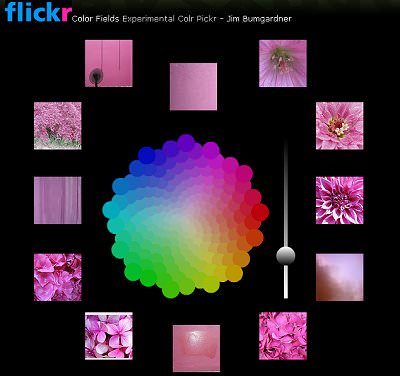
ColrPickr uses a color wheel which is used to find Flickr photos on the basis of color. Choose from a set of picture themes, e.g. flowers, graffiti, doors and windows, textures and urban decay, among others, to set your color.
Spell With Flickr
Spell with Flickr is a fun little program that invites users to type in whatever they want to, then matches each letter of that word with letter pictures straight from Flickr.

fastr
A Flickr game to guess the tag of a photo.

Tagman Flickr
TagMan is a game that combines the classic hangman game with tags. Tags are used to label the subject or category of blog posts, photos and other items on the web.

Color Hunter
Color Hunter is a place to find and make color palettes created from images. When you search for color palettes by tag, ColorHunter.com searches Flickr.com via Flickr’s API for images labeled with the tag you entered. The thumbnails of the Flickr images are used to create a color palette.

Flickr Graph
Flickr Graph is an application that explores the social relationships inside flickr.com. It makes use of the classic attraction-repulsion algorithm for graphs.

Flickr Finder (Mac only)
Flickr Finder is a Mac-only application that lets you browse Flickr photos without a browser. The interface is similar to the Mac Finder.

Gickr
Gickr.com lets you instantly create Animated GIF online, free, by grabbing photos from your Flickr.
