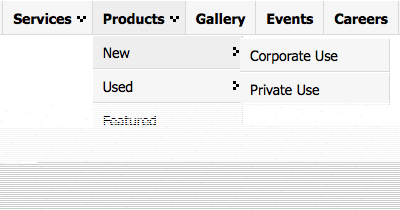
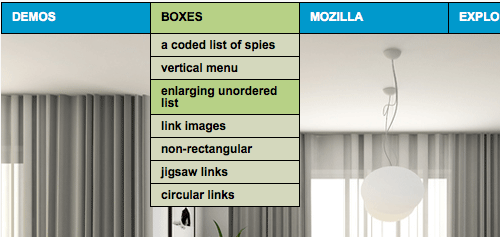
Drop-down menu (also known as pull-down menu) is an essential in most web design. It plays important role in the creation of an effective and user friendly website. It’s a good solution to trim down long menu that is overwhelming the screen space, getting them to display in a more organize category-sub category pattern.
In this article, we’d like to show you some of the best drop-down menu scripts we come to know. These drop-down menu varies from CSS only, CSS & Javascripts and menu that will work with your current Javascript library like jQuery, MooTools and Prototype. Full list after jump.
Here are some related articles we figured you might be interested in:
CSS (Only)
If you are worried about Javascript disabled on client’s browser, these css-only drop down menu will not fail you.
CSS Drop-Down Menu Framework
Title says it all. It’s a framework, released under GNU General Public License. Cross browser compatible, light and easy transformable to mimic a lot of existing drop down menus out there. For example Flickr, Adobe, and MTV.com [Demo | Download]
Ultimate CSS only drop-down menu
Also see this.
CSS Express Drop-Down Menus
Help you produce a quick (express) CSS drop-down menu without some of the limitations found in some other "pure" CSS menus.
CSS + Javascripts
With the help of Javascript, drop down menu are more interactive or at least they get some subtle animation that enhance user experience. CSS on the other hand, make sure the look and feel is easily cuztomizable.
JavaScript Dropdown Menu with Multi Levels
This multi-level drop down menu script weighs in at only 1.2 KB. It features animation, active header persistence, easy implementation and multiple instance support. [Demo | Download]
All Levels Navigational Menu (v2.2)
CSS/ HTML list based menu with support for infinite levels of sub menus. It’s lightweight and easy to implement.
Drop Down Tabs (5 styles)
Drop Down Tabs is a horizontal CSS tabs menu that supports a second level drop down menu for each of its tabs. Comes in 5 different styles.
Chrome CSS Drop Down Menu
Chrome Menu is a CSS and JavaScript hybrid drop down menu. It’s easy to configure and search engine friendly. The main menu bar consist of a CSS list, while the drop down menus are simply regular DIV tags on page.
jQuerys
If you’ve implemented jQuery Javascript Library on your site, here are some really cool jQuery based drop down menus you should know.
Smooth Navigational Menu
Smooth Navigation Menu is a multi level, CSS list based menu powered using jQuery that makes website navigation a smooth affair. Here’s another similar one – jQuery Multi Level CSS Menu.
Superfish
Superfish is an enhanced Suckerfish-style menu jQuery plugin that takes an existing pure CSS drop-down menu (so it degrades gracefully without JavaScript). [Demo | Download]
Animated Drop Down Menu with jQuery
Dropdown with much slicker effect using jQuery and CSS.
Droppy
Quick and dirty nested drop-down menu in the jQuery style.
Dropdown, iPod Drilldown, and Flyout styles with ARIA Support and ThemeRoller Ready
Menu system, which can be used to create a simple dropdown menu for a single list of options, a flyout menu for a smaller hierarchical list of options. [Demo | Download]
Mega Drop-Down Menu
A drop down menu that holds more than just new line of links. It also makes group links and make nagivation much easier! [Demo]
(mb)Menu
Powerful jQuery component to build easily a multilevel tree menu or a contextual menu (right click) in an intuitive way. [Demo | Download]
MooTools
JavaScript drop down menu using Mootools
Easy, unobtrusive way to create a drop down menu with Mootools 1.2. [Demo | Download]
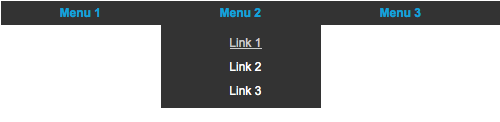
UvumiTools Dropdown Menu
Simple multi-level menu built from an HTML unorderd list, using Mootools Javascript Framework.
Unobstrusive Mootool Drop Down Menu
MenuMatic
MenuMatic takes a sematic ordered or unordered list of links and uses MooTools 1.2 to turn it into a dynamic drop down menu system, with enhanced usability and flair. [Demo | Download]
Scriptaculous/Prototype
Dropdown Menu
Based on Knallgrau Unordered list. Here’s more similar drop down menu – Horizontal dropdown menu, e24TabMenu.
Mimics
Step by step tutorial on how some of the nicest drop down menus are created.
Designing the Digg Header
Step by step tutorial on how to build a drop down menu that really looks like Digg’s. [Demo | Download]
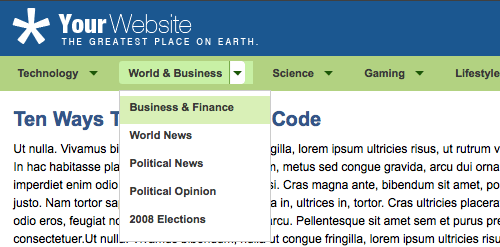
Simple CSS vertical menu Digg-like
Yet another good tutorial to implement a simple vertical menu digg-like using CSS and javascript to show/hide sub-menu. [Demo | Download]
Sliding Jquery Menu
How to create a sliding menu button using jquery that looks like Envato’s TUT+ navigation. [Demo | Download]
Vimeo-like top navigation
If you like Vimeo (see it here, top) this Vimeo-alike drop down script is perhaps 99% the same.[Demo | Download]
MISC
WordPress Multi-Level Drop Down menu using jQuery
A tutorial that helps you build a simple multi-level drop-down menu in your WordPress theme using jQuery’s JavaScript library to ensure cross-browser compatibility. Here’s another Wordpress plugin that does the trick too.
izzyMenu
Create professional looking CSS menus for your website online, without writing a single line of code or just use some of the ready made ones.
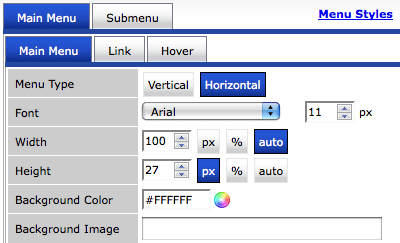
PureCSS Menu
Free CSS Drop Down Menu generator
Related Contents |
Sponsors |
|
Posted by hongkiat in Graphics , at 08.03.09
Tags: css, demo, download, drop-down, javascript, menu, pull-down, script |
|


Comments
Jasmin Halkić August 3rd, 2009
Very nice and useful. Thanks
ReplyStanley August 3rd, 2009
Drop down menu.. That’s what I’m looking for! Thanks!
Replysaponmer August 3rd, 2009
Oh, Very Very good. Thanks.
ReplyMyPSDStudio August 3rd, 2009
nice sharing..i like the css drop-down style
Replynaz August 4th, 2009
(mb)Menu look awesome!
ReplyZach Krasner August 4th, 2009
Coooool article
ReplyJohn Campbell August 4th, 2009
Great collection here. I definitely bookmarked a few of these for later use.
ReplyNotAlame August 4th, 2009
Very useful collection
ReplyThanks a lot!
halibuthero August 4th, 2009
Great list. Perfect for the portfolio I’m starting.
ReplyWhat is the font you are using for the titles throughout the article? Is it an embedded font?
ithemesdotnet August 4th, 2009
This is a great list of drop-down menus. I really like the droppy menu.
Replycoda August 4th, 2009
Here’s another (*jQuery): query.dropSlideMenu.js
Replymiziology August 4th, 2009
i luv it..thanks hk for this info
ReplyMinh Trung August 4th, 2009
Great collection!!!
ReplyThank a lot.
kai August 4th, 2009
You can easy create menu by css menu generator http://www.mycssmenu.com
Or use menu bank at http://www.webmenubank.com
They’re useful addresses.
ReplyWallpapers August 4th, 2009
Really helpful in developing a XHTML Page ! Thanks for sharing and keep it up
ReplyLetter Format August 4th, 2009
I love multiple drop down navigation, it can split the navigation in order and make browsing life easier.
ReplyJohnson Koh August 4th, 2009
Extremely useful for those poor in web programming like me. Thanks so much for this compilation.
ReplyShort Master August 4th, 2009
Wow, Thanks for this cool collection. It will certainly help a lot in my designs.
ReplyDevang Paliwal August 4th, 2009
I personally liked the jQuery Menu & Vimeo-like top navigation.
ReplyThe explanation of the structure is exellent and make it more intutive for a User
iPhone4ever.eu August 4th, 2009
Thx for sharing!
ReplyImad August 4th, 2009
http://www.qtishat.com
Replywe don’t use drop down menus, i think we have to reconsider.
rozy August 4th, 2009
thanks for sharing bro
Replyi’ll try
Vim August 4th, 2009
Nice list of drop down menus, am i right in assuming that some of these are free and some you have to pay for?
ReplySam August 4th, 2009
The Chrome CSS Drop Down Menu looks great due to the clean code it produces, shame it doesn’t degrade as well as the jquery Superfish though.
ReplyExtend Studio August 4th, 2009
You could also have a look at FlexiMenuJS – a Dreamweaver extension that builds JavaScript Menus.
ReplyBorys August 4th, 2009
One more from TinHelix:
Replyhttp://www.twinhelix.com/dhtml/fsmenu/
david August 4th, 2009
awesome
ReplyMTG August 5th, 2009
Thanks for this useful collection of scripts. They will definitely come handy in some point of time. :)
ReplyHenry August 5th, 2009
This is a must bookmark for devs! Thanks
ReplyCode.My August 5th, 2009
Good list of useful Scripts. There still have more outside there.
Replymaggie August 5th, 2009
very nice
ReplyWeb Design Nottingham August 5th, 2009
Great collection dude, thanks for sharing them.
ReplyQuoc Thai August 7th, 2009
Great Post ! Thank you for your share !!!
ReplyTien August 10th, 2009
Hi, I just downloaded CSS Drop-Down Menu Framework
Replyand uploaded it in wp-content plugin. Now I do not see this anywhere in my Wordpress admin, not under Setting either. I am pretty new at this CSS thing. Do you have an instruction as how to use this CSS Drop-Down Menu Framework? I am sorry to bother you as I know you are busy too. Please let me know. Thank you.
Niek Kouwenberg August 11th, 2009
You might also want to check out Menu.js, it’s a small JavaScript (drop-down) menu for developers. Free/open source and based on Prototype: http://www.menujs.net/
The examples on the website are not the best looking ones, but check out the live-website examples for what it can do.
Replyjhon August 18th, 2009
Thank you for information.I think this nice post.
Replyasep rohman August 18th, 2009
great tutorial. thanks for share..
ReplyVijaya Kumar August 26th, 2009
Brilliant work.. I love it. Thanks a lot for sharing this stuff.
ReplyVijaya Kumar August 26th, 2009
1) Really exciting tutorial. i loved it. Thanks for posting
Replyytechcity August 31st, 2009
Great Post! Thank you for your share !!!
ReplyJohn Santiago (alias Dr J) September 5th, 2009
Thanks for sharing the great set of menus. Time to learn again.
Dr J
ReplyJohn Santiago (alias Dr J) September 5th, 2009
Please delete previous comment by me, I had a typo in my URL.
Anyway, thanks for the great set of dropdown menus.
Respectfully, Dr J
Replyeyitayo October 29th, 2009
I want to create a menu on an already created image but the drop down should have a transparent background
ReplyTrackbacks