How to Delete Your Digital Footprint Completely
Whether you want to better your online privacy, or need to remove some embarrassing footprints, deleting your online presence can be a bit difficult. Remembering everything you have done online and removing it is quite close to impossible.
Don’t worry though, if you want to completely delete yourself from the internet or even minimize your footprint, then keep on reading and find out how to find and delete online information about yourself.
Note: The complete deletion process can take quite some time, at least a few days. Even then, there is a chance some of the undeletable information about you may lurk around. Keep these shortcomings in mind before moving forward.
How to Download and Delete Everything Google Knows About You
A detailed guide on how to check and delete your data collected and stored by Google on its... Read more
Track & Delete Online Accounts Automatically
Many websites force you to sign up to use their service, so it’s common for people to sign up for a one-time-use service and forget about it. You might think you only have an account with just a few of the services, but the truth could be eye-opening. I personally thought I only have an account with hardly 10-12 services, but it seems I have signed up to over 140 services!
Deseat.me
deseat.me is a great online service that shows you almost all of your online accounts that you created using a specific email address. You just need to provide your email address and it will automatically show all the websites you have signed up to and will also show how to delete your account there.
Unfortunately, the service is only available for Gmail and Outlook users. If you have an email account with a different user, then jump to the next step where I’ll help you find your accounts as well.
How to Use Deseat.me
To start using deseat.me, click on the "Get started" button on the main website and provide your Google or Outlook account. You will have to give permission to read your emails in order for deseat.me to work. Hope you are okay with that, as we will remove deseat.me in the end anyway.

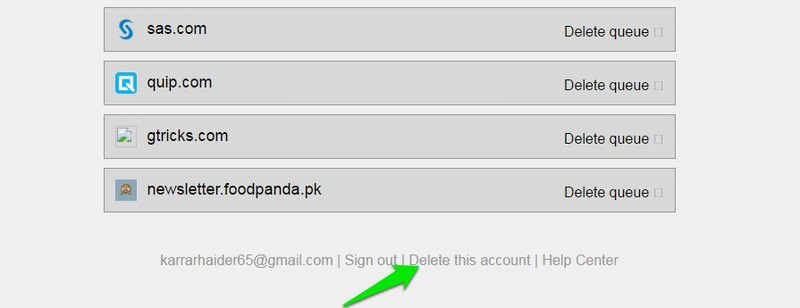
You will now start seeing your signed up accounts on top, but only 3 at a time. If you want to delete a specific account, then click on "Delete queue" account to add it to the delete queue below.
And if you want to keep an account, then click on the "Save" button to add it to the save queue. The items in the "Delete queue" will have a delete button next to them that you can click to directly move to the respective service’s account deletion page.

Note: There is a chance deseat.me may list websites where you may not actually have an account. I scorched through over 70 websites and deseat.me only made one mistake. So I guess the chances of this are quite low.
This whole process can take quite some time as each account may have different demands to be deleted, and some may take 14+ days to completely delete. So hang in there and deseat.me will keep track of your queues even if you sign out, and you can continue where you left off.
When you’re finally done deleting your online accounts, scroll to the bottom of the deseat.me page and click on "Delete this account". Next, confirm that you want to delete the account and all the collected data and your account will be deleted.
This step is important if you want to leave no trace of yourself online.
Track & Delete Online Accounts Manually
If you don’t have a Google or Outlook account or don’t want to use deseat.me, then you are pretty much on your own. You will have to recall all the websites you have signed up for and then delete your account from there.
The best I can do is give you some pointers to jog your memory. The easiest thing you can do is to go through all your mails since the beginning and see which websites you have signed up for. All websites send a confirmation message to your email when you sign up, so you should be able to find all your sign ups.
AccountKiller, Justdelelete.me
However, if you have a habit of deleting unrequired emails, then you can check out AccountKiller and justdelete.me that list some of the most popular websites along with links to how to delete your account from those websites.
Just go through the list and you may remember creating an account with one of these websites. If so, click on the website’s name to find out how to delete your account.
Delete Yourself From The Internet With These Tools
Ever thought about removing a part of your past from the Web? Like a photo of a bad... Read more

Hunt For Your Info
Now that the bigger hurdle is aside, it’s time to clean the scraps. You can check which information about you is public and then try to remove it. Google Search is probably the best point to start your search.
Enter your name in Google Search and put quotes around it like this; "your name". This will force Google to search for pages that contain your name as is.
A Guide to Better Google Searching Techniques
In today's world, to find the answer to any question you refer to the Google search. The search... Read more
You can repeat the same process to search for your email address, contact number, or may be your usual account names. You can also pinpoint results by combining these search keywords by adding an "and" between them. For example, entering search keyword "your name" and "your email address" will show results that contain both your name and your email address.
Using Google Search I was able to find a random page where my name, email address, my job, my current city, and the university where I studied was listed. That’s a bit too much information to be listed online for anyone to search through.
Apart from Google, you can also try searching on People search engines. They can spit out a lot of information about you, and can even search for information available on the dark web. My favorite people search engines is Peek You.
Both are free and have extensive information about the online world.
If you find any information about you online, then see where it is published and try to remove the information or delete the account if possible. Later in this article, I’ll tell what you need to do about hard-to-remove information.
Unsubscribe From Mailing Lists
All websites allow you to manually unsubscribe from their newsletters, but Unroll.me is a great alternative that makes the process very easy.
Just log in to Unroll.me using your email address and provide the required permissions (all email service providers supported). Now move to the "Edit Subscriptions" section and you will see all your subscribed email letters in a list. Simply click on "Unsubscribe" next to each service to unsubscribe.

Delete Forum Comments
You can either login to your account and delete the comments on any forum or talk to the moderator to delete it for you. If you can’t delete comments yourself or you have already deleted your account on the forum, then send a message to the moderator along with the link to the post and politely ask them to remove it.
Do make sure you give an authentic reason to the forum’s moderator to increase the chances of getting it removed.
To search for your comments, you can search Google with your forum nickname enclosed in quotes. If there is a particular comment you are looking for then try searching for some of its content and put it in quotes.
Content You Don’t Have Control Over
There are also some types of content that you may not have direct control over, such as your posts over someone else’s website. In such a case, your best bet is to contact the owner of the website and ask them to remove this information.
You will have to be polite while requesting and give a solid reason why you want the information to be removed. The webmaster isn’t bound to remove any information, so your convincing message is the best way; unless you prefer taking legal action.
What If You Can’t Delete The Account(s)?
There is a chance a service may not allow you to delete your information, and only let you deactivate your account while your information stays on their servers. In that case, you need to replace the information with the fake one.
First, try to delete all the optional information and then add fake information in fields that are mandatory. You can add a fake name, add a fake phone number, change home address and associate the account with a fake email that doesn’t link back to you by any means.
Sometimes talking to the customer support can help in deleting your account, but in most cases, it won’t help.
Delete Cookies
You should also delete all the cookies set by websites to ensure they can’t link to you by any means when you access them again. All browsers give the option to delete cookies, here is how to delete cookies in popular browsers.
You can also use a cleaning tool like CCleaner to delete cookies from all your browsers in one go.
How to Deep-clean Your PC with CCleaner
Like every other machine, your PC needs cleaning and maintenance. However, in the flow of daily life, we... Read more
Delete Your Email Account
If you want to completely get off of the internet, then you should delete your email account as well. However, do keep in mind that today email address is required for many legal purposes. So you should at least create a secondary email account to use it when it is absolutely necessary.
The process of deleting your email account depends on your email provider. So it is better to search online for "how to delete (your email service) account". Here are some quick links to delete Gmail, Outlook, Yahoo, and AOL email accounts.
15 Websites to Send Anonymous Emails
Why go for anonymous email when there are plenty of premium featured and free email services such as... Read more
The Wayback Machine Issue
Wayback Machine is an online internet archiving tool that archives website content and makes it available for anyone to see as it was uploaded. If you have publically uploaded something and then deleted it, there is still a chance Wayback Machine may have archived that page and made it available for anyone to see.

The problem here is that Wayback Machine doesn’t offer any way to delete individual content that is indexed by its bots. In case it did manage to index any of your personal information, then you should contact Wayback Machine support team and give them the URL of the Wayback Machine page that has your information and ask them to delete it.
I can’t guarantee if this will work, but their support team does have the power to delete individual pages if necessary.
Wrapping Up
Depending on your online activity, it can get quite cumbersome to delete all your online traces. Do keep in mind that it is almost impossible to completely delete yourself from the internet if you have spent enough time on it.
There is a chance your data might be lurking on the dark web, someone might have stolen your data before you could delete it, or simply its stored on a company server and that choose not to delete it.
However, in most cases, you are sure to delete most of the publically available information about you.
Do let us know in the comments why you were looking to delete yourself from the internet.
Delete Yourself From The Internet With These Tools
Ever thought about removing a part of your past from the Web? Like a photo of a bad... Read more