25 (Free) 3D Modeling Applications You Should Not Miss

Advertisement

3d modeling tools

Technically, 3 Dimensions refers to objects that are constructed on three plans (X, Y and Z). The process of creating 3D graphics can be divided into three basic phases: 3D modeling, 3D animation and 3D rendering.

Three dimensional (3D) computer graphics are widely used and they are almost too common to see anywhere, let it be movies, products designs, advertisements, etc. Although they are commonly seen, that doesn’t mean they are easily created. In order to interactively control a 3D object, it must be created in a 3D authoring tool which usually cost a lot to a non-professional user.

A 3D model is usually originated on the computer by engineer using some kind of 3d modeling tools. Creating 3D models is not easy and the software alone can cost a fortune Therefore, we thought it might be interesting to check out the availability of open source 3D modeling tools out there. Crawling from sites to sites, reading through end users comments and feedback, we bring you 25 Free 3D Modelling Applications You Should Not Miss. Full list after jump.

  1. Blender

    A free and open source 3D modeling and animation application which can be used for modeling, UV unwrapping, texturing, rigging, water simulations, skinning, animating, rendering, particle and other simulations, non-linear editing, compositing, and creating interactive 3D applications.

    Blender

  2. K-3D

    K-3D is free-as-in-freedom 3D modeling and animation software. It features a plugin-oriented procedural engine for all of its content, making K-3D a very versatile and powerful package.
    K-3D excels at polygonal modeling, and includes basic tools for NURBS, patches, curves and animation.

    k-3d

  3. Art of Illusion

    Art of Illusion is a free, open source 3D modelling and rendering studio. Some of the highlights include subdivision surface based modelling tools, skeleton based animation, and a graphical language for designing procedural textures and materials.

    artofillusions

  4. SOFTIMAGE|XSI Mod Tool

    A free 3D modeling and animation software for aspiring game developers and modders. The Mod Tool is a free version of XSI for non commercial game creation. It is made for everyone needing a powerful 3D application to make and mod games. The Mod Tool plugs into all the major game engines and development frameworks for next-generation games, casual games, mods for existing titles and even Flash-based 3D games.

    SOFTIMAG

  5. Zmodeler

    ZModeler (or Zanoza Modeler) is a 3D modeling application developed by Oleg Melashenko. It is aimed at modelers who model for computer games. ZModeler is capable of complex modeling, even though it does not support important modeling functions such as extruding, or beveling.

    Zmodeler

  6. TopMod3d

    TopMod3d is a free, open source, portable, platform independent topological mesh modeling system that allows users to create high genus 2-manifold meshes. It can also create solid models that can be prototyped using various rapid prototyping technology.

    topmod3D

  7. Google SketchUp 6

    Google SketchUp

    Google SketchUp is software that you can use to create, share and present 3D models. Whether you want to design a new deck for your house, build models for Google Earth, or teach geometry to your fifth-graders, you can use SketchUp to see your ideas in 3D. And when you’re done, you can export an image, make a movie or print out a view of what you made.

  8. AutoQ3D Community – 3D Editor

    AutoQ3D Community is an easy, light and fast 3D model editor tool that uses the full power of your PC´s graphics hardware, allowing you to rapidly prototype your 3D designs. Its interface is intuitive and easy to use and provided at no charge. It is released under the terms of the GNU General Public License so it will be free to use, modify  and distribute within any educational, professional or commercial purposes.

    AutoQ3D

  9. Anim8or

    Anim8or is a 3D modeling and character animation program which allows users to create and modify 3D models with built-in primitives such as spheres, cylinders, platonic solids, etc.; mesh-edit and subdivision; splines, extrusion, lathing, modifiers, bevel and warps,

    Blender

  10. Seamless3d

    Seamless3d is free open source 3d modelling software which designed for the artist who is realistic about the time it takes to learn any tool that’s going to offer creative freedom.

    seamless3d

  11. BRL-CAD

    BRL-CAD is a powerful cross-platform constructive solid geometry solid modeling system that includes an interactive geometry editor, ray-tracing for rendering & geometric analyses, network distributed framebuffer support, image & signal-processing tools.

    BRL-CAD

  12. 3DPlus

    With 3DPlus you can create outstanding 3D designs in just a few minutes – with no need for any complicated VRML or other programming. 3DPlus is the amazing 3D design software that enables you to create stunning 3D graphics for your home, school or business – no experience required!

    3DPlus

  13. 3D Canvas

    3D Canvas is a real-time 3D modeling and animation tool that incorporates an intuitive drag-and-drop approach to 3D modeling. Complex models can be constructed from simple 3D primitives, or created using 3D Canvas’ Object Building Tools. Modeling tools are provided to deform, sculpt, and paint 3D objects.

    3dcanvas

  14. eDrawings

    eDrawings is a freeware utility which will give the user the power to view, create and share 3D models and 2D drawings. eDrawings offers unique capabilities like point-and-click animations that make it easy for anyone with a PC to interpret and understand 2D and 3D design data.

    edrawings

  15. Blink 3D

    Blink 3D is an authoring tool for creating 3D environments. The 3D environments are immersive, just like today’s modern games and can be viewed using the a Blink 3D Viewer on the Web or locally.

    blink3d builder

  16. Minos

    MINOS extends the capabilities of your existing 2D-or 3D-wireframe-based systems, so you can take advantage of all the benefits solid modeling offers right away. MINOS makes it easy to design 3D parts and assemblies. The design methodology is based on defining simple geometric elements including lines, curves, and circles, and then linking them together to form contours.

    minos

  17. freeCAD

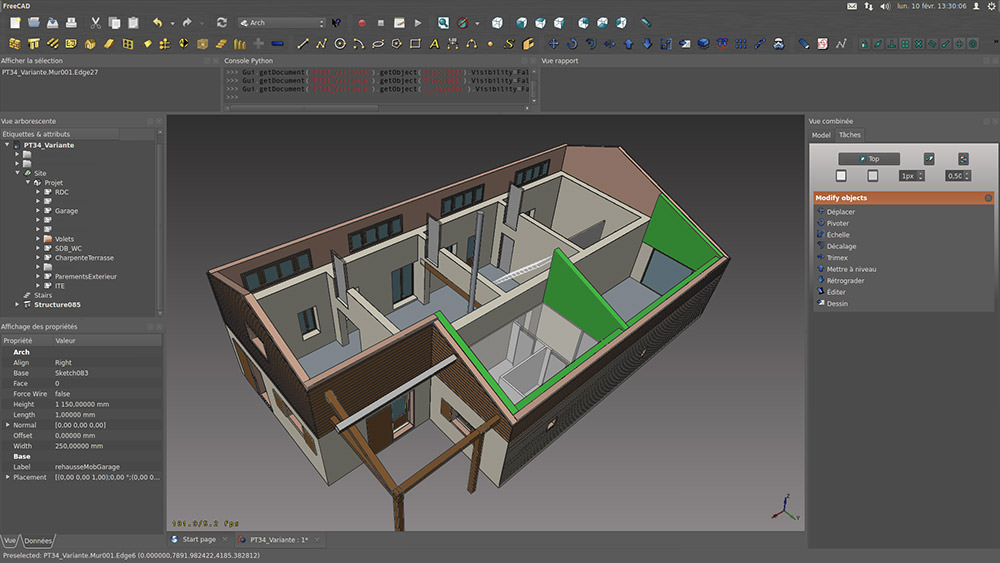
    freeCAD is a basic 3D CAD with advanced Motion Simulation capabilities. It is suitable for anyone interested in learning 3D CAD and Motion Simulation for free before using more sophisticated packages. Its motion simulation capabilities are comparable to the best and can provide accurate answers to engineers and scientists in diverse fields.

    freecad

  18. Bishop3D

    Bishop3D is an interactive modeler and animation tool for the popular freeware raytracer POV-Ray™, a world-class renderer for creating three-dimensional photo-realistic images. Bishop3D allows you to model the scenes interactively and it will automatically generate the correspondent POV-Ray SDL script. It offers native keyframe animation support, POV-Ray SDL import and a powerful texture editor.

    Bishop3D

  19. K3DSurf

    K3DSurf is a program to visualize and manipulate Mathematical models in three, four, five and six dimensions. K3DSurf supports Parametric equations and Isosurfaces. K3DSurf can be used by every one interested in 3D Mathematical drawing functions and don’t require any special competences by users.

  20. DesignWorkshop Lite

    DesignWorkshop is a three-dimensional modeling program for architectural design and related endeavors. Its unique interface makes it more profoundly "Mac-like" than any prior modeling software. This interface allows it to support actual design in three dimensions, as opposed to just recording design ideas already worked out with other media.

    DesignWorkshop Lite

  21. GDesign 2.0

    GDesign 2.0 is a 2D/3D free generative art application for Windows. With GDesign you can interactively build, test, and edit complex models. You can create, edit, build and preview huge 2D and 3D objects with extended LSystems and Cellular Automata tools.

    GDesign

  22. Sweet Home 3D

    Sweet Home 3D is a free interior design application that helps you place your furniture
    on a house 2D plan, with a 3D preview. Sweet Home 3D helps people to design their interior quickly. The user may: draw the walls of his rooms upon the image of an existing plan, change the color or the texture of the walls, import additional 3D models created by himself or downloaded from different Web sites, change the size, view the changes in the plan simultaneously in the 3D view, either from an aerial view point, or from a virtual visitor view point, print the home plan and the 3D view.

    Blender

  23. trueSpace

    trueSpace7.6 is a fully-featured 3D authoring package that will let you model, texture, light, animate and render 3D content. As well as traditional images and movies, you can also make 3D content for online shared spaces, and for Virtual Earth.

    trueSpace

  24. Alibre Design Xpress

    Alibre Design Xpress is a rich and capable 3D solid modeler for creating mechanical parts, assemblies and 2D drawings – and is free. Alibre Design Xpress equips the person needing basic 3D design capabilities. Alibre Design Xpress has a rich set of integrated tutorials that you can use to learn the product quickly.

    Alibre Design Xpress

  25. 3DVIA Shape

    3DVia Shape is a free online 3D modeling application that eases you to create, publish and share ideas in 3D. There are 3DVIA archive of prototypes and modeling software you can choose to create three-dimensional. Each model can be viewed at any angle, spun around and zoomed-in on.

    3DVia Shape

Related Contents

Sponsors

Posted by Kay in Tools , at 09.18.08

Tags: , , , , , ,

Comments

  1. digyourlove September 18th, 2008

    Amazing,great design and useful source!

    Reply
  2. Slipper September 18th, 2008

    Few more here – Maya, 3dsMax,Poser 7 and Lightwave 9.5

    Reply
  3. Kay September 18th, 2008

    @Slipper, those are not freewares. :)

    Reply
  4. Chris September 18th, 2008

    Brilliant list with different programs. Thank you for the work.

    Reply
  5. AnggaRifandi September 18th, 2008

    good article. it’s very useful for me. until now, Google Sketchup is one of my favorite free 3D apps.

    Reply
  6. OcasoProtal September 18th, 2008

    blender FTW!

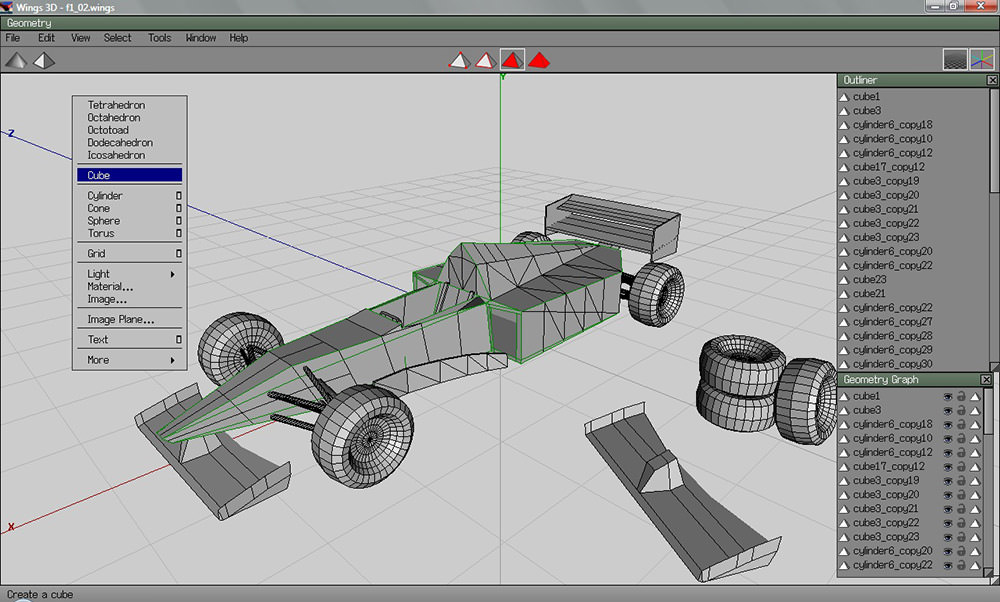
    Good list, but you missed Wings3d: http://www.wings3d.com (although the frontpage is currebtly not working, so use e.g. this link: http://www.wings3d.com/gallery.php)

    Reply
  7. David September 18th, 2008

    I love that 3DVIA Shape product….ok, it’s my product and this is a blatant plug. I just wanted to thank you for including Shape on your list!

    Reply
  8. dev September 19th, 2008

    good article and we really should not miss

    Reply
  9. Rajeev Lochan September 19th, 2008

    A very good summary of top 3D CAD free software. Great work !!
    Thanks for covering freeCAD as well :)

    Regards,
    Rajeev Lochan
    http://www.ar-cad.com

    Reply
  10. Jason Fletcher September 19th, 2008

    don’t forget the insane Xenodream!

    http://www.xenodream.com/

    and some examples of what type of OBJ’s it can export
    http://events.cgsociety.org/NVArt/01/winners.php
    http://www.xenodream.com/meshexgal.htm

    Reply
  11. Gidan September 19th, 2008

  12. Dainis Graveris September 19th, 2008

    Just amazing – I will check those out too! Didn’t imagine that there are so much freeware applications around here! :) Thanks!

    Reply
  13. myadlan September 20th, 2008

    wow. great list.
    but if working in the industry, some of these software are not recognized la.. still we need to learn those expensive softwares

    Reply
  14. Janko September 20th, 2008

    Wow, thanks for sharing!

    Reply
  15. Syahid A. September 20th, 2008

    Awesome list man. Blender seems to be the most popular one imo.

    Reply
  16. 3Drique September 21st, 2008

    Amazing! Thanks for this great list. I discovered Blender, but I didn’t know about the 24 others :-).

    Reply
  17. caduser October 12th, 2008

    WARNING :
    To the author -> the link related to FreeCAD
    is erroneous, the right one is :
    http://juergen-riegel.net/FreeCAD/
    Thanks for this list !

    Reply
  18. caduser October 12th, 2008

  19. Tyler October 17th, 2008

    What about Lego Digital Designer???

    http://ldd.lego.com/

    LMAO!!

    I freaking love it!!

    Reply
  20. Jim November 2nd, 2008

    Just 2 things here:
    1) Daz studio is a free program, human models, animation….etc, at http://www.daz3d.com.
    2) You can’t have true 3D on a 2D screen.

    Reply
  21. Kirk December 20th, 2008

    SOFTIMAGE|XSI Mod Tool is now Autodesk new adquisition.

    “News: Acquisition to Accelerate Autodesk’s Games Strategy; Complements Digital Entertainment and Visual Communications Offering; Lets Artists Choose their Passion.”

    Reply
  22. Winwab January 6th, 2009

    this is perfect for gaming. :)

    Reply
  23. Pastilan January 7th, 2009

    Anim8or is one of the best out there, it is good that it is included in your list

    Reply
  24. Canton real estate January 29th, 2009

    These are excellent for gaming. I can even use this app in my real estate sites!

    Reply
  25. CasinoSanDiego February 20th, 2009

    Blender looks so cool!!

    Reply
  26. Rosver March 4th, 2009

    Great List. I already use Wings 3d and Blender. I’m going to try others too.

    By the way Wings 3d is not in your list. Its a good 3d modeling software

    Reply
  27. soethu March 17th, 2009

    hi hello

    Reply
  28. P4blo March 31st, 2009

    But what happend to wings3d that its a great one

    Reply
  29. Dexter April 30th, 2009

    There is also OpenFX – Open-Source 3D modeling, animation and rendering suite.

    http://www.urban-textures.com

    Reply
  30. mohd arifuddin June 2nd, 2009

    sir/medam
    i have seen the web site its very nice so many picture u have shown thank u

    Reply
  31. breanna kelly June 3rd, 2009

    hey
    well i will love to model for yall

    Reply
  32. hetal June 26th, 2009

    one of d best work done! thanx.
    its a very useful list helps in creating wonderful 3-d graphics

    Reply
  33. Johar June 30th, 2009

    Soo hard to learn about 3D duh…. :(

    Just blog walking from ESC-creation dot com

    Reply
  34. Anton O'Masia July 13th, 2009

    Thanks for a useful article. It might be more useful still if you mentioned which programs export to which formats. I downloaded and tried out 3D Canvas – great program, but it only exports to POVray format, which makes it useless for my purposes.

    You might also mention that the user interface for Blender is probably the most cryptic and confusing software interface ever created. I struggled with that program for weeks before giving up in utter bafflement.

    Reply
  35. game creation July 26th, 2009

    nice list,thank you for that.

    Reply
  36. 3D Modelling Services July 31st, 2009

    3 Dimensions refers to objects that are constructed on three plans. The process of creating 3D graphics can be divided into three basic phases: 3D modeling, 3D animation and 3D rendering.

    Reply
  37. engrmizan August 19th, 2009

    nice illustration…..

    Reply
  38. Arsalan August 20th, 2009

    Sketchup is my favourite too, and its the easiest one

    Reply
  39. roseff August 20th, 2009

    nice picture

    Reply
  40. KiosIT August 20th, 2009

    nice web

    Reply
  41. Bengkel August 20th, 2009

    nice blog

    Reply
  42. battery September 9th, 2009

    This is really amazing, 3D animations may include flash files contains animated objects.Flash and photoshop can be used for developing 3D objects.

    Reply
  43. netocrat September 14th, 2009

    DO NOT SPAM: Xenodream is not free software in any version! Don’t belongs here so… stfu!

    Reply
  44. Angru September 15th, 2009

    Hmmm hmmm yummy! Thanks a lot!

    Reply
  45. Mr.Mix October 31st, 2009

    really gooD thanks for the share !

    Reply
  46. eastmail November 2nd, 2009

    Thanx for the info

    Reply
  47. Leosdad November 4th, 2009

    Great list! Just check out Bishop3D which is pointing to blender.org, and does not seem to be freeware.

    Reply
  48. Gifts November 24th, 2009

    3D,yeah baby,so nice.

    Reply
  49. ALoopingIcon December 10th, 2009

    Good list but you have missed MeshLab the MeshProcessing system able to convert/repair/simplify meshes in a number of formats.

    Reply
  50. macdonald December 11th, 2009

    could you pls send me a free self-tutor software on animation and 3d. so i can learn on my own.

    Remain blessed

    Reply
  51. ブランド 激安 コピー January 7th, 2010

    wa…
    learn more here!!

    Reply
  52. Ron the Hybrid January 11th, 2010

    Blender all the way! Everything in one and constantly advancing. Big community too, which means more tutorials!

    Reply
  53. Socfx Design January 17th, 2010

    Great list. I’m looking for something more light weight to have a mess around with. I may even use one of these apps for a 3D eCover design :)

    Louis

    Reply
  54. symk January 17th, 2010

    great post ! hope i will get some idea

    Reply
  55. links london January 21st, 2010

    change the size, view the changes in the plan simultaneously in the 3D view, either from an aerial view point, or from a virtual visitor view point, print the home plan and the 3D view.

    Reply
  56. suvarna February 3rd, 2010

    Good list but you have missed MeshLab the MeshProcessing system able to convert/repair/simplify meshes in a number of formats.

    Reply

Leave a reply