20 Useful Firefox Sidebar Add-ons
Mozilla has always strived to provide its users with features and services for a wonderful and productive browsing experience. The Firefox browser is so flexible that you can easily optimize it for better performance, through certain commands and especially with the help of add-ons.
So if you are an avid Firefox user and want to make this already awesome browser more amazing take a look at these useful Firefox sidebar add-ons. These add-ons give you quick access to your most-used apps and services as a sidebar on your current screen. So, let’s jump right into it.
Read Also: 10 Firefox Plugins For A Safer Browsing Experience
Sidebar+
Slidebar+ lets you add frequently-used tools in your sidebar. For example, you can access current tabs, bookmarks, downloads, history, and more. What I liked more is, Sidebar+ also supports Pocket and RSS, thus you can read the news in the sidebar as well.

Tree Style Tab
Tree Style Tab allows you to manage your tabs in a tree view. You can drag-and-drop as well as group tabs under a common root. Also, you can expand and collapse its branches or close a whole branch/group of tabs in one go.
I find it is most helpful when you have opened lots of tabs and need to manage them, such as, while doing research.

Pocket in Sidebar
Pocket in Sidebar allows you to see your list of links saved in Pocket. You can access the stacked articles in its reading mode or open them in new tabs with a click of the mouse. However, it does not work with the Pocket in Firefox.
Sidebar for Google Search
Sidebar for Google Search eases googling while browsing the web. You can perform a search on Google directly from the sidebar without switching tabs or opening a new window.
Also, there is a pop-up button to open the current search in a new tab.

Pile
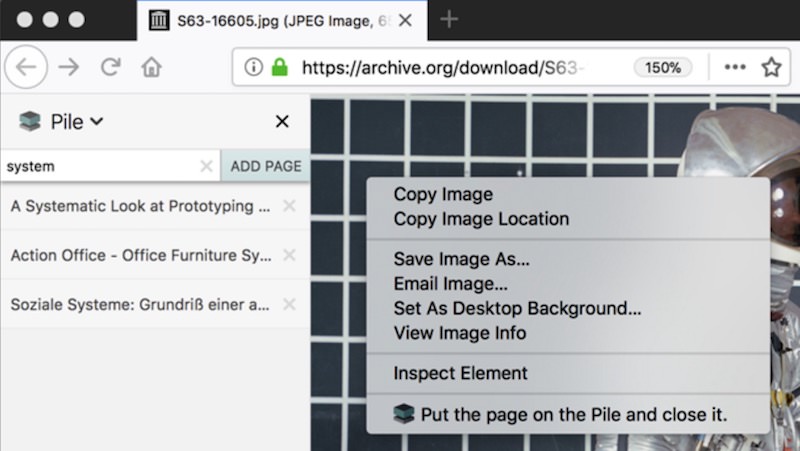
Pile is your temporary bookmark manager that resides in the sidebar of Firefox. It lets you save temporary links (bookmarks), which you need to review later. Using its Pile button in the toolbar, you can quickly add pages to your temporary bookmarks list.
You can also use its shortcuts to promptly add links and pages in the Pile folder.
Tab Sidebar
Tab Sidebar is another tab manager that allows you to work with multiple tabs efficiently by showing them up neatly in the sidebar. You can open, close, and manage the tabs from any tab.
Lastly, you can also group them using its marker tabs.

PwdHash Sidebar
PwdHash Sidebar is a tool to create strong passwords. I liked its strategy to create passwords – it creates a password using a hash of the combination of the site address and your password.
That means, using your one password (which you need to note and remember), it creates different, random passwords for each website.

Facebook Messenger as a Sidebar
With the Facebook Messenger as a Sidebar, you can chat with your friends on Facebook while browsing the web. Using this add-on, you need not switch to the Facebook tab to check new message.
On the contrary, you can read the incoming messages or send new messages directly from any tab, thanks to this add-on in the sidebar.

Twitter as a Sidebar
Twitter as a Sidebar, similar to the above add-on, lets you use Twitter from any tab. You can catch all the news and updates on Twitter without switching to the Twitter tab
Using this add-on, the fixed sidebar reveals the latest tweets, and you can also reply to these tweets or post new tweets directly from the sidebar of Firefox.

Yahoo Mail Sidebar
If you are a Yahoo user, you can access all your emails right in the sidebar of Firefox. You can also reply to and forward mails, and perform all other functions of Yahoo Mail from the sidebar, and check out other sites in browser tabs simultaneously.
Sidebar for YouTube
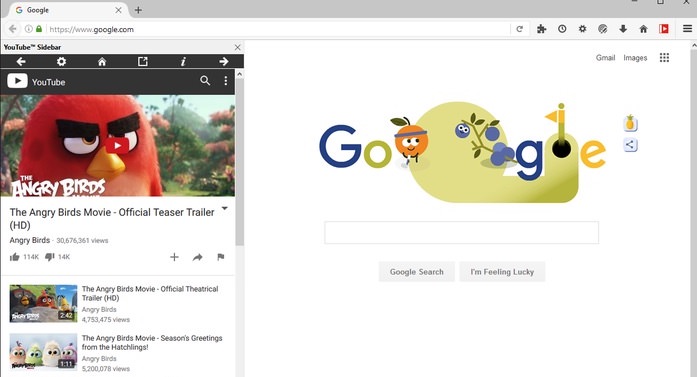
Sidebar for YouTube lets you watch YouTube videos in the sidebar while you browse or work on other tabs and pages. You can perform all usual activities on YouTube such as pausing, rewinding, liking, sharing, and commenting on the videos.
There is also a pop-out button to open the current video in a new tab of the browser.
Google Keep Notes
With this add-on, Google Keep gets fixed to the side of your browser screen. You can view all your notes in the sidebar, write new notes, and perform all related functions such as color-coding the notes, adding time and location, etc. in the sidebar.
WeChat sidebar
WeChat Sidebar allows you to chat with your friends on WeChat while working on some other tab or page in Firefox. You can sign in right from the sidebar, check and write new messages, and manage your conversations as well without switching tabs.
Gmail Mail Sidebar
If you are a Gmail user, this add-on will make your life easy. With this add-on in the browser sidebar, you can check all incoming emails and perform related actions such as replying, forwarding, labeling, and composing mails right from the sidebar.
Telegram as a Sidebar
Webogram, the unofficial web version of Telegram, gets integrated into the sidebar of your browser using this add-on.
Thus, you can chat incessantly with friends or groups of friends, share pictures, location, contacts, videos, and other documents without the need to switch tabs while using Telegram as a Sidebar in Firefox browser.

Sidebar Notepad
Sidebar Notepad lets you create and edit notes through the sidebar. Though the add-on is simple with a single screen to create or save notes, like in Sticky Notes on Windows.
What I found interesting is, the notepad content is saved to the local storage and is protected with a password, ensuring confidentiality on multi-user systems.

2048 Sidebar
When you are bored of the routine work on your computer, you can amuse yourself with a game of 2048, a popular one-player, block-sliding game. 2048 Sidebar makes it possible to play this game right in the sidebar.
I find it is a great stress buster when you are working on something heavy and want to refresh your brain cells.

Read Also: 10 Firefox Plugins For A Safer Browsing Experience
Downloads sidebar
This sidebar makes all your latest downloads visible and lets you manage them. You can view the status of files being downloaded, pause or cancel the download, see them in folders, and view all the other details related to the downloaded files such as date of download, size of files, and so on.
Sidebar Note
Sidebar Note makes the note-taking process easier and faster. You can keep jotting down your notes in the sidebar while reading an Internet page or a PDF document.
It proves extremely useful when you have to take ample notes from different web pages like while doing research or need to jot down something simple like contact details.,

The History Panel
The History Panel add-on makes it possible to view your browser history directly in the sidebar of your browser screen. The links are sorted by date and time, and you can also sort them through a domain.
However, you cannot do a search in the browsing history as it is possible to do with the default history feature of Firefox.