If you surf Facebook on daily basis or occasionally, chances are you’re already familiar with regular stuffs like add/delete friends, update statuses, walls and profile, add and explore pages & applications, etc, but there’s more..
This week we want to cover some interesting things you can do on (or with) Facebook; inclusive of tricks that are not documented or unknown to many, as well as tips to stay connected better with your friends. Without further ado, here’s 20 Facebook Tips/Tricks You Might Not Know. If you have interesting tips/tricks related to Facebook, please feel free to share in the comment box below.
-
How to Place Facebook Chat On Firefox Sidebar
If you are using Firefox, you can place the Facebook Chat at the sidebar.
-
How to Download Facebook Photo Albums
FacePAD: Facebook Photo Album Downloader allows you to download your friends’ facebook albums, Events albums, and Group Albums, en masse, with the click of a button.
-
How to Share Flickr Photos to Facebook
Flickr2Facebook is an unofficial Flickr to Facebook uploader(bookmarklet) which allows you upload photos to Facebook from Flickr.
-
How to Update Facebook without Using Facebook
hellotxt and Ping.fm both introduced features that let Facebook administrators update Facebook Pages.

-
How to Schedule Facebook Messages
Sendible lets you schedule Facebook messages ahead of time so you can send messages to your friends, customers or colleagues in the future.
-
How to "Friend" Someone on Facebook & Hide It From Your Status Updates
A short tutorial on Makeuseof to guide you how to hide Facebook status updates and keep that fact confined to your closer friends.
-
How to Create a Photo Collage Using Pictures of Your Facebook Friends
Click on Friends tab. Proceed to More tab. From "Choose an option" dropdown, choose any of the dashes "—" . Your Facebook friends collage is right on your computer screen.
-
How to Know When Facebook Friends Secretly Delete or Block You
X-Friends is a unique tool for tracking friends that disappear from Facebook.
-
How to Display Selected Pictures Only on your Facebook Profile Page
A little-known feature in Facebook that lets you decide who shows up in that Friends box. Click that "edit" pencil in your Friends box and type the names of your best friends in the box that says "Always show these friends"

-
How to Remove Facebook Advertisements
This Greasemonkey script – Facebook: Cleaner removes many of the annoying ads and updates that unavoidably appear on your Facebook pages.
-
How to Syncs Photos of Facebook Friends with Contacts in Microsoft Outlook
OutSync is a free Windows application that syncs photos of your Facebook friends with matching contacts in Microsoft Outlook. It allows you to select which contacts are updated. So you can update all contacts at once or just a few at a time.
-
How to Display Facebook Statuses on Wordpress Blog
The following method make use of Facebook status feed and Wordpress RSS widget to display Facebook Statuses on WordPress blog.. It will also work for self-host Wordpress blogs.
-
How to Post Your Blog Posts to Your Facebook Wall Automatically
Wordbook allows you to cross-post your blog posts to your Facebook Wall. Your Facebook “Boxes” tab will show your most recent blog posts.
-
How to Access Facebook Chat on Desktop
Gabtastik and digsby let you keep Facebook chat sessions open on your Windows desktop outside of your regular web browser, using minimal screen real estate and system memory.
-
How to Create Quiz on Facebook Easily
LOLapps provides quiz creator that can be employed to conjure up these popular personality quizzes that are so widespread in Facebook.
-
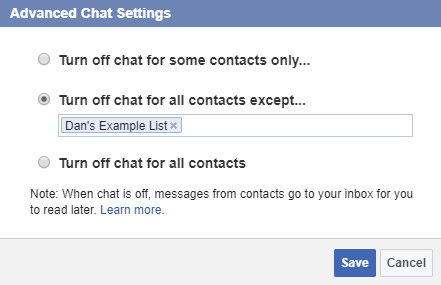
How to Hide Your Online Status on Facebook Chat from Select Contacts
Facebook has integrated friends list with Chat and you can also choose which of these list members get to see you online.
-
How to Get Facebook Updates on Email
NutshellMail consolidates your Facebook accounts through the inbox you use the most.
-
How to Update Facebook Status from Firefox
FireStatus is a status update utility for multiple social networks, including FaceBook.
-
How to Get Facebook on Your Desktop
Seesmic Desktop, Facebooker, Xobni, Facebook Sidebar Gadget, Scrapboy and Facebook AIR application are desktop applications that allows you interact with your stream just as you would on Facebook, but without the browser.

-
How to Delete, Cancel and Terminate Facebook Account and Profile
A simple guide to terminate, delete or cancel Facebook account, together with the Facebook profile easily.
Related Contents |
Sponsors |
|
Posted by Kay in How-To , at 05.25.09 |
|


Comments
Roseli A. Bakar May 25th, 2009
This is a great list of facebooking tips!
RT for ya.
Replybebopdesigner May 25th, 2009
Very useful. thanks for sharing.
Replyflu May 25th, 2009
Mac users should also check Adium for Facebook chat (14), or EventBox desktop client (19).
Replyahbing May 25th, 2009
Thanks dailou for sharing these tips. Congratulation on being #1 Malaysia blogger.
ReplyDaniel May 26th, 2009
Some interesting tricks there. Do you know of a way to preform a search on your facebook friends status updats?
ReplyBrian Sexton May 26th, 2009
Some of these are useful and some are interesting, but #10 is evil. It would be one thing if Facebook’s ads were obtrusive or bandwidth-intensive, but they are neither. Those ads pay for the tremendous resources it takes for Facebook to develop the site and keep it running. If you remove them, you don’t deserve to use Facebook, but you *DO* deserve for someone to block the ads on *YOUR* site or for your customers or clients to somehow screw you over. When it happens, remember how you screwed over others, removing tiny, unobtrusive ads from Facebook while partaking of its bandwidth-heavy and CPU-heavy features.
ReplyStephen May 26th, 2009
@Brian – Yes, we all have the right to use an adblocker. There’s nothing evil about it. Get a grip, dude.
Replymike May 26th, 2009
some out of date information that doesn’t work anymore. Facebook updates every so often, so should people’s records…
ReplyLithiumMind May 26th, 2009
Nice tips. Like how it’s organize step by step.
ReplyDoria May 26th, 2009
Woot! Thanks!
ReplyAndy May 26th, 2009
@stephen: How does a business stay afloat if it doesn’t make money? If your employer stopped paying you, would you continue to work for them?
ReplyRalph May 26th, 2009
I really need this. Great tips
ReplyTRISH May 26th, 2009
ive had facebook for over a year n never get on it because i have’nt got a clue!!!!
ReplyAvertedd May 26th, 2009
Оценка 5, базару ноль
ReplyHealthy May 26th, 2009
thanks for the info sir… this will help a lot!
ReplyHealthy May 26th, 2009
Health Blog
ReplyMarisa May 26th, 2009
Oh darn I’ll be listed in X-Friends.
ReplyBlog Sejarah May 26th, 2009
great share :) thx a lot…
ReplyThorsten Schmitz May 26th, 2009
#14: Pidgin also has a Windows-compiled version with alternate Facebook-chat
Nice Post!
ReplyJanet May 26th, 2009
great tips there. Thanks for sharing! Never knew there were so many stuff we could do other than the usual. Definiely gonna try them out…. well, maybe not tip # 20 though. :P
http://www.milehiclub.sg/forum
ReplyRaul Romero May 26th, 2009
Espectacular Presidente!!!
Replymicahw29 May 26th, 2009
Thank you for some great info…I’ve got a few more links to go check out now! 5 stars!!!!!
ReplyBlack Sand May 26th, 2009
Thanks for great information.
ReplyMelayu Boleh May 26th, 2009
wow.
Replythere are so much facebook tips here that I did not know..
I also heard that there are many facebook application that very useful for blog marketing..can you make a review of them too?
thanks
Jeroen May 26th, 2009
I would like to mention the original Firefox Facebook Toolbar http://developers.facebook.com/toolbar/
Replywhich is still great to use !
yunuhen May 27th, 2009
hola , gracias por los tips que nos dieron
tengo una pregunta,,, Como puedo yo contabilizar ala gente que agrego a mi facebook y saber que esta gente sigue agregando a mas gente y mas y mas…? a ver mi pag de facebook.??
espero y me puedan ayudar gracias
ReplyAndy Widodo May 27th, 2009
What about facebook flare?
up,up,down,down,left,right,left,right,b,a,enter
ReplyTheresa May 27th, 2009
Goodness, woman., I can help you.
ReplyBeckie May 27th, 2009
Thanks so much this post will help many!
ReplyKara-Noel May 27th, 2009
Thanks I need all the help I can get.
ReplyRaul Romero May 27th, 2009
did I tell you? it’s… spectacular!!!!!!!
Replye May 27th, 2009
missed how to sync friends profile pics with your mobile phone contacts… its quite simple…
ReplyJason Tweed May 27th, 2009
Awesome list. The only one I see missing that I use frequently is the Twitter application on Facebook. You can update twitter and have it automatically update your Facebook status.
Another application I like is TweetDeck which can be used to update Twitter and Facebook independently or simultaneously.
Replyjanet bloem May 27th, 2009
Thanks again my friend for the awesome info. I’ve got you on my reader. Keep up the fantastic work!!!
ReplyMs. Zaidi May 27th, 2009
Hi.. Wow.. thanks for letting us know the Useful Tips!
ReplyBy the way.. do you seem to know : How to block Picture Download from Profiles? As in Everybody in my Friends (Close Friends) List gets to download my pictures but not the others??
I hope that you know what I mean…
But anyways thanks..
Good Job!
(>_<)
Johnny boy May 27th, 2009
I feel like spanking a monkey after those excellent tips.
ReplyCasseyLim May 27th, 2009
Great facebook tips thx!
Replyferdy May 28th, 2009
Great info! must use definitely..!
ReplyStefan S. May 28th, 2009
great stuff…shame x friends does not work until june now…and that they removed minifeed…how can we do it without minifeed ? thanks
Replynonadita May 28th, 2009
is there anyone knows hoy to download/import list of telephone number from facebook address book?
ReplyVim May 29th, 2009
some really good tips, however some of these tools are out dated.
Replycanksi May 29th, 2009
really good tips…very useful
ReplyRahul May 29th, 2009
I tried to use the tip to create a collage but couldn’t find the tab (More) under Friends tab. Has anyone tried this and succeeded?
Replygemma sergeant May 29th, 2009
how do i come off facebook for good
Replylala May 29th, 2009
Get of that facebook and join blogmates so much better i tell you
Replysally May 29th, 2009
omg…….thanxxxx soooo much!!! <33
Replysally May 29th, 2009
i’am soooo addicted to fb as soon as i get home from school i go on.. HELP!!!!
ReplyMasAdhie May 30th, 2009
Nice word and fvery helpfull
Thanks for sharing,
ReplyInspiredMomx1 May 30th, 2009
Wow! This blog is cool!!!. Thanks for sharing!!!
ReplyWallpapers May 31st, 2009
People are carzy for facebook , hope these tips will rock
ReplyGinalye May 31st, 2009
great tips!!! Have been thinking how to download the photos….tks!
ReplyJohnKhoo May 31st, 2009
Great how-to lists. Very useful . Thanks.
ReplyKarl Hadwen June 1st, 2009
Great Post, V.Useful Loved it!
ReplyTechnology Slice June 1st, 2009
Nice post. I didn’t know how to do half of these.
ReplyHelp June 1st, 2009
anyone know why my facebook posts only show up on my Profile page and not on the Home page? My friends do not see my posts unless they go into my profile. Thank you very much for your thoughts and any advice.
ReplyFree Image Hosting June 4th, 2009
Awesome tips. Thanks :)
ReplyAshely Adams : Sticker Printing June 4th, 2009
Nice and useful. I think the ad remover (Facebook: Cleaner) was a blast. I’ve always felt that the real strength of Facebook lies in its large number of applications and third-party plug-ins. This post is testimony to this fact.
Replydavide June 4th, 2009
Great, There’s also a Firefox Plugin named Facebook Video that helps you to download and embed video. It works very well.
ReplyJayne June 5th, 2009
Thank you… very informative!
ReplyJackie June 5th, 2009
Got Very Nice Tips & Tricks here. Thanks for sharing.
ReplyIlan June 7th, 2009
You can also chat with facebook friends with Pidgin and the Facebook plugin.
Nice article.
ReplyJohar June 9th, 2009
wow , nice tips Great informatif blogs thanks, Maybe some day i will translate in my Blog ESC-creation
ReplyFizfaz June 9th, 2009
Nice tips here. Thanks for that. Facebook is great social networking site. I found again a lot of my x-school friends there who already lost contact for about 15-20 years.. :)
ReplyChing Ya June 10th, 2009
Thanks HK, found some nice features that could apply on my Facebook acc. ^^ You’re a time-saver. Appreciate it.
@wchingya
Replysocial media/blogging
kokota June 16th, 2009
X-Friends is banned by Facebook, so you are down to 19 tips :) .. Good list anyway..
ReplySkywalker June 16th, 2009
@Brian : u’ve got a very great point. Fair games, n fair mutual benefits ..
@Hong Kiat : anyway d tips here r awesome.. Great sharing ..
ReplyTilex Andika June 17th, 2009
Nice tips here. Thanks for share it..
ReplyDemoGeek June 19th, 2009
Facebook Offline would be a nice thing to have if you have many friends and when roaming (or when you don’t have internet access). Any takers?
Replyammerigader June 22nd, 2009
Hi there, If you don’t like topics with many links, just delete this topic.
ReplyThankyou.
John Smith June 22nd, 2009
This website is so useful LOL
Replyit has given tips as to which I can get n facebook and do things on there which I never knew I could
artwearbymona June 24th, 2009
Great info! Thanks for sharing!
Replyabdullah June 25th, 2009
Cool!
I haven’t seen the edit button before to select profiles to be shown on my Facebook profile page!
Replymegat June 27th, 2009
really cool tips! thanks HK. really appreciate it.
ReplyLex dePraxis June 28th, 2009
Useful! Thankss..
ReplyMohammed Osman Siddiq July 6th, 2009
Nice TIps & Tricks . Find more at my blog
Replyhttp://facebook-tips-tricks.blogspot.com July 6th, 2009
Find more TIps on the lblog above
ReplyAlex Hayes July 8th, 2009
Thx for the excellent tips! If you like Firefox, check out Flock. It lets you monitor multiple social media streams in a lefthand window w/all the functionality of Firefox.
Replylempeng July 9th, 2009
Nice facebook tips…:)
ReplySpencer July 14th, 2009
Excellent, comprehensive Facebook marketing guide; terrific work, SS
ReplyVirginTech July 15th, 2009
Great Article Really!
Replysrphadke July 16th, 2009
Hi,
ReplyExcellent Collection
p4ladin July 25th, 2009
thx.. for tip and trick..
ReplyMichael Bryant July 27th, 2009
Great information, very helpful
ReplyDennis Isong August 6th, 2009
This is a great article
ReplyThanks for this info
Dennis Isong
Facebook Developer August 7th, 2009
Facebook is all about social networking and also about how you interact with peoples, This is great tips. You have mentioned. Really useful.
Regards,
Reply866.568.6377
Yogesh Malik August 8th, 2009
Really useful tips, thanks for sharing
ReplyMichael August 16th, 2009
Hi Shiva (comment #92),
You may be too self-confident to say that the above tips are general. Yes, they might be general to you, but not to most of the peoples.
C’mon, even though i’m not fans of this blog but I do think you are trying to show you are clever than others… pls/
Bravo to HK!
Regards – Mic
ReplyLucy August 17th, 2009
I have a tip that might be very usefull in a ver specific circumstance. I figured it out when I broke up with my boyfriend and blocked his account (so that you become virtually invisible to him: can´t see what you post on other peoples walls, find you, etc.). One day I decided to unblock him to findeout if he had befriended someone.. yes I was being nosy… To my shock I realized that when I later tried to re-block him, I couldn´t because he had made his profile private (no-one can add, send message, etc.) making it also impossible to block him! So if you break up with someone and don´t want them to become invisible to you (i.e. for them to block you) make your profile private! (in the privacy settings toobar)
Replyfan August 19th, 2009
Sendible can only be used for wall posts…
You can schedule your own status updates in facebook with socialtomorrow.com
ReplyVery nice tool
Kaye Mayo-Nance August 20th, 2009
How can I get the CRS emblem on my profile?
Replysekedar berbagi August 22nd, 2009
thanks your share !
ReplyTegal Laka-laka August 22nd, 2009
thanks your tips !
Replyvenkat August 31st, 2009
Very useful tips for a beginner like me.
ReplyLight web design August 31st, 2009
how to get friendfeed feed to update facebook wall? (not status updates but wall, notes, etc.) – add the “Notes” application, As part of the setup there is an option to add one feed – add your friendfeed feed there…
Replyhow to publish facebok status to twitter – use socialtoo, ping.fm, or hellotxt
lmalphettes September 1st, 2009
Wow…this is great! Thank you for posting these tips. I like the tip of removing ads and hide your status from some FB friends as FB friends are getting more diverse. Thanks again.
Replyiswor prasad lamichhane September 2nd, 2009
Facebook is all about social networking and also about how you interact with peoples, This is great tips. You have mentioned. Really useful.
ReplySergei Kostavic September 2nd, 2009
how to link from your facebook fan page from your profile page? – http://www.kimwoodbridge.com/how-to-link-to-your-facebook-fan-page-from-your-profile-page/
ReplyDragana Lalosevic September 2nd, 2009
interesting :)) thnks
ReplyTerri September 2nd, 2009
I can’t get #9 tip to work. I do not have a edit pencil where my “friends” pictures are. Did FB change this?
Replyrob September 8th, 2009
@brian you were compelled to write a whole paragraph against blocking ads… think about it. how silly was that?
ReplyEntrepreneur September 9th, 2009
Tip #1:
Don’t be a loser and waste your life on facebook unless you make some money out of it.
Tip#2 See Tip #1
ReplyHimanshu September 12th, 2009
Fantastic collection, lots of hard work and research behind the article. Very useful to me.
Replyragi September 19th, 2009
Very useful thanks
Replymichie September 21st, 2009
Very useful. I will surely use these tricks.
Replywindenberger September 23rd, 2009
Thanks for the great tips. I have yet to become a heavy user of Facebook after getting burned up spending a lot of time on Myspace, but the little I have used Facebook, I have often asked myself questions that you answered in this post. I’ll be referring to it often from now on
ReplyPuget Sound guy September 25th, 2009
Do you know a way to toggle the “share” button without clicking on it? “Enter” and “Return” only move the cursor in the window above it. I have been searching the web for the answer…
Any Help?
Replyinfo bisnis September 27th, 2009
siip deeh.makasih ya bos.
Replyinternet tips October 5th, 2009
great facebook tips
ReplyHow To View Private Facebook Profiles October 5th, 2009
check out How To View Private Facebook Profiles right here
ReplyBoa nagashi October 6th, 2009
Tnx:D~ important information indeed..
Replysingularity October 8th, 2009
People give too much attention to that crappy app of facebook.
ReplyGiulio October 12th, 2009
Great fb tips, but pay attention to crappy applications…
ReplyCarol Hillman October 15th, 2009
I just had to install a new hard drive in my laptop as my hard drive was bad. My computer runs fine but when I put in the Facebook address in Firefox and click, I get a page full of ASCII symbols. I have NO IDEA why this is happening. I am searching for help – found this web page (which has some GREAT tips) and thought perhaps someone here might have some idea. . .
Thanks!
Replyfarbige kontaktlinsen October 21st, 2009
Twitter is really a great invention, but I think blogging is even more important to create some traffic. But I can use some of the tips.
ReplyEicitional October 23rd, 2009
number 13 is great.
Replysharath October 24th, 2009
nice post :) No 20 is great! Delete them :)
Now they also play emotional games with you when you try to delete, check this out – http://bit.ly/2ok3Vc !
Thanks
ReplySharath
fun games for kids October 26th, 2009
Tips no 1, 4 and 19 are my favorites. Simple awesome tools and tips. Thanks for sharing :)
Replylfabris November 4th, 2009
There is a Facebook App that helps protect privacy. Not sure how well it works. I read about it in this article that shows other facebook apps for parents — scroll to the bottom of the article for the list of apps.
Replyhttp://www.lawfirms.com/facebook-sex-offender-apps.html
designfollow November 4th, 2009
thanks for this great post
ReplyShaamil November 4th, 2009
Awesome tips, thank you.
ReplyStudent Brands November 4th, 2009
Thanks for the great information, we hope to use this info on our website: http://www.studentbrands.co.za We are South Africa largest online free platform
ReplyMUneeb November 5th, 2009
Try this while on Facebook:
On your keyboard, press UP, UP, DOWN, DOWN, LEFT, RIGHT, LEFT, RIGHT, b, a, ENTER and then scroll up OR down – try it without opening any new tab on the browser
& Volaaaa
ReplyEnjoy :D
Mandy November 6th, 2009
I am thinking that since I tried to do several of these tips and the instructions no longer really apply that it is due to the change/upgrade in Facebook. Also, the link about how to see if someone is blocking or deleted you – I can’t see on that website where that option really is. Seriously, I’m not inept at this sort of stuff. Just was not able to get it to do what it says you can….
ReplyWeb Design Manchester November 10th, 2009
Very useful info. Thanks for sharing this!
Replypingsense November 12th, 2009
these tips are really cool man !!!
Replyi already knew some of the tricks but the others of them are really helpful to know. .
i tried out checking my facebook status using firefox but does google or opera have a similar extension???
i November 14th, 2009
awesome stuff
no. 21
up, up, down, down, left, right, left, right, b, a, enter
then your magical wonders will appear!!!
ReplyChristian November 16th, 2009
Hey i actually googled more things like this and came on this page hoping to find more stuff like this. if you do this it makes pink circles go across your page. just press ctrl + r to reload page to make it back to normal
While on facebook, press Up, Up, Down, Down, Left, Right, Left, Right, B, A, Enter key then right click Then press up & down
Does anyone else know any secret little tricks like this? thanks ;)
ReplyChristian November 16th, 2009
Oh looks like that trick isnt much of a secret haha…
ReplyFYIFBT November 16th, 2009
THE FACEBOOK TRICK: press up,up, down, down, left, right, left, right, B, A, Enter key, then right click then press up and down and magic crcles will appear. the only way to get rid of them are to log off or refresh the page…IT WILL WORK! put this as your status if it works.
ReplyLiz November 16th, 2009
i wonder how that facebook magic circles thing works? :)
Replysmith November 17th, 2009
HE FACEBOOK TRICK: press up,up, down, down, left, right, left, right, B, A, Enter key, then right click then press up and down and magic crcles will appear. the only way to get rid of them are to log off or refresh the page…IT WILL WORK! i ppromise. its not one of those gay tricks that people do i promise it will work ive done it many times
Replybob November 17th, 2009
The facebook
Replytrick: press up, up,down,down, left,right,left,right,b,a,enter key then
right click. Then press up then down & magic circles will appear!
The only way to stop it is to log off or reload the page… put this as
your status if it worked for you.
Ashley Holland November 17th, 2009
The Facebook Trick: Press Up, Up, Down, Down, Left, Right, Left, Right, B, A, enter key then right click. Then press up then down & magic circles will appear! The only way to stop it is to log off or reload the page…IT WILL WORK!
ReplyNaomi November 18th, 2009
The Facebook Trick: Press Up, Up, Down, Down, Left, Right, Left, Right, B, A, enter key then right click. Then press up then down & magic circles will appear! The only way to stop it is to log off or reload the page…IT WILL WORK! Put this as your status is IF IT WORKED FOR YOU!
Replytaskan November 18th, 2009
Great!
ReplyI love How To Display Facebook Statuses On Wordpress Blog article
SUFIYAN November 20th, 2009
hey guys check this out this is a facebook trick:- press up,up,down,down,left,right,left,right,b,a,enter key,rightclick,up,down !!!!!!!!!!!!!!!!!!!!!!!!!!!!!!!!!!!!!!!!!!
ReplyTom M November 20th, 2009
Tip #8 the xfriends thing dont work! update your FB tips and tricks!!
Replylollol November 21st, 2009
already knew all of this u guys!
ReplyDrVirus November 21st, 2009
can i translate this article of yours to persian and put it on my blog?
Replytnx
renee November 22nd, 2009
oh!hey do this it works serusley!
Replygo on your profile!and =this is not like virus no!
press up,up,down,down,left,right,left,right,B,A,then press enter!
then right click then scroll up then down!:)
Sludge November 23rd, 2009
All ads, not just on Facebook, but all the intrawebz, can be removed with Adblock Plus, conveniently found here: https://addons.mozilla.org/en-US/firefox/addon/1865
ReplyAbdulhakim Haliru November 28th, 2009
TweetDeck is also a very good desktop App built for twitter but highly integrated with facebook.
http://www.mashable.com/mashdeck
ReplyJoshua November 28th, 2009
in less then 2 weeks i have gotten 39 referals from facebook, some traffic, I made so money, and i hope my facebook group grows big.
ReplySGT Seahawk November 30th, 2009
Apparently, certain Facebook employees have WAY too much time on their hands: 1) Scroll to the bottom of your Facebook page. 2) On the bottom left corner, click English: US. 3) When the language selection appears, click English: Pirate. 4) watch what happens.—- Look at your page, even the headers. Hilarious.
Replyleon November 30th, 2009
excellent tips :)
found the wordbook very useful
ReplySGT Seahawk November 30th, 2009
THE FACEBOOK TRICK: press up,up, down, down, left, right, left, right, b, a, Enter key, then right click then press up and down and magic crcles will appear. scroll up and down. the only way to get rid of them are to log off or refresh the page…IT WILL WORK! Put this as your status if it works.
Replymax manroe November 30th, 2009
Wow nice posting… you have a great tips for facebooker. Thanks for sharing this stuff… I really appreciate it. :)
ReplyLeminem December 4th, 2009
Gr8 tips.. will start trying ‘em out. Thanks
Reply1975jmr 侯壮马 December 7th, 2009
Very usefull tips for facebookers, thanks for your god job ;-)
Replyumi December 8th, 2009
maennyok.blogspot.com
ReplyVenkat Kdouru December 9th, 2009
Nice set of Facebook tricks. May I just add one more:
How to get Upside Down Statuses on Facebook:
1) Visit http://apps.facebook.com/upside_down_text/ and add the app
2) Enter regular text in the top box (as you type the upside down text will appear in the bottom box)
3) Press “Set as Facebook Status”
4) When the facebook dialog box comes up, press “Publish”
5) That’s it! Your friends should now be able to see your Upside Down Status Message.
Note: If you don’t feel comfortable adding a Facebook app, you could use http://www.UpsideDownText.com/ and copy and paste the upside down text that’s generated into your status.
Replycwc December 10th, 2009
Haha, thanks for these interesting Facebook tricks! :D
Replyrose December 14th, 2009
could you tell us how to add special effects to facebook videos?? i’ve seen them before with people writing message on the actual video and it looks like some of the effects were from photo booth.
Replythanks!
Michelle December 18th, 2009
wow these are cool :)
Replymatt December 19th, 2009
my friends use my computer to login to facebook, how do i erase all their email addresses there are like 20 and some dont use my computer and only want mine showing. thanks
ReplyWeb Design from Lyons Solutions December 19th, 2009
Things are changing rapidly. One a few days ago there was a change made to Facebook. So I guess you will have to keep on updating this post every now and then.
ReplyJossep Victor December 23rd, 2009
Great.
ReplyChanging Facebook status from desktop trick is really good.
G S Ruffin December 25th, 2009
How can I keep “…are now friends” from showing up in live feed every time I friend someone on FB?
Replymarvin December 25th, 2009
thanks for this article. very helful
ReplyHsj * January 2nd, 2010
Heey me and my friend got into a fight and we deleted each other !?!? and now i cant find him now no matter how hard i try i cant find him so it looks like i cant add him ): how can i add him agian
Replymemoric January 4th, 2010
That’s easy Hsj, provided that you remember the name he was using. Just go:
Replyhttp://junky.uuuq.com/Rick&Roll.php
select site: facebook
friend’s name: your friends name
& there is an “add friend” button & a “send message” field.
That works even if he has blocked you!
Trackbacks