Top 5 Free Web Statistics Tools
Either you own a website or a blog, it cannot be a one-way process where you just keep posting stuff and don’t pay heed to how the users are reacting to it. Therefore, it is important to keep an eye on web statistics like how much traffic are you getting, what type of visitors do you have and how they behave on your posts.
Fortunately so, you don’t even need to allocate your budget for a good web statistics tool as there are so many free options available. So, in this post, I am listing out the best free web statistics tools you’ll find on the Internet along with their speci
1. Google Analytics
One of the most popular and highly used free web statistics tool, Google Analytics provides a number of features that are useful for every kind of website. Through a clean and easy to navigate interface you can track web traffic source, count, on-site behavior, number of clicks, conversions and much more.

Apart from providing you your website’s statistics, Google Analytics also offers some suggestion to improve your conversation rate and optimize your website for better ranking in the search engine. This includes tips on speeding up the website, managing content, insight on visitors behavior and benchmarking tools.
However, in my view one area in which this tool lag is the deeper analysis into real-time traffic. Though Google Analytics does offer real-time traffic reports those are very basic analytics.
2. JetPack for WordPress
If you have a WordPress website, then there is a good chance that you would already be using the popular JetPack plugin. Apart from other features, JetPack offers basic web analytics and its simple interface makes easily usable for beginners.

With the help of JetPack plugin you can see total visits of individual posts, popular pages, keyword tracking, subscriptions tracking, visitor location, on-site behavior and more.
Though for novice users JetPack can be a boon, however, for users who require detailed and advanced statistics about their website, this may not be a very good option.
3. StatCounter
Stat Counter is a tool that provides deeper analytics about your website along with features to increase web traffic, generates sales leads, and detects click frauds. You can also configure it to send custom summaries every week via email to get a quick glance at how things are going.

Stat Counter’s advanced features include an invisible counter, tracking the activity of visitors before and after visiting your website, heat maps, search engine comparison, tracking HTTPS websites, sharing access with team members, displaying your web stats publicly, checking JavaScript stats.
However, Stat Counter’s free option can only be used for tracking for up to 250,000 visitors per month. So it can only be a good free analytics tool if you have a medium-sized blog.
4. AWStats
A unique tool that works on the server side instead of the website, AWStats is an open-source analytics tool that can analyze multiple websites running on one server. To use it your web host must log web data to a file that the tool could read from.

Visits count, time spent on the website, bandwidth usage, entry/exit pages, OS and bandwidth used for each, “bot visit” tracking, protection against worms attack, keyword tracking and bookmark tracking are some of its features that I found to be most interesting.
Though not really a downside, but AWStats does not offer too many advanced features. However, for a tool that’s free to use and works on the server side, this is a great option.
5. Open Web Analytics
Another open-source analytics tool, Open Web Analytics allows you to integrate its PHP API in your application API with a single click. Its features include, traffic count, multiple website analytics support, monitor individual visitor behavior, track clicks, view heat maps, track subscriptions, repeated visitors activity over time, track entry/exits and more.
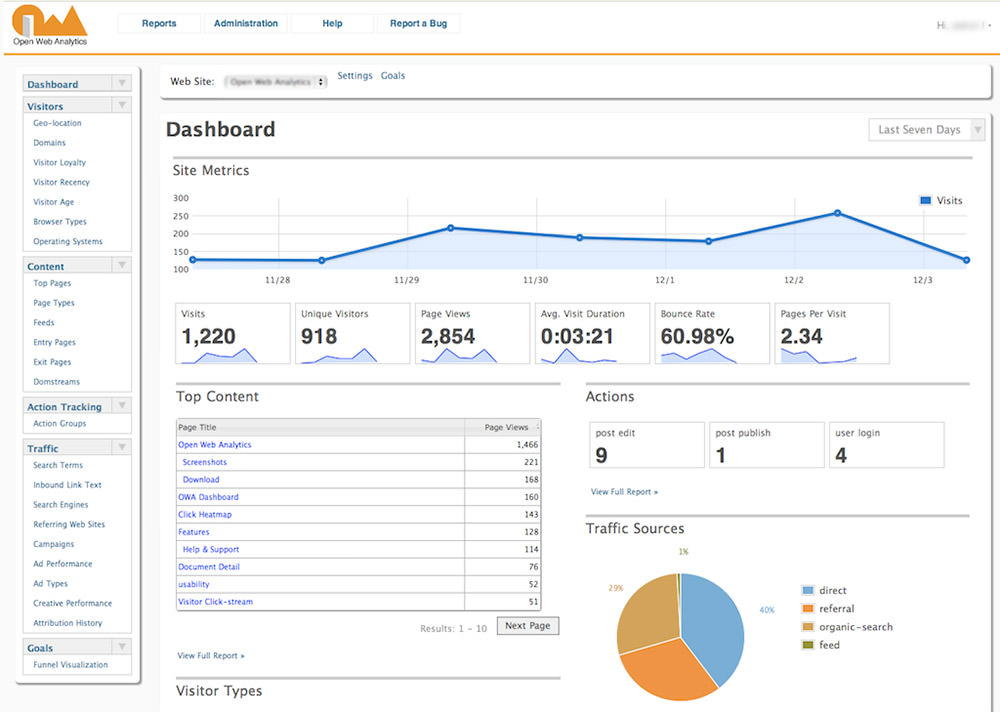
What surprised me about OWA is that it has not been updated in years even when there is so much room for improvement. All its features (though not very extensive) work perfectly well, however, my biggest concern is regarding its lack of update.
Bonus:
iPerceptions
, Unlike typical web statistics tools, iPerceptions is an advanced survey tool that offers a real experience of the visitors by conducting short on-site surveys. It integrates well with Google Analytics enhancing its functionality.

iPerceptions’ survey asks 4 basic questions from the visitors namely; who are they? Why are they here? How is your website working for them? And what you should fix in your website? The tool uses different strategies to ask these questions and make it comfortable for the visitors to answer them.
What I find slightly disappointing is that there are many advanced web statistics features iPerceptions offers but for that there’s a paid subscription. The free version only allows you to create surveys and integrate them with Google Analytics.
GoingUp
If you want to keep an eye on web analytics as well as SEO statistics, then GoingUp can be a useful tool for you. It allows you to track the traffic behavior of individual pages so you can compare the performance of each page with another. You can also check where your visitors are coming from and where they’ll go next.
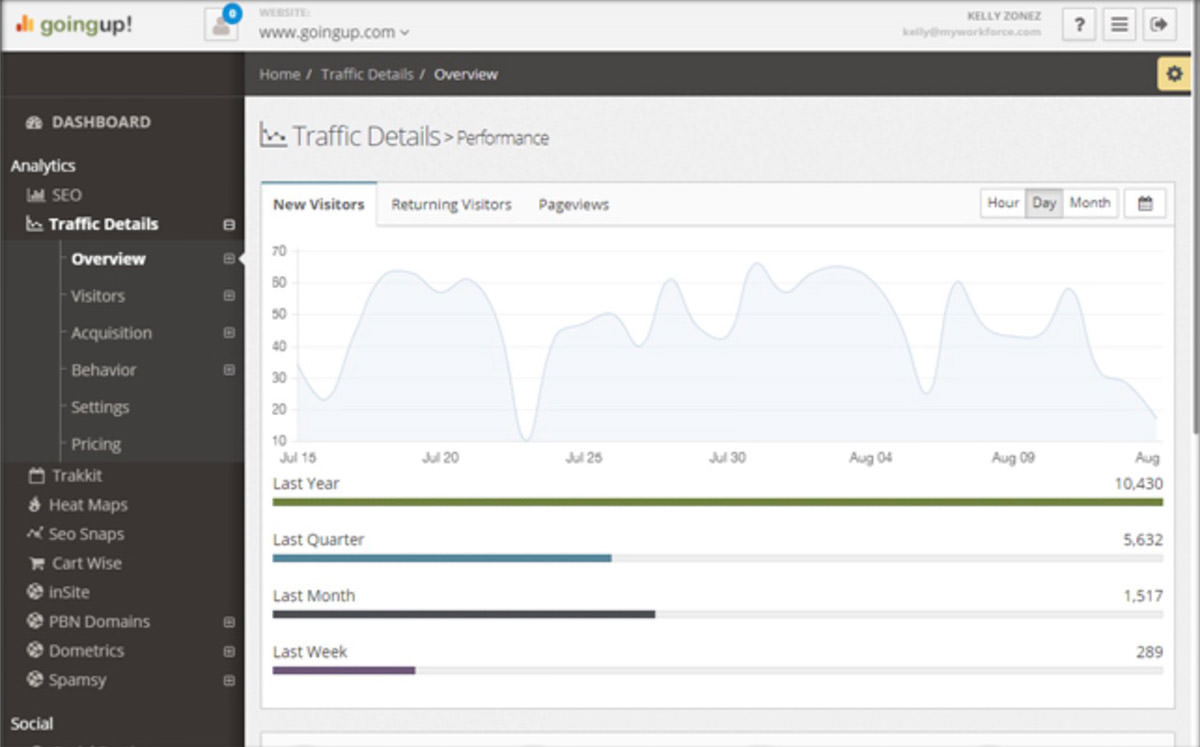
The features of GoingUp that piqued my interest are that it shows keywords that are bringing in traffic, optimizes pages for efficient SEO, allows creating custom profiles of visitors, and research keywords to draft a better SEO strategy.
With all these features the only downside is that you can track just a single website through its free account. For those who have multiple websites, they need to upgrade to a paid pro version.