Optimize Windows Startup Speed with MSConfig
Note: This post was first published on the Jun 9, 2007.
Over time, Windows can start to boot up more slowly, often due to an increasing number of programs set to auto-load when the system starts. One effective way to address this issue is by using MSConfig to disable unnecessary startup programs.
If you’re experiencing slow startup times on your PC, this guide can help you optimize your system for a faster boot.
As you install more software, Windows startup can become progressively slower. Programs that require loading during startup can queue up, dragging down the entire boot process. The MSConfig tool in Windows allows you to manage and remove unnecessary startup programs, helping you speed up your system.
How to Configure MSConfig for Faster Startup
- Click Start > Run, then type msconfig.

- Select the Services tab and review the list. Deselect any services that are unnecessary. As a general rule, it’s best to leave Microsoft Corporation services enabled.

- Navigate to the Startup tab and uncheck any software or applications you don’t need to load at startup. The Command column shows the location of each application. Programs you deselect here won’t load the next time Windows starts.

- Click OK, then restart your computer to see if it loads faster.
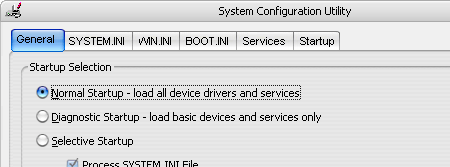
If you make any changes that negatively affect your system, you can easily revert them by going to the General tab in MSConfig and selecting Normal Startup, which will restore the original settings.