Ever wonder how these guys draw their Web 2.0 Logos? Sometimes its nice to learn from others, build up the basic skills and start your own creativity from there. In this Photoshop tutorial, I’m going to reveal you some of the nice Web 2.0 logos, how you can draw their logo exactly the same (well, not really 100% though) with Photoshop.
1. Download and Install style file
First of all, you will need to download a style I’ve created and load it into Photoshop.
- Download Photoshop style here. (Right-click -> Save as)
- For Photoshop CS2 users, put this style file into
“C:\Program Files\Adobe\Adobe Photoshop CS2\Presets\Styles”
Photoshop of other versions, put the file inside Presets\Styles
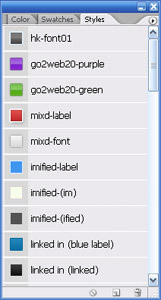
2. Load styleCall up your Style Dialog box in Photoshop
Your result should look something similar to the image on the right. |
![]() |
3. The six Web 2.0 Logos

Here’s six Web 2.0 Logo; MyBlogLog, Imified, mixd, skype, Linked In and Go2Web20. The style you’ve just installed is going to reveal how to draw them. I’ll go through “mixd” and “Go2Web20” logos, the rest is just reusing the same technique.
4. How to draw
The reason I use Style here is because once they are saved in to a .asl file (the file you downloaded) they are convenient to apply. Let’s go about drawing some of these logos.
Drawing mixd Logo
Initial observation, mixd logo consist of
- “mixd” text
- rounded rectangular
- small dot
- smaller dot
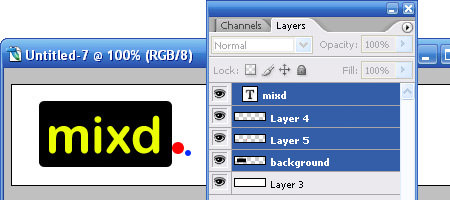
We will roughly draw them out in Photoshop, each elements in a different layer as illustrated in the image below.

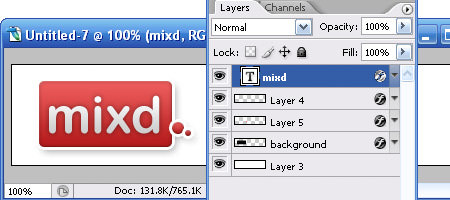
Now here’s the the trick. Look for “mixd-label” in the Style Dialog. Drag them directly to background layer, small dot layer and smaller dot layer respectively. If you drag them correctly you will noticed that the layer will now inherits the colors and blending of the style. Find “mixd-font” in Style Dialog, drag it to the text layer and your mixd logo is complete, 90% like the original I’ll say.

Drawing Go2Web20 Logo
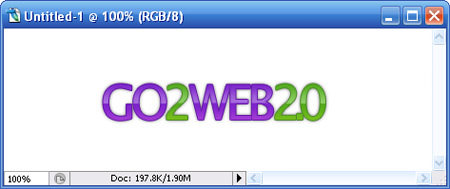
Have 4 new layers created, each for “GO“, “2“, “WEB” and “2.0“
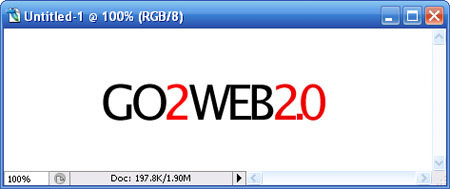
Drag “go2web20-purple” from Style Dialog into “GO” & “WEB”, drag “go2web20-green” into “2″ & “2.0″ and you will get this final output.

As for the rest (MyBlogLog, imified, skype and Linked In), it’s all about dragging their respective style in and match with the correct font.
5. Conclusion
If you look into the Blending Options of each style, you will noticed that most Web 2.0 logos are matter of playing with gradients, strokes with the combination of the right fonts. This may not the “exact” way how these guys had done their logo, but its at least a way to achieve it. I’m not encouraging you to fake their style and redraw your logo, but try understand it and hopefully you can come out with a nice sleek Web 2.0 logo. I love putting my designs in Style (.asl), I can reuse them whenever I want.
Related Contents |
Sponsors |
|
Posted by hongkiat in Photoshop Tutorials , at 03.01.07 |
|


Comments
Shea March 2nd, 2007
Hello!
Whenever I try to open the styles with my photoshop cs2, it says the styles are incompatible with my version of Photoshop.
The version I have is: 9.0.2
Thanks a lot for the gracious tutorial and fun loving styles! I hope I can make them work!
ReplyJason March 2nd, 2007
Awesome! I have been searching the web for 2.0 logo creators — now I can create them myself! Thanks!
Replyjarrodn_au March 2nd, 2007
That’s awesome, very nicely done, thanks! These make an excellent starting point for creating text-logos. Cheers!
Replyjared l. March 2nd, 2007
cool… this is very handy tip!
Replythanks!
hongkiat March 4th, 2007
Commenting were closed due to server overload previously. Its now open. Sorry for the inconvenience. I’ll reply your questions regarding this tut from now.
Shea:Wow, I did not know it will not work for CS2 of different update. I’m using CS2 9.0. Let me get my PS updated and will update the PSD.
ReplyThilak March 5th, 2007
Sorry for the belated comments, but I have to admit that this is simply awesome!
being a photoshop noob, Its just an eye opener for me. Thanks
Replyfishee March 5th, 2007
thanks! it works great.
ReplyIndoDX March 6th, 2007
Just Wonderful and easy way to do
Many thanks
Replysalkis March 7th, 2007
hi, is it possible to use any freeware instead of Photoshop?
or any vector graphics program/
Thanks
Replyajaxlines March 8th, 2007
Ajaxlines is also web2.0 site.
ReplyMichael Muller March 9th, 2007
Great Article, I’ve made a trackback from an article I wrote about creating Web 2.0 logos with Fireworks. Thanks!
Replytech March 9th, 2007
great documentation
thanks !!
Replypip March 9th, 2007
this is awesome. was sick of trying to create a web2.0 logo. thanks a lot
ReplyZack March 9th, 2007
I cant seem to get it working. They don’t show up under Styles. Anyone knows what could be a problem?
Replyhongkiat March 10th, 2007
Zack: You have to load them inside Style. There is a small “arrow” button on the top right corner. Click on it, select “Load Style” and choose the style you’ve downloaded.
ReplyBeatbox March 10th, 2007
Preety cool!
Replylawton chiles March 11th, 2007
What about these not being vector files? what if I want to blow them up?
Reply小刀 March 12th, 2007
有意思
ReplyKate Mag March 13th, 2007
Cool tips
Replyrob March 18th, 2007
rocks!
ReplyGeorge D. March 22nd, 2007
cool thanks.
P.S> If you don’t mind, can you write an article about how you’ve come up with these styles?
ReplyDave March 22nd, 2007
How do you change the logo’s color? When I did this, it worked very well, but I couldn’t change from the default logo color(e.g. Skype wouldn’t change from blue to anything else.)
Great tutorial. though
ReplyDave March 25th, 2007
Is it possible to change the logo’s color?
Replysurfdog March 25th, 2007
Great!
Replythank you very much!
greets!!
hongkiat March 26th, 2007
Dave: as the matter of fact you can, double click on the Blending options and play with the settings inside. Color change is within too.
Replyhongkiat March 26th, 2007
George D: There’s no need for an article I guess :) I’ve got most of these nice logos from GotoWeb2.0
Replyshelly April 4th, 2007
another classical web2.0 logo can be found at http://www.salarybase.com – small calculator + the infamous arial
ReplyLeroy | Green Llama April 5th, 2007
Thanks for the tutorial – this is awesome!
ReplyYou said to change the colors, go to blending options – I must be dumb cuz I don’t see blending options. Can you point me the right way?
hongkiat April 5th, 2007
Leroy: Double click on a particular layer, the dialog box that popups is the Blending Option
ReplyvanBetty April 17th, 2007
Thanx for the tutorial! short and effective. I really like the mixd style. Cheers!
ReplySam Zaydel May 9th, 2007
This is an excellent bit of information. Thank you.
Replyramil May 19th, 2007
thansk a lot !
it’s friggin’ great…
very helpful indeed ^_^
ReplyThomas Romer May 19th, 2007
eye candy… you have to admit that there is a part of this that is a bit embarassing for the whole web 2.0 logomaking crowd. I mean, i have to say that I can’t help but like the whole stroke and gradient thing on logos… but this look is getting so formulaic that soon a good idea will become the web joke of next year. just like all the globe and swoosh logos from the late 90’s.
ReplyRespiro the logo design guy May 20th, 2007
Great tips!
Replyfistball May 26th, 2007
good article, to get me started on my logo design for my own blog “2.0″ site…:)
ReplyCrazyglues June 1st, 2007
This is amazing, oh my god dude I love this… works really nice. Helped me out big time with a logo I was making for GameCovered.com
http://suprfile.com/get.php?id=7lih8wa&get=1
http://suprfile.com/get.php?id=7li6ymm&get=1
I made these for there site for free.. who knows if they will use it but I had fun, thanks to your styles that you made for photoshop. worked like a charm.
I have just started so hopefully I’ll get much better.. Thanks for this, I love it.
ReplyGadgets World June 3rd, 2007
love it. very nice
i will use your function from now
thank you
Max
ReplyGadgets World June 3rd, 2007
like it. very nice
i will use your function from now on
many thanks
Max
ReplySarah June 6th, 2007
I know I should upgrade but…
does anyone have a “goodie” that will do this in v5?
Replyreezluv June 14th, 2007
hye there..
thanks for the good info.For me i’m using AI and Photoshop together to design 2.0 looks logo.Anyway thanks for the style given.:)
View my page at http://reezportfolio.blogspot.com
ReplyDigital Street June 14th, 2007
Thanks for the great tips on web 2.0 logos
Reply:)
Design Guy June 19th, 2007
Hey thank you very very very much for the styles!
ReplyHostimal June 28th, 2007
Great and short tutorial.
ReplyTBD July 9th, 2007
Thanks for sharing.
ReplyI really like this tutorial for the logos.
Palak July 12th, 2007
Really nice and helpful tutorial!!! Thanks
ReplyShakira July 19th, 2007
Mil gracias, genial tutorial.
ReplyJeff Adams July 23rd, 2007
hey loved this, i used it for my log on http://www.pubpublicity.com – i used the LinkedIn logo style – awesome!!
ReplyDLL File Dude July 26th, 2007
I used it to create one on http://umbla.com sorry for the plug. lol
ReplyLora Fukuda July 27th, 2007
Hey! My husband is the designer of the “mixd” logo! He works for Yahoo and his name is Matt Fukuda. If you want to see what he’s up to, check out his blog: http://www.riceplate.com/
Replyblogshowoff August 1st, 2007
thanks for such a good article
ReplyTarun August 13th, 2007
Hi Web2.0 logo is good and funky. I will use it on my site. thanks
Replyödev sitesi August 19th, 2007
logos are very nice.
Replyreplica August 23rd, 2007
The writting is really good.
Replyvaasu August 27th, 2007
Really Superb ! love the way you gave the Tutorial.
Thanks
Replymilos September 6th, 2007
Very good for inspiration .. thank you
Replyzmaja September 6th, 2007
This blog helped me a lot when I started using Photoshop at the beginning, especially when Web 2.0 styles became popular and desired. This was an easy way to make one Web 2.0 logo by myself. I highly recommend it for novices at this area.
Replymisa September 6th, 2007
Great stuff here, thank you very much …
Replyoyunlar September 10th, 2007
stuff here, thank you very much …
ReplyBedava Oyun Oyna September 26th, 2007
love the way you gave the Tutorial.
Thanks like
Replystill-curious September 27th, 2007
Web 2.0 style using PowerPoint
Reply> http://ajayksh.wordpress.com/tech-attack/web-20-style-text-using-powerpoint/
web tasarım September 30th, 2007
works fine, nice clue…
ReplyMYSTERY September 30th, 2007
NICE JOB
Replynokia October 1st, 2007
great site
ReplyHiTCraft October 6th, 2007
Hi. I think I use it my personel website.
ReplyThanks for your greats works. See u
Katalog Stron October 7th, 2007
Nice..
ReplyCreate website October 22nd, 2007
Nice tutorial for logos to use in any web 2.0 website.
Replyyellowpages November 13th, 2007
Wonderful Article i enjoyed reading it, thanks for sharing this web2.0 tutorial with us!
Replyandrej November 20th, 2007
Nice tutorial. Thank you!
Replymizah komedi eglence December 1st, 2007
web 2.0 is very excellent !
thanks for this article ;)
ReplyLife is Colourful December 8th, 2007
Hey, this is pretty cool article – I would save it to my delicious account. Damn good! Kudos!!
ReplyAfrican December 22nd, 2007
Thank you very much for an enlightening and stimulating presentation.
ReplyBlogerko December 22nd, 2007
Nice, thank you
ReplyAnglictina December 22nd, 2007
Really nice
Replyabsolutforyou December 25th, 2007
thank you for this tutorial very great
Replysamui December 26th, 2007
Do You Feel You Can Then
Replykeemanxp January 4th, 2008
Nice one!! Appreciate it
ReplyHängematten January 17th, 2008
Thank You for another very interesting article. It’s really good written and I fully agree with You on main issue, btw. I must say that I really enjoyed reading all of Your posts. It’s interesting to read ideas, and observations from someone else’s point of view… it makes you think more. So please try to keep up the great work all the time. Greetings
Replykral oyun January 27th, 2008
thank for all
Replyankraj January 29th, 2008
thank for tips.
Replymikołaj January 30th, 2008
Biotop Prace wysokościowe malowanie dachów, malowanie dachu odśnieżanie dachów, czyszczenie dachówki malowanie dachówki impregnacja dachówki montaż reklam .
ReplyDomain Names India February 3rd, 2008
Thanks a lot for sharing your designing experience with the world. I really needed this since a log time. Great! Thanks a lot. :)
ReplyDiseño web February 4th, 2008
Good enough to digg, thanks
Replyraffyman February 5th, 2008
Thanks you..
Replyfedmich February 7th, 2008
Wow, and suprisingly easy to use. :) Thanks
Replyanglictina February 9th, 2008
Thanx, nice logos
Replykral oyun February 13th, 2008
thanks
Replykral oyunlar February 13th, 2008
thanks man
ReplyLondynek February 15th, 2008
Thank you! Very nice and interesting article.
ReplyDeLea February 16th, 2008
Thanx for the tutorial! short and effective.
ReplyWebkatalog February 19th, 2008
Enjoyed browsing through the site. Thanks
ReplyAnwalt February 21st, 2008
Interesting and very informative article, Thanks
ReplyClive February 21st, 2008
Fantastic job and I was ‘over the moon’ to find it worked great in Photoshop 7!
ReplyChris Smith February 23rd, 2008
I learnt about how to increase my creativity on my NLP Master Practitioner training with John Burton. NLP master Practitioner
ReplyChris Smith February 23rd, 2008
The link for the NLP master practitioner training I took is – http://www.nlpexperts.co.uk
ReplyAK February 23rd, 2008
Thanks yaar. i will be doing it for my website.
ReplyAtlanta Realtor February 27th, 2008
Thanks for the link to the file. I was looking for this very thing.
ReplyPneumatiky February 29th, 2008
Very useful, please for more tutorials.
Replymike March 3rd, 2008
Great post! I’ll have to try that. Let me know if you ever expand on your code
ReplyJoJAF March 3rd, 2008
please mention the font names and if possible download link. i think creating these logos with other fonts is not that much impressive
ReplyCigdem March 4th, 2008
thanks
ReplyRyan Ward March 5th, 2008
I’ve got photoshop, but, I have never really learned how to use it. I think it’s time to sit down and clean up my skills a little bit after seeing how powerful it is. Nice tutorial – I think I’ve got my work cut out. Every time I open it I think about how foreign it looks to me.
Replybloger March 5th, 2008
thanks for the information.
Replyakçaoğlu March 15th, 2008
thank you..
Replyharika çocuklar March 15th, 2008
super. thank you.
Replygüvenlik March 18th, 2008
Great post! I’ll have to try that.
ReplyLondis March 18th, 2008
Thank you for the good articles have helped me a lot.
ReplyGreen Card March 19th, 2008
Thank You.
Replykishore March 20th, 2008
Woww. You made many designers job very easy. Thanks.
http://www.kishoreblog.com
Replyhelva March 21st, 2008
thx. very good job.
ReplySklepy Internetowe March 22nd, 2008
Thanks for your article
ReplyNice piece of work! I’m expecting more soon!
Keep up the good work! Cheers
fx15 March 25th, 2008
thanks a lot …
ReplyAG March 27th, 2008
I used fireworks for now. But love the logos. Maybe its time to change, the logos look very professional
ReplyHeather April 1st, 2008
Just to let Firefox users know that it seems you cannot download the styles in this browser, switch over to IE to download it. (( Unless it was just me having this problem. ))
Thanks for the good article!
Replykishoreblog April 2nd, 2008
Nice post.and sooomany comments. Your site is GREAT.
http://www.kishoreblog.com
ReplyProfessional Logo Design April 10th, 2008
Great Resource, I’m sure many people will find useful to create their own logos.
ReplyNice work.
Adam April 11th, 2008
Here is a link to a great logo design contest going on right now:
http://presbymergent.org/2008/04/02/announcing-the-official-presbymergent-logo-contest/
ReplyMan and van london April 18th, 2008
What a nice piece of work! Many thanks!
Replyersin April 20th, 2008
thank you for all this. ersin özdemir
Replyersin April 20th, 2008
thank you for all this. ersin özdemir.
Replyget it from boy! May 11th, 2008
i’m using photoshop CS3 and when i get to the part of dragging the mix’d style to the layers button page, it won’t work. i cannot drag it.
ReplyJason Rodriguez May 16th, 2008
Thanks for sharing the style, it’s awesome.
ReplyLee May 19th, 2008
I cant download the file, is anyone having problem with this?
ReplyLee May 19th, 2008
Downloaded it already, thanks. will test it out and post comment soon!
ReplyBelmont Stakes Picks May 20th, 2008
Very nice! I was wondering how some of the logos were made. I think Illustrator is a good way to make vector images and high res logos as well.
Replyjustin May 21st, 2008
Its awesome tutorial I really like it :)
ReplyLee May 21st, 2008
Tested it and i love it, going to use for my website at http://www.internetebookstore.com thanks!
ReplyHerşey Burada June 5th, 2008
Teşekkürler(thanks)…Pek ingilizcem yok ama bayağı bi işime yaradı paylaşımınız…
Replymorfeas June 10th, 2008
works just fine
ReplyKamal Abbas June 15th, 2008
Nice Sources, Thanks – Kami http://www.dotlancer.com
ReplyWeb 2.0 Blog June 19th, 2008
I love these Web 2.0 logos. I need one for my blog so I’ll give this a go.
Replykral oyun June 24th, 2008
thanks so muchs
Replyrent a car June 28th, 2008
Waw
Replyzegarek June 29th, 2008
Verry helpful article for me..
ReplyBest regards !
Sarp Erdag June 30th, 2008
Extremely nice… I am goin to create one for my website too!
ReplyHoroscope June 30th, 2008
These are very interesting information. Thank you for having published.
ReplyHoroscope
çelik kapılar July 8th, 2008
thankks
Replyoktay usta July 9th, 2008
oktay usta
It is a good site for healt (best food cooking)
ReplyI advice everybody
shopping July 10th, 2008
Web 2.0 Logos are really simple, and that’s what so great about them – they represent the simplicity and accessibility of Web 2.0. To be honest, I think that the style has been around for a long time and it appears that it is really starting to affect logo designs for all kinds of businesses now. At least we don’t have the overkill logos like we did back in the 80’s and early 90’s. And, AT LAST, the disgusting cursive font is no longer as popular as it once was.
ReplyWeb Dershanesi.Org July 12th, 2008
WEB DERSHANSI
ReplyMarc July 13th, 2008
fantastic tutorial really helped me
ReplyYucel Eroglu July 13th, 2008
great documentation, thanks..
ReplyPervasivePersuasion.com July 16th, 2008
You did a great job here of revealing the science behind the art!
Bruce Arnold
ReplyWebsite Designer (or should I say Artistic Engineer?)
Miami Florida
Albuquerque Real Estate Agent July 19th, 2008
This is just great! I have been trying to figure out how to do this for months. In just a few minutes with your easy to understand guide and style download I am fleshing out just the type of logo and images I have been trying to do for months now. Thank you.
Replysaswat July 22nd, 2008
Very very good toturail.
Replyhugo July 23rd, 2008
Perfect, great job.
Muchas gracias.
http://www.sitioi.com
ReplyiMuslimz July 29th, 2008
very nicee thanks for these styles .. they will come handy in future…
ReplyiMuslimz.com
Lida August 9th, 2008
thats great, thank you very much
ReplyFx15 August 9th, 2008
really nice, thanks
ReplyAlisveris August 9th, 2008
thanks
Replydeniz August 9th, 2008
hey! thanks. i used it on some of my sites thanks a lot again
Replymuharrem August 9th, 2008
thanks. i used it
Replyprefabrik August 19th, 2008
its good prefabrik project nice to site.
ReplyAnggaRifandi August 28th, 2008
useful information to design web 2.0 logo. but I think I could be easy if you understand how to mix the color
Replysbs August 31st, 2008
hey! thanks. i used it on some of my sites thanks a lot again
ReplySiau Hen August 31st, 2008
Appreciate your Photoshop tutorial. I have tried it and will apply it to sites title. Thanks.
Replysamet August 31st, 2008
Really useful thanks..
ReplySEO Agent September 2nd, 2008
Great, thanks for fantastic selection of the best and easiest web 2.0 PSD styles.
Keep’em coming :-)
ReplyWebkatalog September 3rd, 2008
Downloaded it already, thanks.
ReplyJacksonville FL Homes For Sale September 4th, 2008
I tried it and it works great!
Replyaradıgın hersey September 5th, 2008
thanks
ReplyOyunlar September 7th, 2008
thanks! it works great.
Replyhekim group September 12th, 2008
its very good project.
Replyreplica chanel handbags September 18th, 2008
great,thanks.
ReplyIvan | SEO Consultant September 18th, 2008
Why is it so hard to make a logo for a site…. :(
ReplyJuliana September 21st, 2008
I tryed to download but it seems that the style is not available anymore. I tryed some different browsers and some different platforms like Mac and PC but nothing. Some idea of what happened?
ReplyThanks anyway!
hongkiat September 21st, 2008
@Juliana I’ve fix the link. It should be working now. :-)
Replymurat September 23rd, 2008
great,thanks.
Replylida September 24th, 2008
hey! thanks. i used it on some of my sites thanks a lot again
ReplyReklam September 26th, 2008
Downloaded it already, thanks.
ReplyVietnam software outsourcing September 27th, 2008
Very cool!
I’ve downloaded it.
Thank you so much
Replyhttp://www.tuvinh.com
KIZILTEPE September 27th, 2008
Thank you
Replywebmaster-im September 29th, 2008
very thanx webmaster-im ;)
Replymrashdi October 7th, 2008
how to do it using illustrator? i think better using illustrator in creating a text logo…
Replymochj October 11th, 2008
Hi,
ReplyBrilliant but I can’t see the styles. I’m using Photoshop Elements 6.0, which supports styles. Added it to the folder but it’s not loading. Ideas anyone???
Cheers
Jane
sohbet October 13th, 2008
Works great. Thanks!
ReplyAtlanta Houses Locator October 20th, 2008
Thanks for the tips. We will use this for our real estate websites that are more in the web 2.0 genre.
ReplyAlvaris Falcon October 23rd, 2008
A simple yet cool sharing, thanks!
P.S. Greetings from Malaysia :D
ReplyDigiArtBali October 26th, 2008
wow, nice tutorial. thanks for share. great work
Replyhisabness November 2nd, 2008
I’ve never used Photoshop before, can someone provide better step by step instructions on how to create one of these logos?
ReplyFlirt Kontaktanzeigen November 4th, 2008
Thanks a lot for sharing this information, but I’m also not so experienced in using Photoshop. Does anyone know, where to find a description for newbies?
Thanks… ;-)
Replyoto kiralama ankara November 8th, 2008
thats great, thank you very much
ReplyAmar November 8th, 2008
Nice piece of work, very clear and concise. You should go into some serious big time big buck consulting.Good luck.
ReplyAnders November 13th, 2008
That is very nice. Thank you very much :)
Replyfree wallpapers November 14th, 2008
it really is that simple! nice tips
ReplyMOD8 Kinderschuhe November 16th, 2008
Nice information, thank you very much!
Replyd yapı November 19th, 2008
Wow, nice theme! AdSense is great, but lately I’ve been making more with WidgetBucks. In fact, I’ve been earning almost twice as much with WidgetBucks compared to AdSense. Plus, the ads are optimized for WordPress, Blogger, and even TypePad.
Replyd yapı November 19th, 2008
thats great, thank you very much
Replytravesti November 19th, 2008
thanks a lot
Replylida November 19th, 2008
thanks a lot
Replylida November 19th, 2008
thanks
ReplyKrista Fracke Jacksonville Real Estate Co. November 22nd, 2008
I’m working on some logos and that will help a lot.
Replyttnet vitamin November 24th, 2008
thanks alot
Replyozcan sarica ile kurtlar vadisi pusu 3. sezon 1.seo yarismasi November 28th, 2008
thank you . Very good information.
Replykomik December 1st, 2008
this is awesome. was sick of trying to create a web2.0 logo. thanks a lot
ReplySanny Rizky Jatnika December 5th, 2008
Really cool tricky, i’m using it to in my Blog designerlistic.net
Indonesian People love it so ;)
ReplyAtlanta foreclosures December 7th, 2008
thanks for your effort
Replyhandbags December 8th, 2008
learned very much !!
Replythanks a lot !!
im using it to my website http://www.handbags.bz
youtube December 11th, 2008
hi. very nice lesson man. i like and forward it. thank you lol
Replyweb hosting web tasarim December 13th, 2008
thats exactly what im looking for.. thanks
Replyeczadeposu December 18th, 2008
Great!
Replythank you very much!
greets!!
Lida Dai Dai Hua Jiao Nang Seo Yarışması December 18th, 2008
thanks great
ReplyLİDA December 29th, 2008
thank you, its perfect, orjinal lida
ReplyTravesti January 3rd, 2009
thanks for informations, that are used by my..
ReplyWinwab January 6th, 2009
very artistic post. Thanks! :)
Replybuzandroses January 6th, 2009
That’s pretty cool, thanks a lot it’s very helpful
ReplyWebsite Development January 8th, 2009
Fine collection.I like it. It just like beautiful.
ReplyThanks.
travestivitrini January 10th, 2009
thank you
Replysüper bilişim January 10th, 2009
good collections
Replytravesti January 11th, 2009
travesti travestiler travesti siteleri
Replytravesti January 11th, 2009
travesti,travesti sitesi
ReplyAtlanta Foreclosures January 13th, 2009
thanks. i will try to follow what you have been doing
Reply阿撒 January 16th, 2009
非常喜欢
ReplyLida January 23rd, 2009
The world’s best Weight Loss Product
ReplyPowerful appetite-suppressant: Lida Daidaihua Slimming Capsule is a dietary weight loss supplement that is clinically proven to help lose weight by burning excess body fat. As a result, it has a growing world-wide reputation as a highly effective Lida Dali – Weight Loss Products.
nakliye January 30th, 2009
thanks for collections
Replyevden eve nakliye January 30th, 2009
thanks
Replysohbet February 2nd, 2009
thanx for nice artichle..
Replyvila February 6th, 2009
thanks a lot.
Replyhandbags February 9th, 2009
Just to let Firefox users know that it seems you cannot download the styles in this browser, switch over to IE to download it. (( Unless it was just me having this problem. ))
Replysandy February 9th, 2009
thanks a lot.
ReplyKyle February 10th, 2009
Neat. I love the plugin and have been using it for quite a bit now. Thanks!
Replysite mahallesi February 16th, 2009
thank you
ReplyG1ANN1 ANG3L0 February 18th, 2009
thanks for this :)
ReplyAbeon February 19th, 2009
I think the Skype logo is one of the best “Web 2.0″ logos I’ve seen.
It’s simple, but different enough to stand out.
ReplyMohsin February 23rd, 2009
hey
ReplyAtlanta Houses Discounts February 24th, 2009
you really to be give thanks for this effort that you are making.
ReplyMoveis Mobiliario February 28th, 2009
Very good
Replycep telefonu March 4th, 2009
thank you very much. it was really helpful for me.
Replycilt bakımı March 5th, 2009
Thank you.. its helpful
Replyotel March 5th, 2009
Thank you.
Replysikiş March 6th, 2009
thanksssssssss
Replyibrahim saraçoğlu March 7th, 2009
thanks for yu
ReplyLost March 7th, 2009
Thanks for the share. I love that web site.
Lost
Lost
ReplySohbet March 8th, 2009
Thanks… Sohbet
ReplyChat
davetiye March 10th, 2009
davetiye thanks for you
ReplyManduca March 14th, 2009
Thank you very much, it helps me a lot. Hugs from Germany
ReplyTechii March 16th, 2009
Exactly.. !! I was looking for this one.. I want to use this for creating logo for my blog for govt employees news
Replypimapen March 19th, 2009
thanks
ReplyTells March 22nd, 2009
Wonderful – it works :-) Thanks for your helpful informations.
ReplyKral Oyun March 25th, 2009
Thanks..
oyunlar,oyun,oyun oyna,oyun indir,kral oyun,minikperi
Replynahid March 26th, 2009
for more original photoshop tutorials and other sources pls check my website. We even provide tutorials on suggestions.. so go ahead suggest wut you want!
Replylouisvuitton March 27th, 2009
thanks you share
Louis Vuitton
ReplyCheap Louis Vuitton
Yacht rental March 28th, 2009
Thank you very much, it helps me a lot. Hugs from Germany
Replydesigncode March 30th, 2009
Thanks for sharing the cool trick and styles as well. Those are really helpful for web designers :)
ReplySumit March 31st, 2009
Really awesome dude…!!! I love it..!!!
ReplyAtlanta GA Homes April 5th, 2009
This is great info. And I’m happy I could be the 246th person to chime in here to let you know that.
ReplyAnupam April 16th, 2009
awesome
Thanks..
Replyyates April 16th, 2009
Very thanks…..
ReplyAndroid Market April 19th, 2009
Nice…:)
ReplyTelefony April 19th, 2009
Good work,
ReplyRobin April 19th, 2009
Nice ressources. Thanks for sharing !!
Replyshootdatarget April 22nd, 2009
thx for sharing the knowledge man! ^_^
Replydomuz gribi April 27th, 2009
thanks for sharing
ReplyS.Pradeep Kumar April 30th, 2009
Thanks buddy ! Really cool stuff.. gonna try now..
Cheers !
ReplyHellBound Bloggers
Sevierville Real Estate May 2nd, 2009
Nice post. Thanks for sharing!
Replydizi izle May 3rd, 2009
Very Wonderfull. Thanks.
Replymmm-falken May 22nd, 2009
thx
ReplyWebsite Design May 22nd, 2009
Thanks. Good work
Replydantel May 28th, 2009
thankss good job
ReplyEvents June 2nd, 2009
Hey thank you very much for the styles!
ReplyBitki Derman June 4th, 2009
Nice ressources. Thanks for sharing !!
Replyprefabrik June 8th, 2009
Nice ressources. Thanks for sharing.
Replyprefabrik June 8th, 2009
great documentation, thanks..
Replykonteyner June 8th, 2009
Nice ressources. Thanks for sharing.
Replyfoo June 8th, 2009
Thanks for your kind sharing, it’s really open my mind!
Replyfree design logo June 9th, 2009
Simply awesome. I usually use adobe illustrator for creating logo.
Replyiddaa June 10th, 2009
thanks for this great information.
Replylig tv izle June 10th, 2009
it’s such a great article.
ReplyWeb 2.0 Logos June 12th, 2009
Why bother with all these stuff?
ReplyLogos are available for 0.05$ and quality too.
Haave a look : http://www.tradebit.com/filedetail.php/7885820-190-fantastic-web-2-0-psd-logos
Bara June 12th, 2009
ur da best!
Replysohbet June 13th, 2009
Thanks for the theme. I will just still have to get a different header image.
Replyaraba videoları June 16th, 2009
thanks for this good article. i’ll always read this website.
ReplyHow to make a website June 28th, 2009
Great article indeed. Very useful Thanks!
Replykabin June 29th, 2009
saolun abiler…
ReplySheila June 29th, 2009
Thanks for your explanations.
ReplyA technology Blog July 3rd, 2009
Great post, It helps us to read such informative posts.
open-tube.com
Replypratham July 3rd, 2009
HI I M pratham who mane problam is me d wark
ReplyPrashanth July 14th, 2009
awesome work….!
ReplyThank you very much….
lida July 19th, 2009
nice tip thanks
ReplyLida July 20th, 2009
Good on your
Lida
ReplyLida
Lida
video July 22nd, 2009
great tips thanks for all
ReplyGeorge July 24th, 2009
lv sale , commonly referred to as Louis Vuitton Antigua, or sometimes shortened to wallets for sale has become one of the most Louis Vuitton Agendas luxury brands.Louis Vuitton Bequia Leather bags
Replybitki derman July 25th, 2009
oestro
Replyacı çehre
Eventos July 27th, 2009
thank for tips.
ReplyScript July 28th, 2009
nice tutorial good work
Replybluemeda July 29th, 2009
I can’t download that link..
ReplyPosicionamiento Web Valencia August 2nd, 2009
It is a great tip for easy and fast development
ReplyKaplang August 7th, 2009
some really good points made, thanks :) its not always a style that I tend to use, so I could do with brushing up on my skill :)
ReplyOne Way Link Building August 9th, 2009
How is including a photoshop style more useful than actually teaching someone how to make those styles. The styles themselves are just simple gradients.
Replyalrehopo August 11th, 2009
boots.bz this site, I believe there will be products you like. Including Burberry Shoes, Chanel Shoes, Ferragamo Shoes, Gucci Shoes, LV Shoes, Manolo Blahnik Shoes, Prada Shoes, Versace Shoes I am sure you will love this site! Look forward to your visit!
Replygokmen August 12th, 2009
great tips thanks for all
ReplyDallas Web Design August 14th, 2009
Good article. I found it very useful. Tanks. Look forward to some more good stuff. I see you got a lot of responses from it …thats good!
Replybitki derman August 15th, 2009
kozmetik, sağlık, güzellik, zayıflama, kilo verme, diyet, estetik, bakım, makyaj, epilasyon, selülit, cilt bakımı, kişisel bakım, yüz bakımı, zayıflama ürünleri, kilo kontrolü
Replyörgü August 17th, 2009
thankss good job
Replyizmir şömine August 29th, 2009
Thank site good nice post much
Replysrikanth September 1st, 2009
nice styles
Replytünel kalıp September 1st, 2009
tünel kalıp sistemi
ReplyPawel September 4th, 2009
Really nice tut, gonna use it for my web page but dunno what to design
Replyjoyologo design 2.0 September 7th, 2009
nice resources, thanks for share.. my web 2.0 logo design works are here: http://www.joyologo.com/category/logo-designs
Replyall the best..
medisy September 10th, 2009
wow great.
Get your FREE Logo stuff here
Replyhttp://tinyurl.com/ncdqxd
sandrar September 10th, 2009
Hi! I was surfing and found your blog post… nice! I love your blog. :) Cheers! Sandra. R.
Replyangelina jolie September 11th, 2009
I love your site. :) Love design!!! I just came across your blog and wanted to say that Ive really enjoyed browsing your blog posts. Sign: ndsam
Replymegan fox September 11th, 2009
Sign: umsun Hello!!! rcuwwymhyw and 5917ssgfhphzye and 3929Great!
ReplyNaruto Addicts September 13th, 2009
the tutorial was really great. thanks for photoshop style, thanks for sharing it..(”,)
Replykral oyun September 19th, 2009
Thanks for all post.
ReplyCinsel Sohbet September 19th, 2009
Thanks admiin
Replynetlog September 19th, 2009
Very Good…
ReplyV.C September 21st, 2009
I sometimes wondered why they could make the logo looked very stylist.
ReplyI tried to do like that but I always failed
Thank you.
led ekran September 23rd, 2009
HI I M pratham who mane problam is me d wark
Replymms September 28th, 2009
thank man
Replyمسجات حب
haber October 12th, 2009
its very nice documents.
Replykoxp October 16th, 2009
woows thanks!
ReplyPete October 16th, 2009
Is web2.0 played out yet? What is the style of web 3.0 going to be?
Replyoperacion barcelona October 20th, 2009
Well documented and explained.
Replysezen aksu October 21st, 2009
thankss so much
Replykelis sextape October 24th, 2009
Sign: tpmnp Hello!!! efczr and 8240gqgufmsapk and 8876 : Sorry, what did you mean?? A??
Replyjason October 26th, 2009
great how to blog post – I struggle with doing logos myself
Replyokey October 27th, 2009
Your web site is really nice if we think the others
ReplyI think you had worked about that web site, hardly.
Like I see. Thank you for information tht i get.
Domuz Gribi October 27th, 2009
Thank For u…
Replydomuz gribi October 27th, 2009
great how to blog post – I struggle with doing logos myself
ReplyETM October 28th, 2009
Not bad at all
Replylarkin November 3rd, 2009
Thanks, got some idea and learned few good thing….thanks for this help
Replyaraç sorgulama November 5th, 2009
Not bad at all
ReplyAna in Dallas November 7th, 2009
Thanks for the tutorial, got some good ideas from it.
Replywordpress themes November 10th, 2009
Thanks a lot for sharing your designing experience with the world. I really needed this since a log time.
ReplyDesmal Yeşilmen November 11th, 2009
Thanks. Very nice Styles..
Replydomuz gribi November 13th, 2009
I always follow your blog site. Narrator is very beautiful and informative articles. Would like to thank all the authors I wish you success
Replydiziler November 13th, 2009
#
lot for sharing your designing experience with the world. I really needed this since a log time.
ReplyReply
Santoz November 14th, 2009
Nice trick..ty
ReplyAvşa adası November 20th, 2009
always follow your blog site. Narrator is very beautiful and informative articles. Would like to thank all the authors I wish you success
ReplyTrackbacks