How Web 2.0 Logos are drawn (Photoshop)

Advertisement


Ever wonder how these guys draw their Web 2.0 Logos? Sometimes its nice to learn from others, build up the basic skills and start your own creativity from there. In this Photoshop tutorial, I’m going to reveal you some of the nice Web 2.0 logos, how you can draw their logo exactly the same (well, not really 100% though) with Photoshop.

1. Download and Install style file

First of all, you will need to download a style I’ve created and load it into Photoshop.

  1. Download Photoshop style here. (Right-click -> Save as)
  2. For Photoshop CS2 users, put this style file into
    “C:\Program Files\Adobe\Adobe Photoshop CS2\Presets\Styles”
    Photoshop of other versions, put the file inside Presets\Styles

2. Load style

Call up your Style Dialog box in Photoshop

  1. Windows -> Styles
  2. Notice a small arrow button on the top right corner. Click on it and select Load Styles from the drop down
  3. Find web20 from the list and click Load. If you don’t find web20, try close Photoshop, re-open it repeat Step 1.
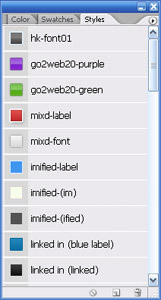
  4. Click on the arrow button again and select Large List from drop down

Your result should look something similar to the image on the right.

3. The six Web 2.0 Logos


Here’s six Web 2.0 Logo; MyBlogLog, Imified, mixd, skype, Linked In and Go2Web20. The style you’ve just installed is going to reveal how to draw them. I’ll go through “mixd” and “Go2Web20” logos, the rest is just reusing the same technique.

4. How to draw

The reason I use Style here is because once they are saved in to a .asl file (the file you downloaded) they are convenient to apply. Let’s go about drawing some of these logos.

Drawing mixd Logo

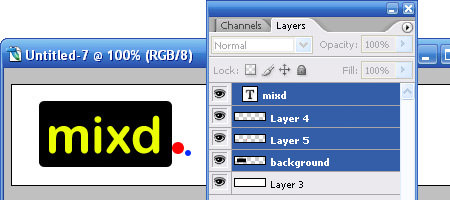
Initial observation, mixd logo consist of

  1. “mixd” text
  2. rounded rectangular
  3. small dot
  4. smaller dot

We will roughly draw them out in Photoshop, each elements in a different layer as illustrated in the image below.

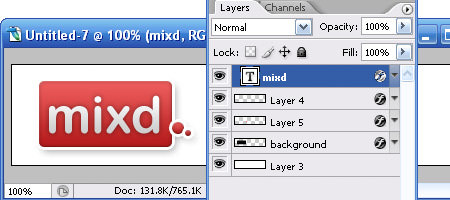
Now here’s the the trick. Look for “mixd-label” in the Style Dialog. Drag them directly to background layer, small dot layer and smaller dot layer respectively. If you drag them correctly you will noticed that the layer will now inherits the colors and blending of the style. Find “mixd-font” in Style Dialog, drag it to the text layer and your mixd logo is complete, 90% like the original I’ll say.

Drawing Go2Web20 Logo

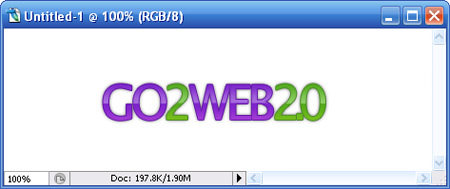
Have 4 new layers created, each for “GO“, “2“, “WEB” and “2.0

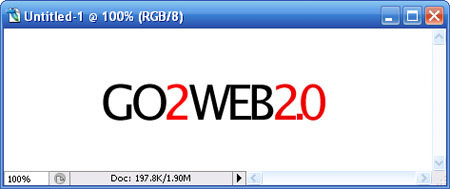
Drag “go2web20-purple” from Style Dialog into “GO” & “WEB”, drag “go2web20-green” into “2″ & “2.0″ and you will get this final output.

As for the rest (MyBlogLog, imified, skype and Linked In), it’s all about dragging their respective style in and match with the correct font.

5. Conclusion

If you look into the Blending Options of each style, you will noticed that most Web 2.0 logos are matter of playing with gradients, strokes with the combination of the right fonts. This may not the “exact” way how these guys had done their logo, but its at least a way to achieve it. I’m not encouraging you to fake their style and redraw your logo, but try understand it and hopefully you can come out with a nice sleek Web 2.0 logo. I love putting my designs in Style (.asl), I can reuse them whenever I want.

Related Contents

Sponsors

Posted by hongkiat in Photoshop Tutorials , at 03.01.07

Tags: , , , ,

Comments

  1. Shea March 2nd, 2007

    Hello!

    Whenever I try to open the styles with my photoshop cs2, it says the styles are incompatible with my version of Photoshop.

    The version I have is: 9.0.2

    Thanks a lot for the gracious tutorial and fun loving styles! I hope I can make them work!

    Reply
  2. Jason March 2nd, 2007

    Awesome! I have been searching the web for 2.0 logo creators — now I can create them myself! Thanks!

    Reply
  3. jarrodn_au March 2nd, 2007

    That’s awesome, very nicely done, thanks! These make an excellent starting point for creating text-logos. Cheers!

    Reply
  4. jared l. March 2nd, 2007

    cool… this is very handy tip!
    thanks!

    Reply
  5. hongkiat March 4th, 2007

    Commenting were closed due to server overload previously. Its now open. Sorry for the inconvenience. I’ll reply your questions regarding this tut from now.

    Shea:Wow, I did not know it will not work for CS2 of different update. I’m using CS2 9.0. Let me get my PS updated and will update the PSD.

    Reply
  6. Thilak March 5th, 2007

    Sorry for the belated comments, but I have to admit that this is simply awesome!

    being a photoshop noob, Its just an eye opener for me. Thanks

    Reply
  7. fishee March 5th, 2007

    thanks! it works great.

    Reply
  8. IndoDX March 6th, 2007

    Just Wonderful and easy way to do

    Many thanks

    Reply
  9. salkis March 7th, 2007

    hi, is it possible to use any freeware instead of Photoshop?
    or any vector graphics program/

    Thanks

    Reply
  10. ajaxlines March 8th, 2007

    Ajaxlines is also web2.0 site.

    Reply
  11. Michael Muller March 9th, 2007

    Great Article, I’ve made a trackback from an article I wrote about creating Web 2.0 logos with Fireworks. Thanks!

    Reply
  12. tech March 9th, 2007

    great documentation

    thanks !!

    Reply
  13. pip March 9th, 2007

    this is awesome. was sick of trying to create a web2.0 logo. thanks a lot

    Reply
  14. Zack March 9th, 2007

    I cant seem to get it working. They don’t show up under Styles. Anyone knows what could be a problem?

    Reply
  15. hongkiat March 10th, 2007

    Zack: You have to load them inside Style. There is a small “arrow” button on the top right corner. Click on it, select “Load Style” and choose the style you’ve downloaded.

    Reply
  16. Beatbox March 10th, 2007

    Preety cool!

    Reply
  17. lawton chiles March 11th, 2007

    What about these not being vector files? what if I want to blow them up?

    Reply
  18. 小刀 March 12th, 2007

    有意思

    Reply
  19. Kate Mag March 13th, 2007

    Cool tips

    Reply
  20. rob March 18th, 2007

    rocks!

    Reply
  21. George D. March 22nd, 2007

    cool thanks.

    P.S> If you don’t mind, can you write an article about how you’ve come up with these styles?

    Reply
  22. Dave March 22nd, 2007

    How do you change the logo’s color? When I did this, it worked very well, but I couldn’t change from the default logo color(e.g. Skype wouldn’t change from blue to anything else.)

    Great tutorial. though

    Reply
  23. Dave March 25th, 2007

    Is it possible to change the logo’s color?

    Reply
  24. surfdog March 25th, 2007

    Great!
    thank you very much!
    greets!!

    Reply
  25. hongkiat March 26th, 2007

    Dave: as the matter of fact you can, double click on the Blending options and play with the settings inside. Color change is within too.

    Reply
  26. hongkiat March 26th, 2007

    George D: There’s no need for an article I guess :) I’ve got most of these nice logos from GotoWeb2.0

    Reply
  27. shelly April 4th, 2007

    another classical web2.0 logo can be found at http://www.salarybase.com - small calculator + the infamous arial

    Reply
  28. Leroy | Green Llama April 5th, 2007

    Thanks for the tutorial - this is awesome!
    You said to change the colors, go to blending options - I must be dumb cuz I don’t see blending options. Can you point me the right way?

    Reply
  29. hongkiat April 5th, 2007

    Leroy: Double click on a particular layer, the dialog box that popups is the Blending Option

    Reply
  30. vanBetty April 17th, 2007

    Thanx for the tutorial! short and effective. I really like the mixd style. Cheers!

    Reply
  31. Sam Zaydel May 9th, 2007

    This is an excellent bit of information. Thank you.

    Reply
  32. ramil May 19th, 2007

    thansk a lot !

    it’s friggin’ great…

    very helpful indeed ^_^

    Reply
  33. Thomas Romer May 19th, 2007

    eye candy… you have to admit that there is a part of this that is a bit embarassing for the whole web 2.0 logomaking crowd. I mean, i have to say that I can’t help but like the whole stroke and gradient thing on logos… but this look is getting so formulaic that soon a good idea will become the web joke of next year. just like all the globe and swoosh logos from the late 90’s.

    Reply
  34. Respiro the logo design guy May 20th, 2007

    Great tips!

    Reply
  35. fistball May 26th, 2007

    good article, to get me started on my logo design for my own blog “2.0″ site…:)

    Reply
  36. Crazyglues June 1st, 2007

    This is amazing, oh my god dude I love this… works really nice. Helped me out big time with a logo I was making for GameCovered.com

    http://suprfile.com/get.php?id=7lih8wa&get=1

    http://suprfile.com/get.php?id=7li6ymm&get=1

    I made these for there site for free.. who knows if they will use it but I had fun, thanks to your styles that you made for photoshop. worked like a charm.

    I have just started so hopefully I’ll get much better.. Thanks for this, I love it.

    Reply
  37. Gadgets World June 3rd, 2007

    love it. very nice
    i will use your function from now

    thank you

    Max

    Reply
  38. Gadgets World June 3rd, 2007

    like it. very nice
    i will use your function from now on

    many thanks

    Max

    Reply
  39. Sarah June 6th, 2007

    I know I should upgrade but…

    does anyone have a “goodie” that will do this in v5?

    Reply
  40. reezluv June 14th, 2007

    hye there..

    thanks for the good info.For me i’m using AI and Photoshop together to design 2.0 looks logo.Anyway thanks for the style given.:)

    View my page at http://reezportfolio.blogspot.com

    Reply
  41. Digital Street June 14th, 2007

    Thanks for the great tips on web 2.0 logos
    :)

    Reply
  42. Design Guy June 19th, 2007

    Hey thank you very very very much for the styles!

    Reply
  43. Hostimal June 28th, 2007

    Great and short tutorial.

    Reply
  44. TBD July 9th, 2007

    Thanks for sharing.
    I really like this tutorial for the logos.

    Reply
  45. Palak July 12th, 2007

    Really nice and helpful tutorial!!! Thanks

    Reply
  46. Shakira July 19th, 2007

    Mil gracias, genial tutorial.

    Reply
  47. Jeff Adams July 23rd, 2007

    hey loved this, i used it for my log on http://www.pubpublicity.com - i used the LinkedIn logo style - awesome!!

    Reply
  48. DLL File Dude July 26th, 2007

    I used it to create one on http://umbla.com sorry for the plug. lol

    Reply
  49. Lora Fukuda July 27th, 2007

    Hey! My husband is the designer of the “mixd” logo! He works for Yahoo and his name is Matt Fukuda. If you want to see what he’s up to, check out his blog: http://www.riceplate.com/

    Reply
  50. blogshowoff August 1st, 2007

    thanks for such a good article

    Reply
  51. Tarun August 13th, 2007

    Hi Web2.0 logo is good and funky. I will use it on my site. thanks

    Reply
  52. ödev sitesi August 19th, 2007

    logos are very nice.

    Reply
  53. replica August 23rd, 2007

    The writting is really good.

    Reply
  54. vaasu August 27th, 2007

    Really Superb ! love the way you gave the Tutorial.

    Thanks

    Reply
  55. milos September 6th, 2007

    Very good for inspiration .. thank you

    Reply
  56. zmaja September 6th, 2007

    This blog helped me a lot when I started using Photoshop at the beginning, especially when Web 2.0 styles became popular and desired. This was an easy way to make one Web 2.0 logo by myself. I highly recommend it for novices at this area.

    Reply
  57. misa September 6th, 2007

    Great stuff here, thank you very much …

    Reply
  58. oyunlar September 10th, 2007

    stuff here, thank you very much …

    Reply
  59. Bedava Oyun Oyna September 26th, 2007

    love the way you gave the Tutorial.

    Thanks like

    Reply
  60. still-curious September 27th, 2007

  61. web tasarım September 30th, 2007

    works fine, nice clue…

    Reply
  62. MYSTERY September 30th, 2007

    NICE JOB

    Reply
  63. nokia October 1st, 2007

    great site

    Reply
  64. HiTCraft October 6th, 2007

    Hi. I think I use it my personel website.
    Thanks for your greats works. See u

    Reply
  65. Katalog Stron October 7th, 2007

    Nice..

    Reply
  66. Create website October 22nd, 2007

    Nice tutorial for logos to use in any web 2.0 website.

    Reply
  67. yellowpages November 13th, 2007

    Wonderful Article i enjoyed reading it, thanks for sharing this web2.0 tutorial with us!

    Reply
  68. andrej November 20th, 2007

    Nice tutorial. Thank you!

    Reply
  69. mizah komedi eglence December 1st, 2007

    web 2.0 is very excellent !

    thanks for this article ;)

    Reply
  70. Life is Colourful December 8th, 2007

    Hey, this is pretty cool article - I would save it to my delicious account. Damn good! Kudos!!

    Reply
  71. African December 22nd, 2007

    Thank you very much for an enlightening and stimulating presentation.

    Reply
  72. Blogerko December 22nd, 2007

    Nice, thank you

    Reply
  73. Anglictina December 22nd, 2007

    Really nice

    Reply
  74. absolutforyou December 25th, 2007

    thank you for this tutorial very great

    Reply
  75. samui December 26th, 2007

    Do You Feel You Can Then

    Reply
  76. keemanxp January 4th, 2008

    Nice one!! Appreciate it

    Reply
  77. Hängematten January 17th, 2008

    Thank You for another very interesting article. It’s really good written and I fully agree with You on main issue, btw. I must say that I really enjoyed reading all of Your posts. It’s interesting to read ideas, and observations from someone else’s point of view… it makes you think more. So please try to keep up the great work all the time. Greetings

    Reply
  78. kral oyun January 27th, 2008

    thank for all

    Reply
  79. ankraj January 29th, 2008

    thank for tips.

    Reply
  80. mikołaj January 30th, 2008

    Biotop Prace wysokościowe malowanie dachów, malowanie dachu odśnieżanie dachów, czyszczenie dachówki malowanie dachówki impregnacja dachówki montaż reklam .

    Reply
  81. Domain Names India February 3rd, 2008

    Thanks a lot for sharing your designing experience with the world. I really needed this since a log time. Great! Thanks a lot. :)

    Reply
  82. Diseño web February 4th, 2008

    Good enough to digg, thanks

    Reply
  83. raffyman February 5th, 2008

    Thanks you..

    Reply
  84. fedmich February 7th, 2008

    Wow, and suprisingly easy to use. :) Thanks

    Reply
  85. anglictina February 9th, 2008

    Thanx, nice logos

    Reply
  86. kral oyun February 13th, 2008

    thanks

    Reply
  87. kral oyunlar February 13th, 2008

    thanks man

    Reply
  88. Londynek February 15th, 2008

    Thank you! Very nice and interesting article.

    Reply
  89. DeLea February 16th, 2008

    Thanx for the tutorial! short and effective.

    Reply
  90. Webkatalog February 19th, 2008

    Enjoyed browsing through the site. Thanks

    Reply
  91. Anwalt February 21st, 2008

    Interesting and very informative article, Thanks

    Reply
  92. Clive February 21st, 2008

    Fantastic job and I was ‘over the moon’ to find it worked great in Photoshop 7!

    Reply
  93. Chris Smith February 23rd, 2008

    I learnt about how to increase my creativity on my NLP Master Practitioner training with John Burton. NLP master Practitioner

    Reply
  94. Chris Smith February 23rd, 2008

    The link for the NLP master practitioner training I took is - http://www.nlpexperts.co.uk

    Reply
  95. AK February 23rd, 2008

    Thanks yaar. i will be doing it for my website.

    Reply
  96. Atlanta Realtor February 27th, 2008

    Thanks for the link to the file. I was looking for this very thing.

    Reply
  97. Pneumatiky February 29th, 2008

    Very useful, please for more tutorials.

    Reply
  98. mike March 3rd, 2008

    Great post! I’ll have to try that. Let me know if you ever expand on your code

    Reply
  99. JoJAF March 3rd, 2008

    please mention the font names and if possible download link. i think creating these logos with other fonts is not that much impressive

    Reply
  100. Cigdem March 4th, 2008

    thanks

    Reply
  101. Ryan Ward March 5th, 2008

    I’ve got photoshop, but, I have never really learned how to use it. I think it’s time to sit down and clean up my skills a little bit after seeing how powerful it is. Nice tutorial - I think I’ve got my work cut out. Every time I open it I think about how foreign it looks to me.

    Reply
  102. bloger March 5th, 2008

    thanks for the information.

    Reply
  103. akçaoğlu March 15th, 2008

    thank you..

    Reply
  104. harika çocuklar March 15th, 2008

    super. thank you.

    Reply
  105. güvenlik March 18th, 2008

    Great post! I’ll have to try that.

    Reply
  106. Londis March 18th, 2008

    Thank you for the good articles have helped me a lot.

    Reply
  107. Green Card March 19th, 2008

    Thank You.

    Reply
  108. kishore March 20th, 2008

    Woww. You made many designers job very easy. Thanks.

    http://www.kishoreblog.com

    Reply
  109. helva March 21st, 2008

    thx. very good job.

    Reply
  110. Sklepy Internetowe March 22nd, 2008

    Thanks for your article
    Nice piece of work! I’m expecting more soon!
    Keep up the good work! Cheers

    Reply
  111. fx15 March 25th, 2008

    thanks a lot …

    Reply
  112. AG March 27th, 2008

    I used fireworks for now. But love the logos. Maybe its time to change, the logos look very professional

    Reply
  113. Heather April 1st, 2008

    Just to let Firefox users know that it seems you cannot download the styles in this browser, switch over to IE to download it. (( Unless it was just me having this problem. ))

    Thanks for the good article!

    Reply
  114. kishoreblog April 2nd, 2008

    Nice post.and sooomany comments. Your site is GREAT.

    http://www.kishoreblog.com

    Reply
  115. Professional Logo Design April 10th, 2008

    Great Resource, I’m sure many people will find useful to create their own logos.
    Nice work.

    Reply
  116. Adam April 11th, 2008

    Here is a link to a great logo design contest going on right now:

    http://presbymergent.org/2008/04/02/announcing-the-official-presbymergent-logo-contest/

    Reply
  117. Man and van london April 18th, 2008

    What a nice piece of work! Many thanks!

    Reply
  118. ersin April 20th, 2008

    thank you for all this. ersin özdemir

    Reply
  119. ersin April 20th, 2008

    thank you for all this. ersin özdemir.

    Reply
  120. get it from boy! May 11th, 2008

    i’m using photoshop CS3 and when i get to the part of dragging the mix’d style to the layers button page, it won’t work. i cannot drag it.

    Reply
  121. Jason Rodriguez May 16th, 2008

    Thanks for sharing the style, it’s awesome.

    Reply
  122. Lee May 19th, 2008

    I cant download the file, is anyone having problem with this?

    Reply
  123. Lee May 19th, 2008

    Downloaded it already, thanks. will test it out and post comment soon!

    Reply
  124. Belmont Stakes Picks May 20th, 2008

    Very nice! I was wondering how some of the logos were made. I think Illustrator is a good way to make vector images and high res logos as well.

    Reply
  125. justin May 21st, 2008

    Its awesome tutorial I really like it :)

    Reply
  126. Lee May 21st, 2008

    Tested it and i love it, going to use for my website at http://www.internetebookstore.com thanks!

    Reply
  127. Herşey Burada June 5th, 2008

    Teşekkürler(thanks)…Pek ingilizcem yok ama bayağı bi işime yaradı paylaşımınız…

    Reply
  128. morfeas June 10th, 2008

    works just fine

    Reply
  129. Kamal Abbas June 15th, 2008

    Nice Sources, Thanks - Kami http://www.dotlancer.com

    Reply
  130. Web 2.0 Blog June 19th, 2008

    I love these Web 2.0 logos. I need one for my blog so I’ll give this a go.

    Reply
  131. kral oyun June 24th, 2008

    thanks so muchs

    Reply
  132. rent a car June 28th, 2008

    Waw

    Reply
  133. zegarek June 29th, 2008

    Verry helpful article for me..
    Best regards !

    Reply
  134. Sarp Erdag June 30th, 2008

    Extremely nice… I am goin to create one for my website too!

    Reply
  135. Horoscope June 30th, 2008

    These are very interesting information. Thank you for having published.
    Horoscope

    Reply
  136. çelik kapılar July 8th, 2008

    thankks

    Reply
  137. oktay usta July 9th, 2008

    oktay usta

    It is a good site for healt (best food cooking)
    I advice everybody

    Reply
  138. shopping July 10th, 2008

    Web 2.0 Logos are really simple, and that’s what so great about them – they represent the simplicity and accessibility of Web 2.0. To be honest, I think that the style has been around for a long time and it appears that it is really starting to affect logo designs for all kinds of businesses now. At least we don’t have the overkill logos like we did back in the 80’s and early 90’s. And, AT LAST, the disgusting cursive font is no longer as popular as it once was.

    Reply
  139. Web Dershanesi.Org July 12th, 2008

    WEB DERSHANSI

    Reply
  140. Marc July 13th, 2008

    fantastic tutorial really helped me

    Reply
  141. Yucel Eroglu July 13th, 2008

    great documentation, thanks..

    Reply
  142. PervasivePersuasion.com July 16th, 2008

    You did a great job here of revealing the science behind the art!

    Bruce Arnold
    Website Designer (or should I say Artistic Engineer?)
    Miami Florida

    Reply
  143. Albuquerque Real Estate Agent July 19th, 2008

    This is just great! I have been trying to figure out how to do this for months. In just a few minutes with your easy to understand guide and style download I am fleshing out just the type of logo and images I have been trying to do for months now. Thank you.

    Reply
  144. saswat July 22nd, 2008

    Very very good toturail.

    Reply
  145. hugo July 23rd, 2008

    Perfect, great job.
    Muchas gracias.

    http://www.sitioi.com

    Reply
  146. iMuslimz July 29th, 2008

    very nicee thanks for these styles .. they will come handy in future…
    iMuslimz.com

    Reply
  147. Lida August 9th, 2008

    thats great, thank you very much

    Reply
  148. Fx15 August 9th, 2008

    really nice, thanks

    Reply
  149. Alisveris August 9th, 2008

    thanks

    Reply
  150. deniz August 9th, 2008

    hey! thanks. i used it on some of my sites thanks a lot again

    Reply
  151. muharrem August 9th, 2008

    thanks. i used it

    Reply
  152. prefabrik August 19th, 2008

    its good prefabrik project nice to site.

    Reply
  153. AnggaRifandi August 28th, 2008

    useful information to design web 2.0 logo. but I think I could be easy if you understand how to mix the color

    Reply
  154. sbs August 31st, 2008

    hey! thanks. i used it on some of my sites thanks a lot again

    Reply
  155. Siau Hen August 31st, 2008

    Appreciate your Photoshop tutorial. I have tried it and will apply it to sites title. Thanks.

    Reply <