How To Change Mac OS X Leopard Icons

Advertisement

change mac icon

[Mac only] Customizing a folder icon help it to easily stand of from the rest in a directory. In Mac, changing a folder icon is fairly easy. You can do it without assistant from any 3rd party application. Full guide after jump.

Changing a folder icon in Mac

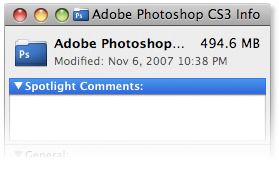
  1. First find an icon you want to use. Here we use the Photoshop [Ps] icon as an example. Click to select the application. File -> Get Info (Command + I) to launch application info.

    change mac icon
  2. Click the icon to select it, Edit -> Copy (Command + C) to copy the icon.
    change mac icon
  3. On the icon you want to change, File -> Get Info (Command + I) to launch the folder info, click on the icon and do a Edit -> Paste (Command + V).
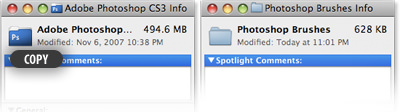
    change mac iconchange mac icon

Voila, your folder now have new look.

Related Contents

Sponsors

Posted by hongkiat in Mac Tips , at 01.23.08

Tags: , , ,

Comments

  1. mr me February 14th, 2008

    wow, so much easier than anything I read anywhere else on-line on how to do this!

    thanks…seriously.

    Reply
  2. Russ February 22nd, 2008

    Yeah I know how to do that, but what I wanna know is how to change the system folder and the users folder, they seem to just be locked or something.

    Reply
  3. N. March 26th, 2008

    This is wonderful! thank you so much for this. The question now is, how to get the old Icon back if that is possible! Thank you.

    Reply
  4. hongkiat March 26th, 2008

    Well, I’d recommend that you keep a copy before replacing them.

    Reply
  5. Andrew Roazen April 10th, 2008

    No, just select the custom icon and then select Cut from the Edit menu. The default icon will be restored.

    Reply
  6. kelly May 7th, 2008

    You can just highlight the icon again like this, and do Edit>Cut and it restores the original icon.

    Reply
  7. denshitenki May 26th, 2008

    Does anybody know how to change the all icons at once?
    I mean, not one by one like in the example here but all the folders that are the same.

    Thank you!

    Reply
  8. Pman July 1st, 2008

    use candybar…nice application for changing icons, dock etc.

    enjoy your new icons

    Reply
  9. Berger September 11th, 2008

    does this apply when a folder is mounted to the dock? i may have to restart to see that??!?

    Reply
  10. lala October 9th, 2008

    how to restore the mac original icons if i ever did the same as u taught( File -> Get Info,Edit -> Copy,File -> Get Info, Edit -> Paste )? as I found that if i use candybar to change icons, the folder icon that i’ve changed earlier using ur methol (as the way u said above) wont get to change, yet i’ve to manually change it again.

    how to default the icons setting? and where is the default icons folder in mac os x?

    Reply

Leave a reply