9 Essential Tips To Speed Up Windows 7

The Microsoft Windows 7 operating system has been designed for delivering better speeds than its predecessors. However, as time passes by, the laptop/PC might tend to get slower. This is not exactly the fault of the OS. As the matter of fact, it is a common problem faced by many operating systems.

windows 7 performances tips

The major reasons for this are accumulation of junk in the system or a highly stuffed hard drive or running of too many unnecessary services and programs. Here we shared a few essential tips that can help speed up Windows 7 performance on laptops or computers. Hope it helps!

Visual and Sound Related

1. Using minimal Visual Effects

Disabling certain (or all) visual effects can definitely enhance performance. To disable visual effects, do the following:

  1. Press Windows key and while holding it down, press Pause/Break key.
  2. In the window that appears, click on Advanced system settings in the left side pane.
  3. In the Advanced tab, under Performance Section, click on Settings
  4. In the Performance Options window (refer figure) that appears, under Visual Effects tab, disable the options that you do not need. Or simply selecting ‘Adjust for best performance‘ will disable all options.
  5. After disabling the option, click Apply and then OK.

Doing the above might make the screen less attractive. But, the performance will surely get a boost.
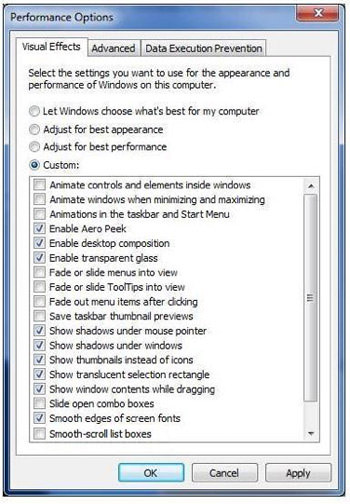
performance options

2. Using minimal Sound Effects

For disabling sound effects, do the following:

  1. Click Start. In the search box type mmsys.cpl and press Enter
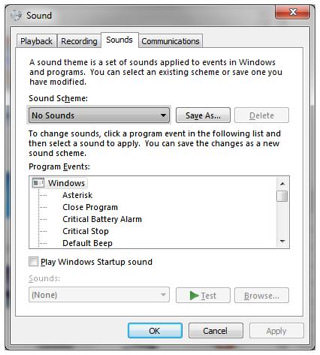
  2. In the Sound window (refer figure) that appears click on Sounds tab
  3. Set the Sounds scheme to ‘No Sounds
  4. You could set only the essential sounds if needed in the Program Events, by selecting the specific event and then choosing the sound from the Sounds drop-down menu below.
  5. You can as well disable the "Play Windows Startup sound" option.
  6. After the settings are done, click Apply and OK.
sounds 9 Essential Tips To Speed Up Windows 7

Software and Services related

1. Run a trusted Anti-Virus program

Ensure that you have a good anti-virus software loaded on your laptop/computer. This will ensure that no malware or spyware gets planted in your system. Without such protection software, there are chances of third party malware and virus being installed or stored on your system, causing harmful effects and also eating up precious space.

2. Install only essential software

Ensure that you install only that software which you need. If you install any trial software and find out that you don’t really need it, uninstall and delete it immediately. Else, they might hog precious disk space, RAM and processor cycles. If you’ve installed a software, which you are unable to get rid of, and which is hampering the normal functioning of your laptop, then you might have to format your hard drive. Be aware that formatting your hard drive might wipe out all your data. Therefore it is best you take a back-up before going ahead with formatting.

3. Disable or make unneeded services Manual

Some processes and services, which might not really be necessary, are by default made to start automatically once the system starts up. They will consume RAM as well as the processor’s attention, slowing down other important tasks. It is best to disable them. For this, do the following:

  1. Click Start. In the search box type services.msc and press Enter
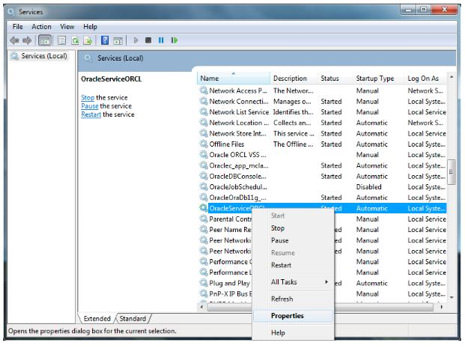
  2. Go to Services & Applications > Services. You’ll see the Services window (refer figure).
  3. Right-click on a service that you wish to set to manual or disable. If the service is already started, Stop it first.
  4. Once the service is stopped, again right-click on it and select Properties.
  5. In the Startup type, you can either set the service to Manual, if you would be using it later, or Disable it, if not needed.
  6. Once done, you can close the window.

services 9 Essential Tips To Speed Up Windows 7

4. Disabling Unwanted Start-up programs to speed up System Start-up

Some programs are set to start during system start-up. These might slow down the start-up process. Programs that are not really needed during start-up can be disabled. For this, do the following:

  1. Click Start. In the search box type msconfig and press Enter.
  2. In the System Configuration window (refer figure), go to Startup.
  3. Uncheck the box next to those processes that are not important for start-up. This will disable them.
  4. Once you’ve disabled the processes, click Apply and OK.
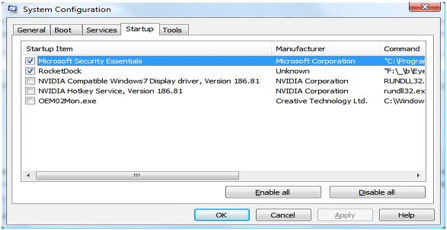
system configuration

Hard Drive related

1. Clean up the hard drive

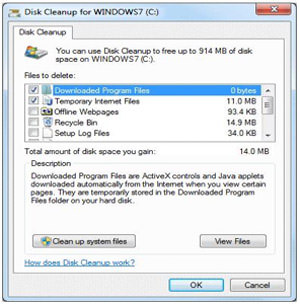
Remove unwanted files, like temp files, downloaded program files, recycle bin, etc. You could use Disk Cleanup option to do this, as follows:

  1. Click Start > All Programs > Accessories > System Tools > Disk Cleanup
  2. The system will first calculate how much space can be freed up this way. In the Disk Cleanup window (refer figure) that appears, select the files in that need to be deleted under the Files to delete list.
  3. For deleting ‘System Restore‘ and ‘Shadow copy‘ files, click "Clean up system files" and then on "More Options" tab
  4. Finally click OK. You’ll be prompted again before the deletion. Click Yes.
disc cleanup

2. Enable Write caching on device

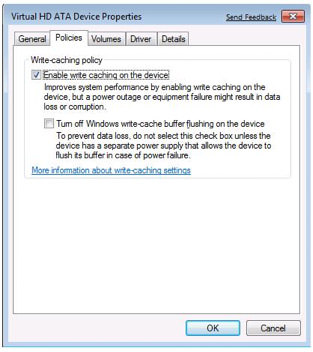
This is an option which allows the OS to flush changed data to the hard disk when the system is idle, so that performance is not affected when in use. For enabling this, do the following:

  1. Press Windows key and while holding it down, press Pause/Break key.
  2. In the window that appears, click on Device Manager in the left hand pane.
  3. In the next window that appears, expand Disk drives.
  4. The drop-down list will show the hard drive. Right-click on it and select Properties.
  5. Click the Policies tab in the Device Properties window (refer figure).
  6. Check the box next to "Enable write caching on the device"
  7. You can as well check the box next to "Turn off Windows write-cache buffer flushing on the device" and then click OK.
virtual HD

Note: However, there is one disadvantage in enabling these options – if there is a power outage or a system crash, data might be lost or corrupted. If you have a secondary power supply, like a UPS, you could go ahead with checking these options.

3. Perform Disk Defragmentation

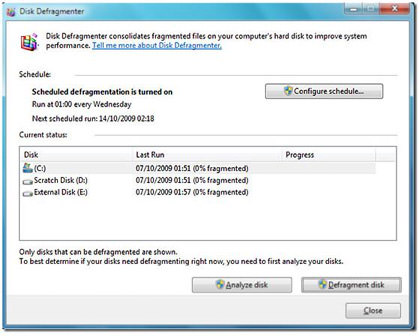
When there is no sufficient space to store in a hard drive, the OS splits the file into parts and stores it in different areas on the hard drive. Defragmenting allows all these parts to be stored in contiguous memory locations. For defragmenting disk do the following:

  1. Click Start > All Programs > Accessories > System Tools > Disk Defragmenter
  2. In the window (refer figure) that appears, click on the drive that you want to defragment and then click Analyze disk.
  3. This will estimate the time required for the process. When done click on Defragment disk.
  4. Once done you can either View Report or click Close.
disk defrag

These pretty much sum up the small things that you can do, to make a big difference to your Windows 7′s performance. If you have some personal tips you’ve done yourself to improve the performances, we’d like to hear from you.

Author: Trinity Nick

Trinity is a blogger from the UK. She reviews products for sites like LaptopReviews.org.uk and Missphones.co.uk. She is a tech-geek and contributes to other technological websites as well.

Share!

Enjoy the article so far? Recommend it to your friends and peers.

Subscribe! (free)

Be the first to our articles and get latest updates on freebies.

Advertisement

  • http://mpstudio.nazwa.pl/blog/?p=129 9 Essential Tips To Speed Up Windows 7 | 4design

    [...] original post here: 9 Essential Tips To Speed Up Windows 7 :data, design, essential, hard, how-to, laptop, microsoft, refer-figure, search, service, speed, [...]

  • http://www.vectelligence.com Ilie Ciorba

    Never faced any problems with my speed, althought I have only 2gb of ram and a lot of software running.

  • http://www.vectelligence.com Ilie Ciorba

    Never faced any problems with my speed, althought I have only 2gb of ram and a lot of software running.

  • http://www.puntogeek.com/2010/06/14/acelerar-windows-7-consejos-para-lograr-la-mejor-velocidad/ Acelerar Windows 7: Consejos para lograr la mejor velocidad

    [...] Windows 7 y una gran parte dicen adorar este SO. En el caso de que necesiten hacerlo mas rápido, Hongkiat publicó una serie de formas de acelerar Windows 7. Les muestro cuales son así lo tienen [...]

  • http://www.wplatte.com Claudia

    Thanks for the tips.My laptop is getting slower day after day!

  • http://www.wplatte.com Claudia

    Thanks for the tips.My laptop is getting slower day after day!

  • baz willrun

    “These pretty much sum up the small things that you can do, to make a big difference to your Windows 7’s performance”

    Hmmm, unless the machine is that bad to start with , these will make minimal difference , in fact youd be hard pushed to notice any difference on the sort of machines that come with Win 7, and if it is that bad then these are hardly likely to be the major causes of it.

    As for Windows Services, 99.9% of people dont even know what 99.9% of the services do so how are they going to know what ones to turn off.

    Yet more so called top tips from people who have probably just read them in a magazine somehwere.

  • baz willrun

    “These pretty much sum up the small things that you can do, to make a big difference to your Windows 7’s performance”

    Hmmm, unless the machine is that bad to start with , these will make minimal difference , in fact youd be hard pushed to notice any difference on the sort of machines that come with Win 7, and if it is that bad then these are hardly likely to be the major causes of it.

    As for Windows Services, 99.9% of people dont even know what 99.9% of the services do so how are they going to know what ones to turn off.

    Yet more so called top tips from people who have probably just read them in a magazine somehwere.

  • http://bec24.com Houston ER

    These all seem like helpful tips. Most of the advice seems to be centered around just making sure that you just turn off all the extras that one may not be using. Thanks for the advice though.

  • http://bec24.com Houston ER

    These all seem like helpful tips. Most of the advice seems to be centered around just making sure that you just turn off all the extras that one may not be using. Thanks for the advice though.

  • http://www.healthylifes.net/9-essential-tips-to-speed-up-windows-7-2.html 9 Essential Tips To Speed Up Windows 7 « Health Topics And Articles

    [...] Visit link: 9 Essential Tips To Speed Up Windows 7 [...]

  • http://magplazza.com MagPlazza.com

    Besides those tips, be sure to use ccleaner to clean out your temporary files and save space for the hard drive. In addition, use system utilities such as iolo System Mechanic to clean out registry, zip and clean RAM memory, etc. Those are tips that I often do at my computer :)

  • http://magplazza.com MagPlazza.com

    Besides those tips, be sure to use ccleaner to clean out your temporary files and save space for the hard drive. In addition, use system utilities such as iolo System Mechanic to clean out registry, zip and clean RAM memory, etc. Those are tips that I often do at my computer :)

  • http://sitedart.org/2010/9-essential-tips-to-speed-up-windows-7/ SiteDart – Webdesign in your hands » Blog Archive » 9 Essential Tips To Speed Up Windows 7

    [...] View full post on hongkiat.com [...]

  • Diego

    Nothing new.

  • Diego

    Nothing new.

  • http://www.zhngdesign.com/blog wongpk

    I use Auslogic to clean my computer though. But I find the visual effect is one of the most significant effect of slowing down the whole system.

    However, when I disable some services, and need it to enable, it took me hours to find which is related…

    Oh, by the way, turning off some Windows Features also helps! Who need solitaire nowadays anyway?! :P

  • http://www.zhngdesign.com/blog wongpk

    I use Auslogic to clean my computer though. But I find the visual effect is one of the most significant effect of slowing down the whole system.

    However, when I disable some services, and need it to enable, it took me hours to find which is related…

    Oh, by the way, turning off some Windows Features also helps! Who need solitaire nowadays anyway?! :P

  • http://MELIJOY.FREETOSERVE.INFO Melissa joyce

    Such a very nice posting also these tips are useful for many users .so a great Thanks for the outstanding posting…

  • http://MELIJOY.FREETOSERVE.INFO Melissa joyce

    Such a very nice posting also these tips are useful for many users .so a great Thanks for the outstanding posting…

  • http://popular.econsultant.com/9-essential-tips-to-speed-up-windows-7-how-to/ 9 Essential Tips To Speed Up Windows 7 | How-To : Popular Links : eConsultant

    [...] from: 9 Essential Tips To Speed Up Windows 7 | How-To 14 June 2010 | Uncategorized | Trackback | del.icio.us | Stumble it! | View Count : 0 Next Post [...]

  • http://www.cachicha.com/2010/06/acelerar-windows-7-consejos-para-lograr-la-mejor-velocidad/ Acelerar Windows 7: Consejos para lograr la mejor velocidad | Cachicha.com

    [...] Windows 7 y una gran parte dicen adorar este SO. En el caso de que necesiten hacerlo mas rápido, Hongkiat publicó una serie de formas de acelerar Windows 7. Les muestro cuales son así lo tienen [...]

  • http://www.iguama.com/ Memoria USB

    Thanks for the tips!! Windows 7 rulez!

  • http://www.iguama.com/ Memoria USB

    Thanks for the tips!! Windows 7 rulez!

  • Tj

    Turn off your paging file if you have enough ram.

  • Tj

    Turn off your paging file if you have enough ram.

  • http://zobristinc.wordpress.com/2010/06/14/links-for-2010-06-14/ links for 2010-06-14 « Zobrist Consulting Group

    [...] 9 Essential Tips To Speed Up Windows 7 | How-To (tags: windows7 development) [...]

  • http://yohan06.student.ipb.ac.id/ yohan

    nice tips, thank you :)

  • http://yohan06.student.ipb.ac.id/ yohan

    nice tips, thank you :)

  • http://www.michaelalanmiller.com/?p=6723 Michael Alan Miller » Don’t need it for this OS

    [...] Posted by Chill on 15 Jun 2010 at 02:15 am | Advice like this for Windows 7 is mostly useless. Disabling certain (or all) visual effects can definitely enhance [...]

  • Niubi

    Even better, switch over to Linux :) – just kidding! DubLi has some nice new computers at bargain basement prices, so if your computer is really frustrating you, why not check it out?

  • Niubi

    Even better, switch over to Linux :) – just kidding! DubLi has some nice new computers at bargain basement prices, so if your computer is really frustrating you, why not check it out?

  • http://xtra.wordpress.com/2010/06/15/links-for-2010-06-15/ links for 2010-06-15 « xtra’s blog

    [...] 9 Essential Tips To Speed Up Windows 7 | How-To (tags: 7 computer tutorial windows technology speed hacks tips development performance) Leave a Comment [...]

  • http://www.seodivers.com SEO Divers

    Thanks for the tips :-)

  • http://www.seodivers.com SEO Divers

    Thanks for the tips :-)

  • Vaderist

    wow. you just recycled every tip from the Vista and published it as Windows 7. genius.

  • Vaderist

    wow. you just recycled every tip from the Vista and published it as Windows 7. genius.

  • http://www.thedesignbuzz.net/9-essential-tips-to-speed-up-windows-7/ 9 Essential Tips To Speed Up Windows 7

    [...] View full post on hongkiat.com [...]

  • http://www.freshbusinesscards.com business cards

    Nice tips thanks

  • http://www.freshbusinesscards.com business cards

    Nice tips thanks

  • http://gabrielcatalano.wordpress.com/2010/06/15/9-essential-tips-to-speed-up-windows-7/ 9 Essential Tips To Speed Up Windows 7 « gabriel catalano | in-perfección

    [...] She is a tech-geek and contributes to other technological websites as well. Read more: 9 Essential Tips To Speed Up Windows 7 | How-To http://www.hongkiat.com/blog/essential-tips-to-speed-up-windows-7/#ixzz0qwlkD87L -34.552356 [...]

  • http://www.windows7theme.net Windows 7 Theme

    I have never faced any speed problem ever since I started using Windows 7. I have been installing a lot of softwares too but my OS is working fine and fast. But I agree with your points Trinity.

    However, I dont think such a lot of things is necessary. My guide would be:

    1) Keep an antivirus and anti-malware installed and running on your computer and run a scan at least once a week. If you opt for a free AV then I would advise you to go with Microsoft Security Essentials suite as it is free and fast.

    2) Keep a genuine Windows OS and keep updating the latest security updates. Also update the virus and malware defination in the MSE suite if you also use it.

    3) Surf safe. I personally advise Firefox with the noscript addon.

    Virus and malware are the major reasons of slowing down of OS. Just make sure you are virus free and you should be ok. And secondly dont install tons of antivirus and security softwares as they consume a lot of your active memory. Just keep on security suite and if you go for free I recommend MSE.

  • http://www.windows7theme.net Windows 7 Theme

    I have never faced any speed problem ever since I started using Windows 7. I have been installing a lot of softwares too but my OS is working fine and fast. But I agree with your points Trinity.

    However, I dont think such a lot of things is necessary. My guide would be:

    1) Keep an antivirus and anti-malware installed and running on your computer and run a scan at least once a week. If you opt for a free AV then I would advise you to go with Microsoft Security Essentials suite as it is free and fast.

    2) Keep a genuine Windows OS and keep updating the latest security updates. Also update the virus and malware defination in the MSE suite if you also use it.

    3) Surf safe. I personally advise Firefox with the noscript addon.

    Virus and malware are the major reasons of slowing down of OS. Just make sure you are virus free and you should be ok. And secondly dont install tons of antivirus and security softwares as they consume a lot of your active memory. Just keep on security suite and if you go for free I recommend MSE.

  • http://www.10popular.com/desdev/9-essential-tips-to-speed-up-windows-7/ 9 Essential Tips To Speed Up Windows 7

    [...] view post [...]

  • http://techmiso.com/3079/9-essential-tips-to-speed-up-windows-7/ 9 Essential Tips To Speed Up Windows 7 :: TechMiso

    [...] 9 Essential Tips To Speed Up Windows 7 ☀ [...]

  • http://www.orjinkremim.net orjin kremi

    Great themes! I’m looking for a beautiful wordpress theme as my blog, thank you very much

    orjin kremi

  • http://www.orjinkremim.net orjin kremi

    Great themes! I’m looking for a beautiful wordpress theme as my blog, thank you very much

    orjin kremi

  • http://www.templatemo.com Min Thu

    I run Windows 7 Ultimate 64-bit on Core i7 CPU + 128 GB SSD + 9GB DDR3 RAM and the performance is superior, very fast and stable!

    Windows Rating is 7.1

  • http://www.templatemo.com Min Thu

    I run Windows 7 Ultimate 64-bit on Core i7 CPU + 128 GB SSD + 9GB DDR3 RAM and the performance is superior, very fast and stable!

    Windows Rating is 7.1

  • http://www.google.com Tejas

    I run Windows 7 Ultimate 64-bit on Core i7 CPU + 1 TB SSD + 12 GB DDR3 RAM and the performance is superior, very fast and stable!

    Windows Rating is 9.1

  • http://www.google.com Tejas

    I run Windows 7 Ultimate 64-bit on Core i7 CPU + 1 TB SSD + 12 GB DDR3 RAM and the performance is superior, very fast and stable!

    Windows Rating is 9.1

  • http://www.dadswhowanttoworkathome.com/ Outsourcing Guide

    Great tips! Thanks for sharing this informative article.

  • http://www.dadswhowanttoworkathome.com/ Outsourcing Guide

    Great tips! Thanks for sharing this informative article.

  • http://didedo.com/9-essential-tips-to-speed-up-windows-7/ 9 Essential Tips To Speed Up Windows 7 | didedo.com

    [...] Hongkiat] // var disqus_url = 'http://didedo.com/9-essential-tips-to-speed-up-windows-7/ '; [...]

  • http://www.rozy.web.id Rozy

    Thanks for the tips :-)

  • http://www.rozy.web.id Rozy

    Thanks for the tips :-)

  • http://www.touchupsoft.com/ blueshell

    Good tips to speed up Windows 7. Thanks for sharing!

  • http://www.touchupsoft.com/ blueshell

    Good tips to speed up Windows 7. Thanks for sharing!

  • http://hiteb.com Ricky

    I have tried out few of these tips, it works well and boost performance of my laptop. Good tips.

  • http://hiteb.com Ricky

    I have tried out few of these tips, it works well and boost performance of my laptop. Good tips.

  • http://www.kiararealty.com.my Kent Tan

    Never had a chance at Windows 7 yet – but great tips. I think even thinks like NOT using a desktop wallpaper will help when your system is clogged.

  • http://www.kiararealty.com.my Kent Tan

    Never had a chance at Windows 7 yet – but great tips. I think even thinks like NOT using a desktop wallpaper will help when your system is clogged.

  • http://www.uol.my university student

    I just bought a new laptop with Window 7 last week. So your tips seem to be helpful to me. Thank you!

  • http://www.uol.my university student

    I just bought a new laptop with Window 7 last week. So your tips seem to be helpful to me. Thank you!

  • http://www.djlikdersi.com WorkShop

    I have win7 and I like win7 :D
    thankss

  • http://www.djlikdersi.com WorkShop

    I have win7 and I like win7 :D
    thankss

  • bill

    these ‘tips’ are recycled common sense

  • bill

    these ‘tips’ are recycled common sense

  • http://www.mikroekran.com/windows-7yi-hizlandirmak.html Windows 7′yi Hızlandırmak | Mikroekran

    [...] Kaynaklar: 1 – 2 [...]

  • hari

    haha… i agree with u … :D

  • hari

    haha… i agree with u … :D

  • http://csssample.com csssample

    Excellent Article, keep positng like this.

  • http://csssample.com csssample

    Excellent Article, keep positng like this.

  • http://www.windowsnoticias.com/como-potenciar-windows-7-en-velocidad/ Como potenciar Windows 7 en velocidad | Windows Noticias

    [...] de discos, desinstalación de aplicaciones entre otros aspectos relacionados en el sitio Hongkiart se encuentra publicado un completo articulo explicando cuales son los aspectos que deben considerarse y administrarse para asegurar un óptimo [...]

  • http://juanjoc48.totalh.com/2010/06/26/acelerar-windows-7-consejos-para-lograr-la-mejor-velocidad/ Acelerar Windows 7: Consejos para lograr la mejor velocidad « JuanJoC48

    [...] Windows 7 y una gran parte dicen adorar este SO. En el caso de que necesiten hacerlo mas rápido, Hongkiat publicó una serie de formas de acelerar Windows 7. Les muestro cuales son así lo tienen [...]

  • http://onlythetruth.ning.com Jane

    Thank you for this info. Now my laptop runs like it did when I first got it.

  • http://onlythetruth.ning.com Jane

    Thank you for this info. Now my laptop runs like it did when I first got it.

  • http://teachj.wordpress.com/2010/06/28/cool-links-92-the-one-about-training/ Cool Links #92: The One About Training « TEACH J: For Teachers of Journalism And Media

    [...] 13 – I use Mac, so I don’t know nothing about Windows.  But I do know that all computers get slow once in a while.  Hongkiat has 9 Super Tips To Speed up Windows 7. [...]

  • http://500dphotos.blogspot.com Sara

    Good one!
    These are well explained and even any non IT person can do this!
    -Excellent

    Sara

  • http://500dphotos.blogspot.com Sara

    Good one!
    These are well explained and even any non IT person can do this!
    -Excellent

    Sara

  • http://dakjaat.com Dakjaat

    hey.. :) thanks for the tips ya..

  • http://dakjaat.com Dakjaat

    hey.. :) thanks for the tips ya..

  • http://www.designfools.com/how-to/9-essential-tips-to-speed-up-windows-7/ 9 Essential Tips To Speed Up Windows 7

    [...] hongkiat.com [...]

  • http://www.carjosh.com/acelerar-windows-7-logra-la-mejor-velocidad-con-estos-consejos/ Acelerar Windows 7: Logra la mejor velocidad con estos consejos « CarJosh

    [...] Windows 7 y una gran parte dicen adorar este SO. En el caso de que necesiten hacerlo mas rápido, Hongkiat publicó una serie de formas de acelerar Windows 7. Les muestro cuales son así lo tienen [...]

  • AMD

    Same here, wtf tell us something new!

  • AMD

    Same here, wtf tell us something new!

  • http://bestwpnews.info/?p=39 9 Essential Tips To Speed Up Windows 7 | Best Wordpress News™

    [...] full post on hongkiat.com This entry was posted in WordPress News and tagged Essential, Speed, Tips, Windows. Bookmark the [...]

  • http://windowsnavigator.blogspot.com/ besho

    Well, I also think that the ReadyBoost function rocks , it makes the performance reach a great extent

    http://windowsnavigator.blogspot.com/2010/07/readyboost-function-speed-up-windows-7.html

  • http://windowsnavigator.blogspot.com/ besho

    Well, I also think that the ReadyBoost function rocks , it makes the performance reach a great extent

    http://windowsnavigator.blogspot.com/2010/07/readyboost-function-speed-up-windows-7.html

  • http://www.likaweb.net/blog/?p=1936 9 Essential Tips To Speed Up Windows 7 | Lika Web Blog Feed RSS

    [...] 9 Essential Tips To Speed Up Windows 7 View likaweb's Profile      Subscribe via RSS RelatedBookmarksTags [...]

  • http://www.facebook.com/fauzi2009 Fauzi Ahmad

    Very info, i like this artikel.

  • http://twitter.com/asm0diel Michal Slupczynski

    Disc defrag is not needed when you have the Indexing Service running (which i personally really suggest, because it speeds up file searches)…

    And disabling sound isn't really a speed up as far as i know :P

    nice article anyway

  • http://MELIJOY.FREETOSERVE.INFO Melissa joyce

    Such a very nice posting also these tips are useful for many users .so a great Thanks for the outstanding posting…

  • http://www.rodrigo-silveira.com/website-tutorial.php Publications Prototype

    agreed. I love hongkiat :)

blog comments powered by Disqus