Live Chat with Friends on Facebook Live Stream: Connect and Engage
The Facebook Live experience is about to get a lot more intimate as Facebook is making it easier for friends to watch or join a livestream.
I would start by taking a look at the Live Chat With Friends functionality. With the introduction of this feature, friends who are participating in a livestream that you’re in will be shown on the upper right hand corner of the screen.

By tapping on one of them, you’ll instantly be able to initiate a private conversation with your friends without having to leave the livestream. Additionally, you’ll also be able to jump between private conversations and global conversations at any time.

If you’re the type who prefers livestreaming yourself, Facebook has got you covered by way of Live With. Previously a feature that was only available to public figures, Live With will let you host a friend on your livestream via a picture-in-picture mode.

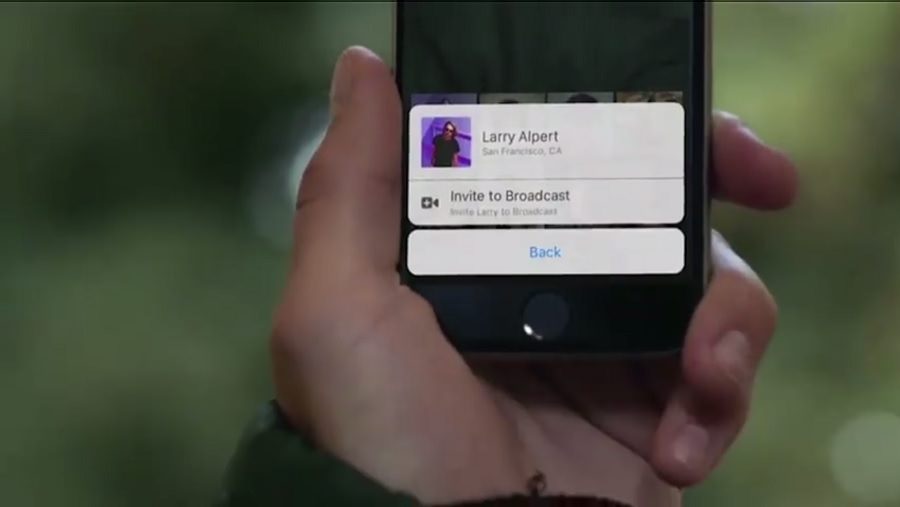
To add a friend to your livestream, all you need to do after you start your broadcast is to swipe left on the screen to bring up your friend list. After that, all you need to do is tap on your friend’s picture and choose the "Invite to Broadcast" option.
Both these features will be making their way to the iOS version of the Facebook app. Facebook has made no mention of the features coming to Android just yet, so Android owners are going to have to wait.
Read Also: 5 Facebook Features You Should Know