20 Best iPhone Photography Apps
There were times when the pre-requisites of creating masterpiece photography was a high-quality digital camera and super skills in Adobe Lightroom and Photoshop etc. Well, all of this has been taken over by an iPhone. The iPhone is not just a cool smart device, they are also a great tool to create amazing feats of photography.
All you need is an iPhone with the latest OS and some cool photography apps to do the magic. For the latter part, here are 20 of the best iPhone photography apps. These apps have a range of features from adding filters, stickers, and text to creating collages and photo retouching etc. In the following, you can read through each app’s features in detail.
Read Also: Best Time Lapse Apps For Your Smartphone
1. Enlight
Enlight is an all-in-one photo editor with easy-to-use tools that help make your photos look perfect. This app has analog and duo filters, multiple corrections features, various types of artistic and special effects, a photo mixer tool, and much more.
What I liked in Enlight is that you can create and save presets apart from using the inbuilt ones. Moreover, it packs in common features like crop options, sharing options, etc.

2. Phonto
Phonto lets you add text to your photos and videos. It avails over 400 fonts, which you can use in different colors and sizes. Moreover, you can change the text’s background add shapes, and do a lot more changes to the text before adding it.
I was fascinated to check its vast collection of fonts and styles. Additionally, one can create color patterns and share the final images on various social networks.

3. Retrica
Retrica is a fantastic camera app that lets you click cool pictures, thanks to its various real-time filters. You can make a GIF or shoot a video using these filters as well. The tool also packs in collage maker and more for shooting superb pictures.
I particularly enjoy making pics with its fun stickers – there are more than hundred of them with ghost and party being two of my favorites. Also, you can share your pictures in a snap.

4. Facetune 2
Facetune 2 is all about taking better selfies. It comes with a magic camera – one of my favorite features, which allows you to apply live filters, perfect your eyes and smiles, reshape your face, smooth out skin, and do more to click beautiful selfies.
Apart from that, it offers many artistic and professional tools including lots of beautiful effects and filters that help enhance your photos to super new levels.

5. YouCam Perfect
YouCam Perfect is another all-in-one photo editor with collage tool, frames, and stickers. Along with clicking beautiful pics and selfies, you can also edit your pics to add effects, hide the blemishes, and do more edits with just a few taps.
Its other features include creating collages, using frames, and a lot more to perfect your selfies. Also, I liked its integrated social network for beauty lovers.

6. Polarr Photo Editor
Polarr Photo Editor is a powerful editor with numerous features to create excellent photos. You’ll fall in love with its cool filters and photorealistic effects. It also features blending modes and presets, which you can also create and save.
The interesting thing about this app is that it packs in many adjustments features like color, lens, masks, and more. Also, you can customize the app, like you can set light/dark theme.

7. VSCO
VSCO is a creative photo editing application with a simple interface. It lets you set parameters like image color, exposure, and packs in video editing features including contrast, crop, and more tools.
Like others on the list, you can create, save, and use presets. However, it offers a unique feature of a network of creators, including professional photographers, for inspiration.

8. PicsArt Photo Editor & Collage
PicsArt is an all-in-one camera and editor app that avails tools such as live effects, collage maker, photo editor, and more. Additionally, you can create your own personalized stickers apart from using the provided clip arts and other drawing tools.
What I found interesting is that its “Remix Chat” feature lets you edit pics with a friend or in a group. Also, it hosts photo contests and challenges to help you learn editing tricks.

9. A Color Story
A Color Story is all about creating lively photos. This app has multiple image editing tools like crop, curve, etc. and stores around 100 fresh and crispy image filters and 40 live moveable effects for taking cool pics.
Interestingly, it also packs in Instagram grid planning and batch editing features. The former one lets you preview posts, set reminders, and sync with multiple accounts.

10. Warmlight
Warmlight is another fantastic camera app with live filters and adjustment options to help you take stunning shots. You can apply artistic filters and overlays on the live camera and adjust gallery pictures as well with all its photo editing options.
Warmlight has all the essential camera features with a lot of other goodies you can desire. Last but not the least, you can also share the final photos to Facebook and Instagram.
11. Darkroom
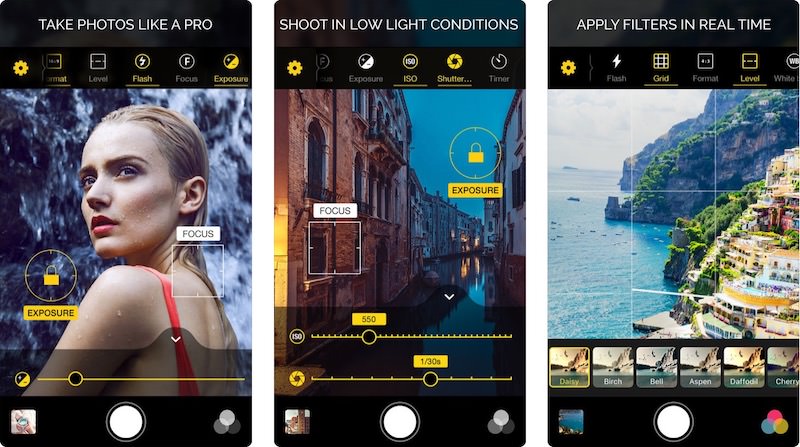
Darkroom, more than its catchy name, comes with numerous features including bundled filters and a set of professional tools. You can edit your pictures including live photos and videos and later export them to multiple file formats.
Its coolest feature, however, is the batch processing features, using which you can edit multiple photos at a time. Also, it has got support for large images.

12. PLOTAVERSE
PLOTAVERSE offers you amazing features being an image editor. It packs in various animation tools, selection tools, filters and overlays, and more features to snap cool photos or edit your photos to make them look jaw-dropping.
You can play with images’ parameters including brightness, contrast, and more. Lastly, you can finally export them as GIFs, making them perfect for sharing online.

13. Snapseed
Snapseed is a photo editing app by Google, and as one can expect, it comes with a load of features. The list includes filters and tools like brush, perspective, structure, etc.
What I liked the most in this app is that you can save looks (presets) and use them quickly on pics. Moreover, in its big list of features, one can find many types of focusing, smoothing and tuning tools, which help you to edit and create awesome-looking photos.

14. LightX
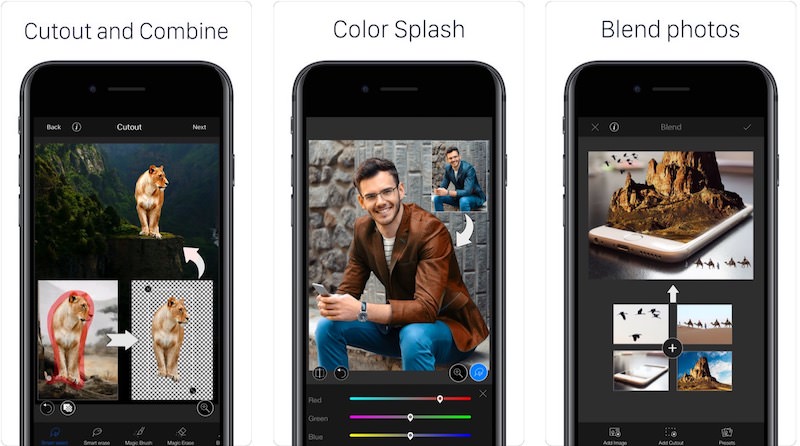
LightX is another complete photo-editing app with fascinating live camera – one can live filters, smoother the skin, and do a lot more for snapping the best selfies. Also, one can remove the background and blend images using its editing tools.
Additionally, it allows to create stickers, use them on pics, and share them quickly on social networks. Also, it features selective editing and more pro features.
15. TouchRetouch
TouchRetouch is a unique image editing app, which helps to remove objects from photos. You can delete objects as small as pimples and as large as street lights and many types of background details from a picture efficiently using this app.
Apart of that, it offers easy-to-use tool and many tutorials to help you get started with it. I liked its blemish remover and single-flick line removal tools, which can work wonders.

16. Superimpose
Superimpose will assist you to develop professional looking photos by juxtaposing and superimposing them. That means you can blend, combine, or mix pictures using this app quickly without using computer software like Adobe Photoshop.
Moreover, it packs in some photo editing tools as well like blend, exposure, and overlay options and you can even share the pics directly online.

17. Pro HDR X
Pro HDR X is a camera app that focuses on high-resolution photography. It offers multiple live options to perfect your HDR such as contrast, warmth, tint, and more.
Though this app is not as featureful as some others on this list yet thanks to its HDR focused features, it works way better than some of them at taking HDR pics.

18. Lens Distortions
Lens Distortions helps add distinct photo effects to beautify your images. For example, you can add sunlight and lens flares effects to give the pictures a natural look. It packs in wide range effects and overlays as well to help distinguish your photos.

19. ProCamera
ProCamera is a professional camera app that comes with advanced editing tools. The camera app has semi-automatic as well as manual controls, allowing you to take control of the camera parameters, which ultimately helps to make perfect shots.
I liked its anti-shake and lowlight modes that assist in clicking sharp pictures even in unfavorable conditions. Also, you can share the pics to social networks as well.

20. Pixlr
Pixlr is another amazing photo editing app with almost all the expected goodies. You can click cool photos, make collages, and enhance your photos, thanks to its big list of tools. In the list, I am a fan of “Auto Fix” that fixes colors automatically.
The app additionally offers numerous borders, filters, and overlays as well, and this collection keeps growing with updates. As with others, it also allows sharing pics effortlessly.
