5 Best macOS Time Trackers For Freelancers
For many freelancers, a common challenge is tracking the hours they’ve dedicated to a project and ensuring they’re compensated adequately. This dilemma also extends to team managers who find it challenging to monitor the performance of remote teams in a virtual environment.
Time-tracking applications offer a viable solution to these concerns. They aid freelancers in logging billable hours and provide remote team managers with insights into their teams’ work efficiency.
Regardless of your specific requirements, here’s a compilation of the top time tracking software designed for macOS. These tools come equipped with features such as time management, insights into work patterns, performance analytics, and invoicing. Browse through the list to find the application that aligns with your needs in both functionality and cost.
Read also: 9 Best Time Trackers That Work Right on Browsers
Overview:
| Tool Name | Supported Platforms/OS | Is It Free? | Offers Free Plan? | Starting Price |
|---|---|---|---|---|
| Timeline | macOS and iOS | Yes | No (But offers 14-day trial) | $19.99 for macOS, $5.99 for iOS |
| Tyme | macOS and iOS | Yes | Yes (14-day trial) | Starting at $3.99/month |
| Billings Pro Time Track | macOS and iOS | Yes | Yes (With limitations) | $5/user/month |
| Caato Time Tracker | macOS | Yes | No | N/A (In-app purchases in Pro plan) |
| Timing | macOS | Yes | Yes (14-day trial) | Starting at $7.5/user/month |
Timeline

Timelime sets itself apart as a robust time-tracking solution, comparable to platforms like Freshbooks and Harvest. It boasts a flexible charting interface, granting users the liberty to choose specific metrics and insights they want to delve into.
Another distinguishing feature is its adeptness at managing multiple time zones. This is ideal for users collaborating with clients or teammates scattered across various time zones, enabling them to log time entries and generate reports seamlessly.
Timelime extends a 14-day trial for its macOS application. However, its iOS counterpart doesn’t have a trial offer. The macOS version comes at a price of $19.99, whereas the iOS variant is priced at $5.99.
- Supported Platforms: macOS and iOS
- Is Timeline Available for Free? Yes
- Does Timeline Offer Paid Plans? Yes, with a 14-day trial for macOS.
Pros:
- Calendar view fosters an intuitive understanding of daily tasks.
- Supports both export and import of time entries.
Cons:
- No integration capabilities with third-party applications.
- Missing free trial option for the iOS version.
Tyme
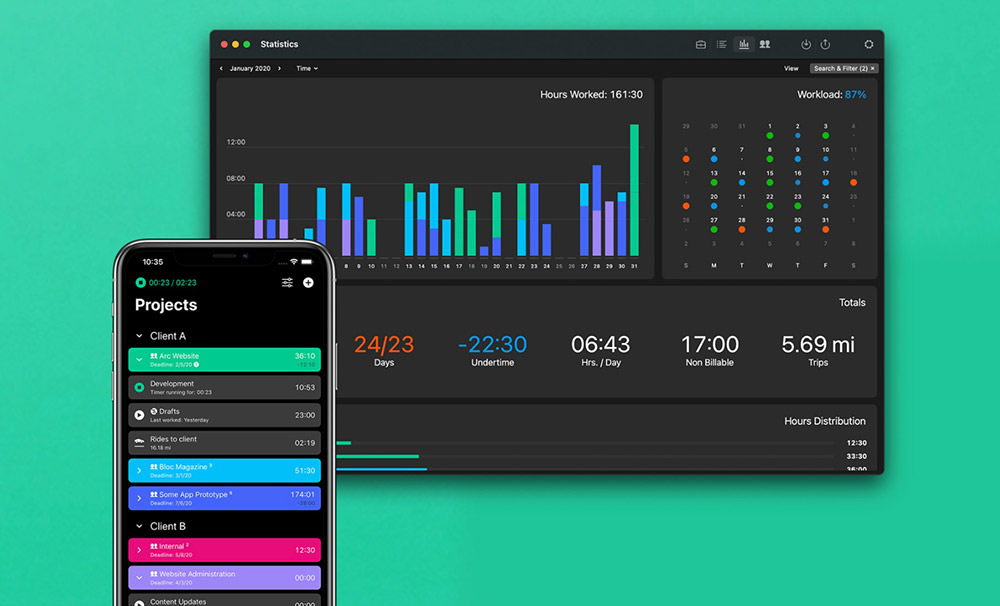
Tyme is an excellent choice for users who prefer uncomplicated time tracking solutions, reminiscent of Harvest and Tick. What drives its popularity is its user-friendly interface combined with smart import features.
Furthermore, it boosts your time management capabilities by ensuring synchronization of your tracked durations and work insights across both iOS and macOS platforms.
While Tyme does have a cost associated with its features, it’s on par with the pricing structures of other software in this domain. The Individual plan is priced at $3.99 per month, while the Team plan is available for $3.99 per user each month.
- Supported Platforms: macOS and iOS
- Is Tyme free? Yes
- Does Tyme offer a paid plan? Yes – 14-day trial available with plans starting at $3.99/month.
Pros:
- Swift and straightforward time logging process.
- Features reminders to start and stop tracking on the device.
Cons:
- Lacks support for Android and Windows platforms.
Billings Pro Time Track

Billings Pro offers an effortless experience for time tracking, estimating, and invoicing tailored for freelancers and small enterprises. This app efficiently captures all billable hours across various devices, inclusive of the Apple Watch, iOS, and macOS. Furthermore, it provides straightforward account management and reporting capabilities, making it easier to gain valuable insights.
While Billings Pro presents a limited Free plan, it also introduces a 30-day free trial for its users. After this period, users can choose between the Freelancer plan priced at $5 per user per month or the Professional plan available for $10 per user per month.
- Supported Platforms: macOS and iOS
- Is Billings Pro Time Track Free? Yes
- Does Billings Pro Time Track Offer Paid Plans? Yes, Free version with restrictions or starting at $5/user/month.
Pros:
- Quick and efficient creation of cost estimates for clients or potential leads.
- Ability to produce professional and appealing invoices.
Cons:
- Complexity in tracking expenses.
- Absence of support for Android and Windows platforms.
Download Billings Pro for macOS
Caato Time Tracker

Caato Time Tracker boasts a user-friendly interface tailored for macOS users. It caters to professionals aiming to meticulously log their work hours and compute billable hours within the macOS environment.
One of its standout features is the ability to monitor multiple projects simultaneously. Additionally, it facilitates exporting logged time records to both CSV and XLSX formats. Although Caato is a free platform, the Pro plan accessible via in-app purchases unveils an extended set of features.
- Supported Platforms: macOS
- Is Caato Time Tracker Free? Yes
- Does Caato Time Tracker Offer Paid Plans? No
Pros:
- Intuitive setup and user experience.
Cons:
- Timer’s interface may be perplexing for novices.
- Does not support Windows, Android, or iOS.
Timing

Timing sets itself apart by offering automatic time tracking, eliminating the need for manual start-stop actions associated with many other tools. It intelligently captures the time you spend across various apps, documents, and websites throughout your work hours.
This helps you gain a deeper understanding of time consumption on various tasks, aiming to enhance productivity levels. The comprehensive dashboard provides a bird’s-eye view of your time distribution, also incorporating calendar events.
Timing presents three distinct plans: The Professional plan priced at A$11.5, the Expert plan at A$16.5, and the Teams plan priced at A$12.5/user/month suitable for teams comprising 2-20 members.
- Supported Platforms: macOS
- Is Timing Available for Free? Yes
- Does Timing Offer Paid Plans? Yes, with a 14-day trial, and plans commencing from $7.5/user/month.
Pros:
- Seamless integration with Zapier.
Cons:
- The user interface can be a tad overwhelming for newcomers.
- It doesn’t cater to Android, iOS, or Windows users.