LTEngine — Free Offline AI-Powered Translator
For years, we’ve had to make a trade-off using cloud-based tools like Google Translate or DeepL, or choosing open-source, privacy-friendly tools that didn’t always deliver the same quality.
Fortunately, with the rapid advancements in AI and machine learning, that trade-off is no longer necessary.
Enter LTEngine.
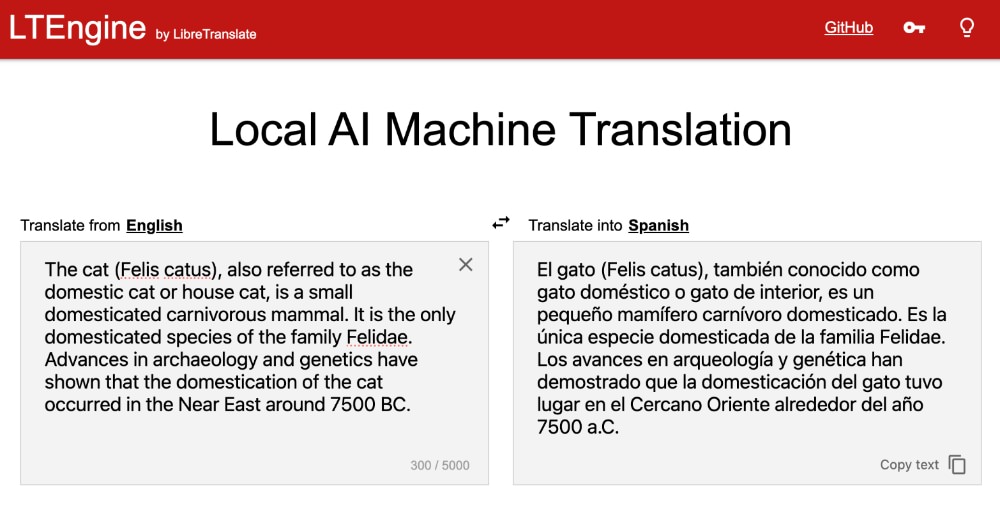
LTEngine is a powerful, AI-powered upgrade for the popular LibreTranslate project. It gives you the same advanced translation quality you’d expect from major commercial services, but with one key difference: everything runs locally, right on your computer.
A perfect tool if you value privacy while still needing high-quality translations for business documents, personal messages, or any other text.
Let’s see how you can make this work.
Pre-requisites
At the time of this writing, LTEngine is still in active development. There isn’t a single binary that we could install yet, so the following prerequisites are required to set up your environment:
- Rust: The primary language of the LTEngine server.
- Clang: A C/C++ frontend compiler for building the native dependencies.
- CMake: A cross-platform build system used to configure the native build process.
- A C++ Compiler: Either g++ (Linux/macOS) or MSVC (Windows) for the final compilation of the native bindings.
To check if these tools are already installed, open your terminal or command prompt and run the commands listed below.
| Tool | Check Command | Installation Recommendation |
|---|---|---|
| Rust | rustc --version |
Install via rustup. This is the recommended toolchain manager for all platforms. |
| Clang | clang --version |
On Linux, run sudo apt install build-essential clang. On macOS, you could run xcode-select --install. On Windows, install the Desktop development with C++ workload in the Visual Studio Build Tools installer. |
| CMake | cmake --version |
On Linux, run sudo apt install cmake. On macOS, you could run brew install cmake. On Windows, install CMake via the official installer. |
If you receive a version number for each tool, you’re good to go!
Installation
With the prerequisites in place, we can now proceed to install LTEngine.
First, we need to clone the repository:
git clone https://github.com/LibreTranslate/LTEngine --recursive
Then, go to the directory:
cd LTEngine
Next, we need to build the project. Depending on your system’s GPU, you can choose one of the following commands:
# For Metal (macOS)
cargo build --features metal --release

# For CUDA and Vulkan (Linux/Windows)
cargo build --features cuda,vulkan --release
This process may take some time as it compiles the necessary components. Once it’s done, the compiled binary will be located in the target/release directory.
Now, we can run the server by executing the binary built:
./target/release/ltengine
LTEngine supports Gemma3 out of the box. You can pass the -m parameter to download the model, for example:
./target/release/ltengine -m gemma3-1b
This will download the Gemma3 1B model, which is a tiny model suitable for testing purposes since it requires less computational power and memory, but it lacks the translation quality of larger models.
For production use, consider using larger models like Gemma3 4B or 16B if you have the necessary hardware resources.
Once the model is downloaded, you can start translating text by sending requests to the server’s API endpoints at http://localhost:5050/translate.
API Usage
LTEngine provides a RESTful API for translation requests. You can send a POST request to the /translate endpoint with the text you want to translate and the target language, for example:
curl -X POST "http://localhost:5050/translate" -H "Content-Type: application/json" -d '{
    "q": "Hello, world!",
    "source": "en",
    "target": "es"
}'
This request translates “Hello, world!” from English to Spanish. The server will respond with the translated text.
{
    "translatedText": "¡Hola, mundo!"
}
Auto Detect Language
You can also let LTEngine auto-detect the source language by omitting the source parameter:
curl -X POST "http://localhost:5050/translate" -H "Content-Type: application/json" -d '{
    "q": "Bonjour le monde!",
    "source": "auto",
    "target": "en"
}'
This will translate “Bonjour le monde!” to English, with the server automatically detecting that the source language is French. The response will be:
{
    "detectedLanguage": {
        "confidence": 85,
        "language": "fr"
    },
    "translatedText": "Hello world!"
}
Wrapping up
At the time of writing, LTEngine is still under active development, with several exciting features on the roadmap. One that I’m particularly looking forward to is file translation, ideally with support for popular formats like DOCX and PDF.
Even so, LTEngine already delivers high-quality, AI-powered translations all running locally on your machine.
With its API endpoint, you can even build your own translation tools or apps while keeping all data processing local and secure. This means your data stays private, secure, and completely under your control.