How to View Flickr Photos in Highest Resolution
Not all photo in Flickr comes with "All Size" option, and in case they don’t you are still able to view the biggest size photo, which means the actual size of the uploaded photo. Here’s how you do it provided you have a Firefox Browser.
Step 1
Copy the following codes:
javascript:for(m in M=document.getElementsByTagName('img')){s=M[m].src; if(s && s.match(/static/) && !s.match(/_s|buddy/)){void(window.open(s.replace('.jpg','_b.jpg'),'_self')); break}}
Step 2
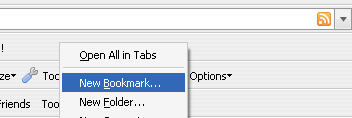
Right click on browser tab, choose New Bookmark
Step 3
Give the bookmark a name and paste the codes inside Location

Step 4
Done! On any Flickr photo that does not have the  icon, simply click on the button created and you will be given the highest resolution (original) of the particular photo.
And if the above don’t work, drag Flickr Original to your Firefox Bookmark Toolbar
)%7Bs=M%5Bm%5D.src;%20if(s%20&&%20s.match(/static/)%20&&%20!s.match(/_s%7Cbuddy/))%7Bvoid(window.open(s.replace('.jpg','_b.jpg'),'_self'));%20break%7D%7D)