Fixing the Unexpected WordPress Database Table Error
Recently, a particular table in the WordPress database for hongkiat.com became corrupted without any warning. The wp_comments table crashed unexpectedly, leaving me in search of solutions. Here are the symptoms I encountered:
- When attempting to back up your database, you may receive the error message:
wp_commentsis marked as crashed and should be repaired when using LOCK TABLES. - The recent comments widget displays blank.
- The top commenter widget is also blank.
- Comments posted are not saved in the database and therefore are not visible.
- The comments section in WP Admin shows zero records.
After extensive searching online for similar cases to help identify and resolve the issue, I found nothing helpful. I decided to troubleshoot it myself and, fortunately, I found a solution. I hope that by documenting this process, I can assist others facing the same problem and serve as a reminder for myself should I encounter this error again in the future.
Solution to Fix the Issue
To resolve this issue, you need access to the WordPress database via either PhpMyAdmin or Secure Shell (SSH). Most shared hosting accounts include phpMyAdmin, but regardless of the method you choose, be extremely careful when dealing with the database. Any incorrect action may lead to data loss.
Using PhpMyAdmin

In PhpMyAdmin, select the WordPress database and locate the error table, in this case, the wp_comments table. Check the box next to it, scroll down, and find the With selected drop-down menu. Select Repair table, and the issue should be resolved.
Using Secure Shell (SSH)
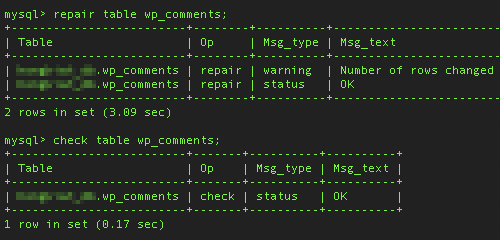
- Log in to your shell.
- Enter
mysql -u username -p database_nameto access your databases. - Enter
show databases;to view all databases. - Enter
use database_name;to select the database. - Enter
show tables;to list all tables in the database. - Enter
check table wp_comments;to verify if this is the corrupted table. - Repair it using
repair table wp_comments;. - Finally, enter
check table wp_comments;again to ensure it is fixed.
Steps 3 and 5 can be skipped if you are already familiar with your databases and tables. I hope this guide proves helpful!