Quick Tip: How to Recover Lost WordPress (Localhost) Password
If you design and develop WordPress theme, chances are you’ll have a local (localhost) copy in your machine for testing & debugging and preview purposes. Here’s a common mistake some of us may make – we tend to forget our admin password.
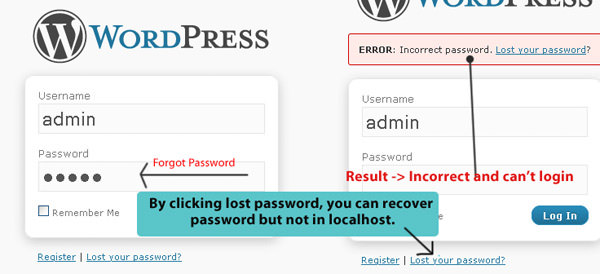
If you’ve forgotten your password for an online self-host WordPress blog, it’s easy as clicking on the “Lost your password” to recover. But in a localhost environment, configurations may vary from machine to machine. Most of the time “Lost your password” will not work as email system is either not supported or not properly setup.
In this article, I’m going to show a simple workaround to login to your localhost WordPress Dashboard even if you’ve forgot your password, or even the login.
The problem
So you’ve forgotten your password, or username, or both. WordPress suggest you use the "Lost your password" function to help recover but email system wasn’t properly setup in your localhost? Here’s how to get you back into the Dashboard quickly.
The Solution
Go into PhpMyAdmin. The URL should be http://localhost/phpmyadmin, but it might vary depending on configurations. Look for the database name on the left sidebar. In our case it’s called “wordpress“.
Click “wordpress“ to see its tables. Look for *_users, in our case it’s called wp1_users. Click it and you’ll notice a page change on the right frame. user_login column shows you all usernames you currently have. If you are looking for usernames, your problem is solved. But if you are looking to recover lost password, there is one more thing you’ll need to do.
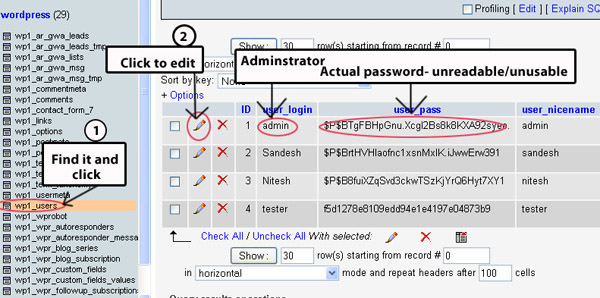
Click on the pen icon to edit the data for the specific user. Look for “user_pass” field. Select "MD5" for the Function dropdown, and change it’s value to a new password, in our case the new password is call “admin“. Click GO once you are done.

That’s it! You’ve just changed the password for username admin to “admin“.