How to Display Facebook Statuses on WordPress Blog
If you want to show your Facebook Statuses and you are hosting on a WordPress.com blog that restricts you from installing plugins, try this. The following method make use of Facebook status feed and WordPress RSS widget. It will also work for self-host WordPress blogs, but you guys who self-host can use better plugins for that.
Step 1
Login into Facebook. Under Profile, look for Mini Feed column, click on See All.

Step 2
Under Mini Feed, click on ‘Status Stories‘ on the right column. Scroll all the way to the bottom, look for ‘My Status‘

Step 3
Copy the link of My Status, and we are about to use this in WordPress blog. Your link will look something like the following:

Step 4 (WordPress)
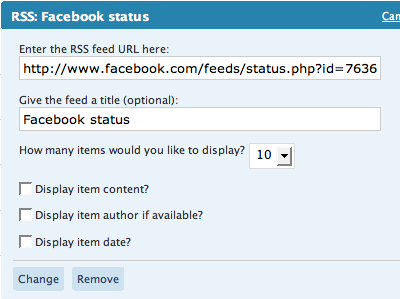
Under WordPress admin, Navigate to Design -> Widget. Look for RSS Widget, add it to your side bar.

Step 5
Paste the copied URL inside, give it a name, save and your Facebook statuses (or status depends on how many you display) will now appear on your WordPress blog.