
Click one by one to open links
Here’s what we usually do. To open links of multiple pages, we click each of them one by one. Firefox has a cool plugin that helps you speed things up a little.
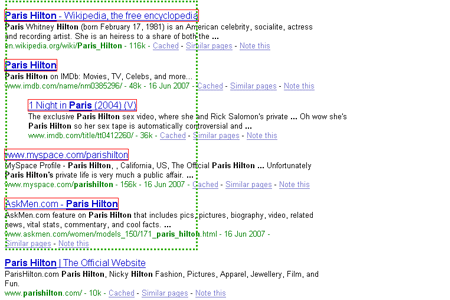
Drag across to open all
Snap Links helps you open multiple links within selected area in tabs. All you need to do is hold mouse’s right click and drag the across the hyperlinks. Highlighted areas are in dotted green and hyperlinks detected will be boxed in red. Upon release of right click, links will be open in tabs. Simple as that.
More controls available on Snaplinks Options

Download SnapLinks Plugin for Firefox
Don't miss any post. Subscribe to Hongkiat's RSS feed now.


Comments
BoltClock June 19th, 2007
Why a search results page of Paris Hilton -_-
Replyhongkiat June 19th, 2007
I knew someone will come back with this question. lol :-)
ReplyDeeroy June 27th, 2007
eh..cannot install ler..what is xpi file?
Replyhongkiat June 27th, 2007
Here, right click save as.
ReplyOperaFan May 24th, 2008
there’s a same javascript for opera too, FYI.
ReplyBradley Hart July 16th, 2008
what really sucks is snap links doesn’t work in the latest stable release of firefox 3. I will so be removing ff 3 as soon as I need to reboot again.
Reply